Tuesday, April 1, 2014
How to bypass and avoid writting captcha code

Today, we are going to learn how to bypass and avoid writing captcha codes that appear in each time you want to register or fill information in a website. talking about the challenge-response test used in computing as an attempt to ensure that the response is generated by a human being.
- Enter on this site skipinput.com
- Register on the site and then activate your account by e-mail.
- Choose your browser and download the application as shown here:

- After you download and install this application you will see an icon on the top right corner of your browser, activate it:

- Now to use this application, right click on the captcha empty field and click “use this field to enter CAPTCHA”, after that just wait a few seconds and you’re done! Hope you like it.


Saturday, March 22, 2014
How to convert DVDs to AVI or MPEG video files
AutoGK or DVDx can be used.
AutoGK (Official) Tutorial
For Macs
Handbrake, theres also Instant Handbrake.
Handbrake gives a good interface and multiple format/compression options.
Easy To create Free Online TV Channels !

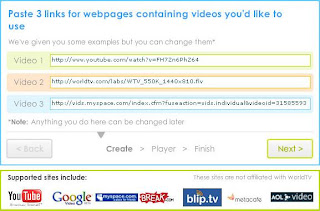
Than ,click next,go to edit page and correct the setting.Add your web site and just above the tab editor for assistance .
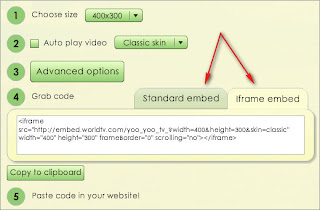
Last you can visit Online channels and watch the TV and video and image .As you can see and thanks for everyone.
Friday, March 21, 2014
How to Twitter Use Can Boost Your Business in Slow Economy

Does your Business need a boost in this slow Economy? If so, you are not alone! Many small businesses are jumping on the Twitter train hoping to gain some momentum in their business.
Twitter use for business is growing rapidly, and, considering that Twitter has over 50 million users, its not difficult to see why!
Timing is Everything. Twitter has surprised everyone by surpassing all other social media networks in its amazing growth. If your business isnt already using Twitter, dont wait any longer. The Twitter train is leaving the station and you want to be on it...every stop it makes could be more exposure, sales and profits for your business!
Twitter use could be the answer to your problems in that it can actually inject some momentum into your marketing plan without adding a lot of expense to it. Its really as simple as this: take the marketing strategies you currently use, add a great Twitter account, and you will have a marketing plan on steroids.
From there, you may want to make adjustments to your marketing plan to either save money or maximize your budget. Twitter use can definitely boost your business and you can use that momentum to make some changes to keep the sales coming in!
The beauty of using Twitter for business is that you can magnify whatever marketing efforts are already in progress by building a community of interested followers and including them in your efforts. Going viral on Twitter is the most effective and affordable marketing available today! Your tweets being retweeted to even more people, over a longer period of time...thats marketing gold!
Twitter is free and simple enough to use. However, effective Twitter use for business can get more complicated in that you want to build a large community and tweet good, relevant content to them. You want to connect with your followers so that they see the value in your product or service with a 140 character message. Its well worth it, though, and it will pay off.
If you already use Twitter for your business, congratulations and keep building your Twitter following. If you havent joined the fun yet, its not too late...get your Twitter account up and running sooner than later. Get your business in front of this wave while you still have time!
Easy To Stop Hang With Your Program
How do work ?
At first take my kind regards. Now i share the new post . some problems due to the post being late. Visit our blog to learn something new for a few days before Kidding, I really thought I was parei I would share it. We calai when the computer hangs when it was found that there was a program. The problem here is we want to help in the task manager. So today Ill share the tips with a capei which allows one to be able to hang out with your program.
Lets see it, then right click on the desktop and on the new shortcut, select the shortcuts location, you ask. Copy and paste the following and click Next.
taskkill.exe / f / fi "status eq not responding"
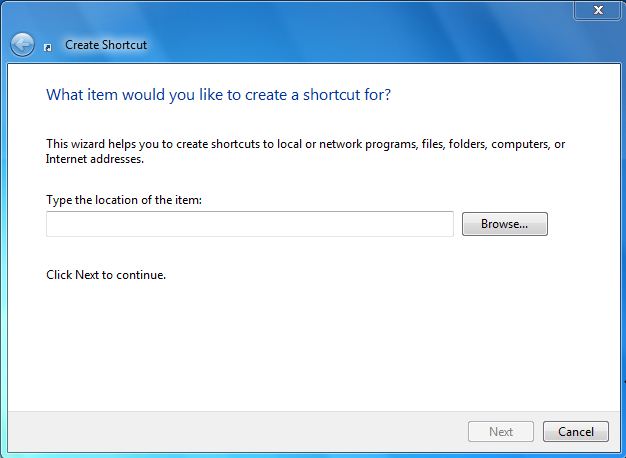
How to Block or Remove Blogspot Follower User
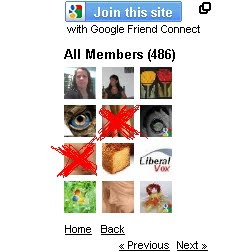
How to Add Friend Blogapot Follower User?
Some Blogspot follower user use Adult and sexy image. If you are having blogger blog, you will have followers widget for every blog by default. In this case any visitor can become your follower. Now if you wanted to moderate it and blog any follower here are some simple steps to do this. Or else if you wish to Add the follower as friend then also check the below 8 steps.
1. Login to blogger.com.
2. Here, for every blog of you an see followers link if it has minimum one, as you can see in bellow image my blog has 101 Followers
3. Click on Followers Link for the blog for which you want to block some follower
 4. It will show list of followers as shown in bellow image.
5. Now click on the picture of the follower which you wanted to block
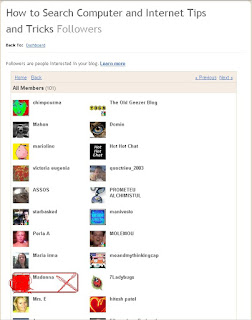 6. This will show updates and links of follower as well as link for blocking the follower.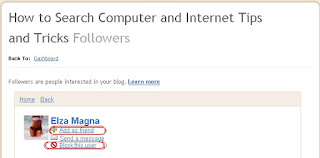
7. Click on Block This User Link and follow the steps and the follower gets blocked from following your blog.
8. If you dont want block the follower but add as a friend then click on Add as friend as shown in the above image.
Thank you....
Thursday, March 20, 2014
Computer Diagnostics How to Fix a Slow Computer
Why is my computer running slow?
The modern consumer PC is a complicated beast. Unlike a relatively simple machine such as a lawnmower or a stereo, computers have numerous points of failure that can inhibit or completely restrict proper functioning. Occasionally, a piece of hardware like a failing hard drive or faulty RAM modules are the reason your computer isnt humming along like it used to when brand new. However, its far more often a software issue related to your operating system thats slowing down the machine. Whether you run Windows, Mac OS X or Linux, a little software optimization and house cleaning goes a long way in prolonging the life of any PC.
Due to the mind-boggling complexity of todays computers, good Computer Diagnostics tools are essential for the safe operation and long-lasting life of any machine. For instance, the Windows operating system has a few quirks that, if left unattended, can lead to a slowdown in performance over time. Dead-end shortcuts and links pile up over time, using up valuable disk space, leading to disk fragmentation and overall hurting responsiveness and usability. In addition, errors within the Windows Registry as well incorrectly deleted programs can lead to other important programs crashing. Without a Diagnostics Tool to tell you exactly whats going on, you have no real idea whats wrong with your PC when speed and performance issues occur.
As such, comprehensive Computer Diagnostics software is of paramount importance when it comes to getting the most out of your PC. Most technically savvy users possess the ability to manually tweak settings, schedule maintenance tasks, change startup programs, and troubleshoot issues that may crop up. Unfortunately, that ability to diagnose computer performance issues on the fly can take years of experience and learning, and we dont all have the time to become certified repair specialists. Specially designed Computer Diagnosis software gives ordinary users the ability to speed up their PCs by repairing malfunctioning programs, getting rid of unnecessary files automatically & choosing which programs should run on start up.
A dependable Computer Diagnosis software suite can do most of the heavy lifting for us normal, everyday users who dont possess a Computer Science degree or the gift of feeling out bugs in our operating systems. When choosing a Computer Diagnosis tool, reputation and track record are of the utmost importance. Youre placing the health and longevity of your valuable computer in the hands of a third-party program, so you want to be sure that you opt for a Diagnostics and Analysis application thats time-tested and reliable. Dont just spring for the first free-ware service you find online. Thoroughly research the available options when buying a PC optimization software, and your computer will thank you in the long run.
Computer Diagnostics Software is the simplest way of finding & fixing issues that are causing poor PC performance, whether your computer is slow running, booting slow or taking forever to shutdown, by changing startup programs, fixing registry errors & optimizing the systems settings you can recover that original performance
Tuesday, March 18, 2014
How to Fix a Noisy Fan Sound On Asus Netbook

1. Open the laptop battery, and disconnect all 4 small nuts that are inside
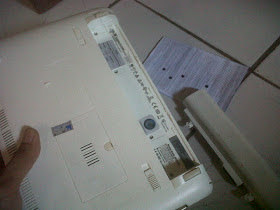
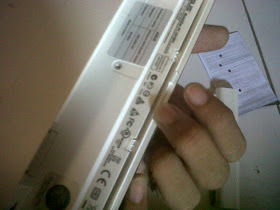
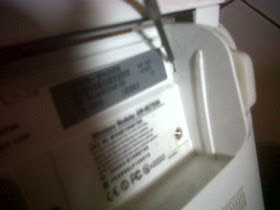
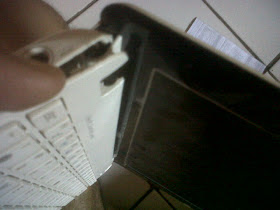

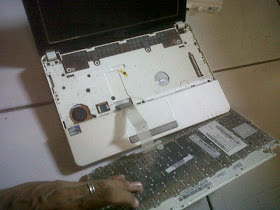
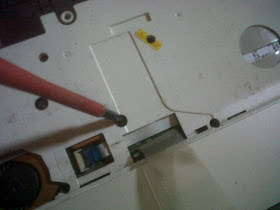
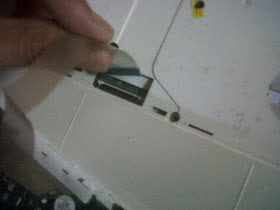
9. After all the nut is removed, it is time to open the casing. Start by lifting the cover or casing left netbook. View image
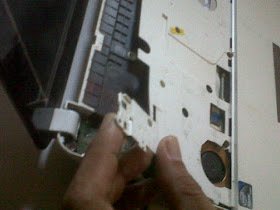
10. Continue to loosen the back of the netbook. Use a thin object to enter the gap

11. Do it up all around the edge of the netbook is open, remember do not force too strong if there is a part that is difficult
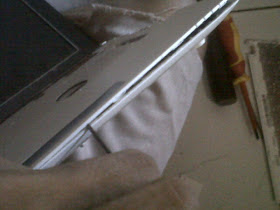
12. After all is open, now pull the casing cover. Be careful not too strong, because there is no cable connectors to the motherboard
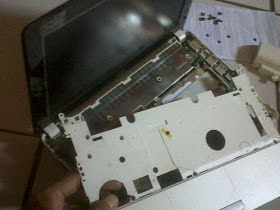
13. Focus your attention on the fan, on the left. Open the first all nuts the glue on the fan to the motherboard
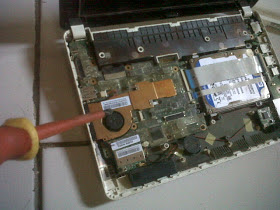
14. Unscrew the nut fan
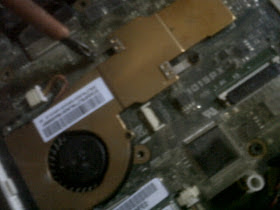
15. After all apart, remove the fan and brass. Be careful no fan power cable is still connected to the motherboard
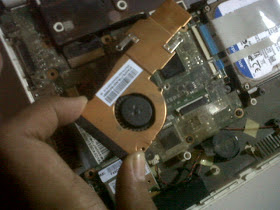
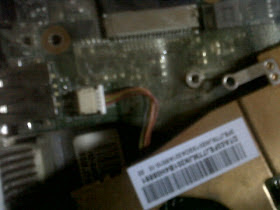
17. Remove the fan cover brass, use a very small screwdriver to open the netbook fan
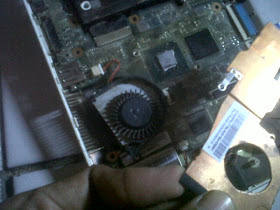
18. Take the fan wheel, check to see if a lot of dust around it. If more then immediately clean
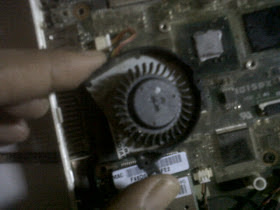
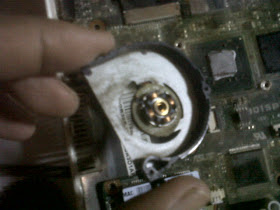
19. Use a toothbrush or a soft brush to clean between the wheel and around the coil

20. Fan sound is usually caused by dry lubricant in the middle of the coil. Therefore, apply stemplet (soft oil) lightly at the middle of the iron mill as the center of rotation. And also rub around the inside of the wheel, because this section in contact with the coil in the middle. Remember only a few.
21. Good Luck
Monday, March 17, 2014
How to restore the forgotten password on Windows 8
The steps are as follows:
- Put Windows 8 Installation DVD into the last DVDRoom Boot
- Click the Repair
- On the Menu Choose an Option click Troubleshoot
- Click Advanced Options
- Select the Command Prompt
- Know first drive used windows, by default it will use drive c: but here I demonstrated when Windows is installed on drive D:
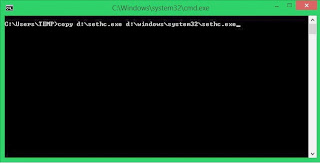
- Type the following command
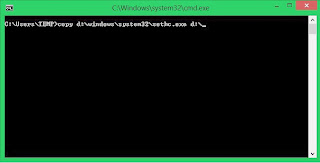
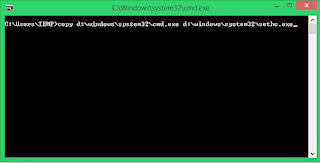
8.When finished we click Restart
9. After restarting it will reappear Login Form .. We Press the Shift key five (5) times at the keyboard until the Command Prompt again
10. Type the command like this USERNAME PASSWORD Net User (username should be the same as the username that we want to use, and for the password it will be the username new password). For more details please see the picture below.
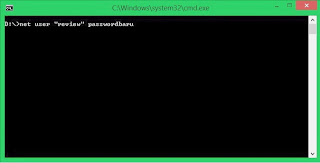
11. Please restart and enter the password that we created earlier
Sunday, March 16, 2014
How to Overcome NTLDR is Missing on Computers and Laptops

1. Computer does not boot using the bootable disk.
When booting windows access device containing a bootable disk. such as the hard drive containing the Windows operating system, or removable disk bootable cd bootable. Because a bootable disk is not accessible, it could result windows can not boot characterized by messages like the above
2. Setting boot device in the BIOS / CMOS does not lead to hard drive.
Still dealing with the above numbers, resetting the BIOS boot settings / CMOS computer with firstboot setting device on the hard drive that contained the operating system windowsnya
Check the cable Sata or IDE, if it is loose remove and then reinstall the correct and proper, or replace the cord
This is the most frequent cause of terjadi.Untuk restore ntldr file or ndetect.com corrupted or lost, can be done by using the recovery console. To get into the recovery console, do the following:
a) Set the BIOS / CMOS settings to boot using the CDROM
b) Insert the Windows XP CD into the CDROM.
c) When the command "press any key to boot from the CD", press any key on the keyboard (any key)
d) After the Windows XP setup menu press the "R" on the keyboard to choose to repair a Windows XP installation using Recovery Console.
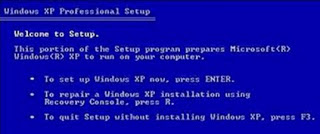
If prompted to enter your administrator password, enter the administrator password and press enter (If no password just press enter).
Copy ntldr and ntdetect.com files from the CD to your windows system by giving command like this:
COPY F: i386 NTLDR C:
COPY F: i386 NTDETECT.COM C:
note: F the sentence above is the name of the cdrom drive in the computer.
Each computer can vary. If you are dikomputer CDROM on drive D, then the writing becomes COPY D: i386 NTLDR C:
Meanwhile, C is the directory in which the windows operating system is installed.
To exit the recovery console window, type EXIT then press enter
After all files have been copied to the file system, grab your windows cd and restart the computer. (Set back so that windows boot from the hard disk)
Corrupt boot sector / master boot record
If the cause of the boot sector or master boot record, which can be done is to fix the boot sector or master boot record by giving orders FIXBOOT or FIXMBR in recovery console windows
How To Make Your Computer Faster Increase Virtual RAM
Just follow below simple steps
1) Right Click on My Computer and Select Properties .
2) Now Click on the Advanced Tab.
3) Now Under Performance Tab click on Settings .
4) Click on Advanced Tab on the Button that Pops up .
5) Now Under Virtual Memory Click on Change >- Custom Size.
6) For the initial size (depending on your Hard Disk space) type in anywhere from 1000-1500 ,and for the Maximum size type in anywhere from 2000-2500.
7) Now Click on Set and then exit out of all the windows.
8) Restart your Computer and now you have faster computer and 1-2 GB Virtual RAM .
Feel free to comment. Enjoy!!
How To Customise Your start Button
After you download it, follow the guide here:
Step 1:
A - Run "Resource Hacker" and open the file "%windir%Explorer.exe".
B - You see a Tree of all Resources in this file, expand the "String Table"
C - Find the "start" (look for the place 37->1033 on the "String Table") and replace it with your own text. then press the [Compile Script] button.
D - Save "Explorer.exe" as "MyStart.exe" DONT save it as Explorer.exe, do "save as.." and give it a new name.
E - Quit "Resource Hacker".
Step 2:
A - Click on the [Start] button and choose the "Run..." item from the start menu. (Or use the shortcut key WinKey+R)
B - Type "RegEdit" in the Run "Dialog Box". And then press the [Ok] buton to run the "Registry Editor" program.
C - Go to: "HKEY_LOCAL_MACHINESOFTWAREMicrosoftWindowsNTCurrentVersionWinlogon" and find the "Shell" property.
D - Replace value of the "Shell" property to "MyStart.exe".
E - Quit "Registry Editor".
F - Restart your system.
Note about Registry Editor:
if you did not find the key "HKEY_LOCAL_MACHINESOFTWAREMicrosoftWindowsNTCurrentVersionWinlogon", you can search the Registry for the "Explorer.exe", to do this use the Edit Menu | Find Next (Ctrl+F).
Saturday, March 15, 2014
How to get free facebook likes followers and comments
1.Visit this site http://Like-Ex.com/?ref=38581.
2.Make your account on this site.
3.Add your facebook page or your profile to this site.
4.As you will follow or like the posts of othr members you will get the coins.
5.You can use these coins for your page or profile.
6.As the other members see your profile or your page they will like it.
In this way it works.
4 Alternatives to Google AdWords

Going back a bit, for those unfamiliar with the main features and tools of Google AdWords, we can find a very simple interface yet complete in every sense.
- AdWords appearance has changed, however there is a chance of returning to the old design;
- allows you to place a phrase or keyword, a web site and use the categories;
- for a better keywords search, you can apply filters such as location, language and add custom fields (competition, local or global monthly searches, CPC, Ad share, etc.);
- displays keyword ideas in columns with the amount of local and global monthly searches and approximate CPC;
- you can download keyword ideas, search results in a format to open with Excel.
Having recalled and refreshed the memory a little with the characteristics of AdWords, now it is time to learn about other options both free and paid.
Google AdWords Alternatives
Bing Webmaster Tools: Bing may not be the tool that we had first thought of, however it wants to provide the best conditions for studying keywords.

After we register, to access the tool, go to Diagnostics & Tools and click on the second option on the list:Keyword Research.
Ubersuggest: This nice and simple online tool searches keywords suggestion as well as potential titles for an article. Personally, I recommend it 100%.
Keyword Eye: If you are looking to perform a keyword research on a particular region, Keyword Eye will be your help. It also has the option of requesting the display of search volume or AdWords competition and a full report of anchor text, keywords and domain.
At first it offers a free plan with limitations and to enjoy all other benefits, we have to pay $9.99 per month.
How to Know When You Need Computer Repairs For Viruses
Many people relate computer malfunction to the presence of a virus but one should not be too quick to deduce that. Although viruses have become the biggest menaces of computers, you should remember that the computer is a very complicated machine and any of its components could be the one causing the problem. Do not always assume that when your computer is suddenly not turning on, that it is has been infected with a virus; it could easily be because of a problem in the motherboard, power supply, hard drive and you might need to contact a computer repairÊservice to address this situation.
Not all your computer problems will be caused by a virus; so to effectively address the problem you should first be sure of what you are dealing with. Here are some guidelines that you can follow, to immediately identify the existence of a virus:
Is your computer running slow right now? Do you find yourself waiting too long for a certain page to load or is your computer taking ages to open a folder? If any of these are familiar with you, it would be safe to assume that you are dealing with a virus. However, you can also be dealing with a defective hard drive or RAM. You can check for this easily by hitting Ctrl-Alt-Delete and seeing the performance tab (are they at 100%).
After which, you can check the process tab and see if the CPU is going through large cycles. If yes, then you could very well be dealing with a virus.
Are some of the elements in your operating system missing; like your task bar perhaps? Or are there components in your computer that you cannot control? Is there something that seems to be preventing you to enjoy the normal function of your computer? Some viruses attack your system this way. They tell the operating system to behave this way; and if this happens to your system, a good computer repair service can remedy the situation.
c. Are you often inundated by a barrage of pop-up advertisements while using the computer? If you are having problems with this, you are most likely dealing with a virus and you should contact a repair service. You could simply be loading something and all the pop-ups will begin to appear uncontrollably. Quickly address the situation by finding out if you are truly dealing with a virus and get rid of the problem before it even gets worst.
The truth is, a virus can attack your system in many different ways and you may not even know that you are already dealing with one. The best solution for you is to install an anti-virus software who will keep a guard of your system. When you notice something out of the ordinary, you are most likely dealing with a virus. Be wary of things such as these because they will be indicative of problems within your system. Be observant and do not be complacent; a computer that is healthy is not supposed to give you problems so when your system starts to give you a headache, contact a specialist.
4G wireless devices to call customer service for help
It’s not clear whether these 4G problems are a long-term phenomena or growing pains. In any case, J.D. Power found that 60 percent of 4G subscribers called their wireless provider in the last six months. Customers with 3G phones called their carrier 47 percent of the time. Feature phone owners only called for support 35 percent of the time.
The big problems: 4G devices see more network problems and customers don’t understand that service coverage is limited.
Given Verizon’s lead in 4G most of those calls were aimed at the carrier. Nevertheless, Verizon Wireless had to top overall customer service score.


TRICK TO BYPASS MOBILE VERIFICATION IN GMAIL

STEPS FOR THIS TRICK
1. GO TO THIS SITE- CLICK HERE
2.CREATE A ACCOUNT ON GMAIL BUT LOCATION FILL UNITED STATES..
3.CREATE YOUR EMAIL ACCOUNT
4.NOW IT WILL TAKE TO YOU MOBILE VERIFICATION PAGE . HERE SELECT THE
OPTION OF VOICE CALL AND FILL THE NO. THAT YOU GOT FROM SITE .
5. YOU WILL GET A MAIL HAVING VERIFICATION CODE AS VOICE MAIL ON THAT
ACCOUNT FROM WHICH YOU HAVE REGISTERED ON.
6. GO OPEN IT , DOWNLOAD THE ATTACHMENT FILE AND LISTEN THE CODE ,
AFTER THAT TYPE THE CODE OG YOUR VOICE MAIL IN VERIFICATION
CODE CLICK OK .DONE
Wireless Networks An Effective and Reliable Way to Connect With the World
A computer network that is wire free is called a wireless network. Wireless networks are those networks that are interlinked to one anther with some other wire free tools. These networks are generally associated with telecommunications and networking wherein two or more nodes are connected with one another such that the data can flow to and fro between them. These networks do not use wires and are generally implemented with a kind of remote information system which makes the use of electronic radio waves for connectivity. These networks can easily transmit data and other information to other nodes i.e. computers very easily.
A wireless network is again divided into four kinds, depending on their features and uses, they are:
• Wireless PAN: It stands for wireless personal area network; this is known as a personal area network as it covers only a small geographical area. One such example of the WPAN is the Bluetooth; it provides connectivity only to an area of 10mts and thus a wireless personal area connectivity provider.
• Wireless LAN: This is a sort of wireless network that supports local area connectivity. It stands for wireless local area network. The only difference is that it covers a larger area than pan.
• Wireless Wan: It stands for Wireless metropolitan area network. This wireless network is spread in a metropolitan area i.e. wide area than when compared to pan and LAN.
• Wireless WAN: It stands for wireless wide area network wherein a wide are is covered and the nodes are connected with one another perfectly.
• Mobile networks: This network came in to initiation with the development of mobile smart phones which are used to talk and at the same time can hold computer data with transferring abilities because they are often connected to GSM.
A wireless network eases the flow of information from one computer to the other. One can share real time information at a rapid speed and with an amazing efficiency. These networks are age old techniques to send information anywhere in the world without recognizing the geographical frontiers and language barriers. Wireless networks are in operation from a long time and are used to send, receive and communicate through radio electromagnetic signals. People are now sharing data, merging and exchanging files across borders breaking barriers. One can say that wireless networks have considerably changed the world and made it one big family.
These networks are inexpensive and a cost efficient way of communicating and sharing files, data and other info between groups of computers. These networks are used in business and other important areas where communication is important. Wireless networks offer a wide range of connectivity and that too without the hassles of wiring. All in all, wireless connectivity is reliable, superficial, fast, flexible and easy to get in. It involves a rapid speed and consumes very little time. It is an answer to all your connectivity needs and gives you instant access to the world behind your table.
Is It Possible To Send An Email That Is Completely Untraceable
Sometimes a person needs to send an anonymous email and they have to remain anonymous. They want the sent email to be completely untraceable so that they can never be identified. People hear about international hackers and Internet crimes so they assume that it is possible but is it really? The answer is both yes and no. Make no mistake about it, with enough time and money any email can be traced right back to the sender. Any online communication can be traced , the author identified and located. The best you can hope for is to make the trace more difficult for investigators.
The first thing most people will try to send an untraceable email is to create a fake email account. They will use fictitious information to fill out the application. While this may thwart most of the instant reverse email search data bases it will do nothing for you to conceal your identify. It will be a very simple matter for an investigator to trace the email right back to your computer. It could be as simple as just a quick header examination.
The next step a person might take would be to use a proxy server to mask their IP address. Its a quick and simple process to set up a proxy IP address into your email program and this will alter your email headers to look as if the email was sent from a different location. This will slow down the average investigator who is starting with the incoming email header as the initial focus of his investigation. But again the experienced investigator will not be distracted by a proxy IP or a forged header.
Another tactic the sender may use is an anonymous remailer program. Now this is where 90% of email investigators will just give up. But again the experienced email tracer has seen it all and has successfully identified people even if they are using an anonymous email re mailing service. In fact many times the person who will use a remailer may be easier to identify because they think theyre technically savvy and untouchable. They get overconfident, stupid and sloppy and will fall right into the traps set by the email investigator.
Lastly the would be anonymous emailer may think they can use a public computer in a library or perhaps a college to send their anonymous email. They think this will completely cover their tracks. But again this is simply wishful thinking. The incoming email will easily be traced right back to the public work station and these facilities will have records of the users. In fact these types of public places are very eager to cooperate with investigators that need to identify the sender of an email.
So in closing we can see that it really is impossible to send an untraceable anonymous email. Any information sent or received over the Internet can be traced to locate or identify the person or persons at the other end. While there are steps you can take to slow down the investigation or fool an instant data base search thorough reverse email search investigation will always return at least some identifying information about that other person at the end of the Internet communications.
Copyright (c) 2011 Opperman Investigations Inc
Friday, March 14, 2014
How to Disable New Categories Tabs In Gmail

But, now gmail introduced new feature for desktop and mobile that will be very useful for us to manage all different mails easily.
On the desktop, the new inbox gatherings your mail into categories which show up as diverse tabs. You basically pick which categories you need and voilà! Your inbox is formed in a manner that gives you a chance to see what’s new at a look and choose which messages you need to read when.

What you can do with the new inbox :
- Select the tabs you need from each of the five to none.
- Drag-and-drop to move messages between tabs.
- Set certain senders to dependably show up in a specific tab.
- Star messages so they additionally show up in the Primary tab.
Personally, I like that feature but after reading this forum I found that many people unliked this feature and they want to remove/disable this feature from their gmail account. So, if you one of them and you want to disable this feature from your gmail account, then follow the introduction below. Actually, there is an option to disable these tabs and get old look right away and the good thing is that option is officially available by Gmail. so, you don’t need to download or install any kind of app or add-on to do this.
- First of all you have to open gmail.com > Click on setting gear icon and choose Configure Inbox. (It will help you to configure your tabs settings.)
- Now, New pop-up will apprear with all the option like below.
- Now, Uncheck all items except Primary (which you cannot uncheck)
- That’s it.
![configure-inbox-gmail[3]](https://lh3.googleusercontent.com/blogger_img_proxy/AEn0k_ueClDE4tOaHXG7d58uVjZ1tKDpP7OGuAapvF8jXIUNKl65CF_4ASMCZRXuEIXmFk7Ux7gCPodtedFCFCdkI7VWxatX6HvLwnp_y19e0Q1X1ny8e4dhspeqIrc7-2fZzQSqZApDeQgT10Xw3cSzOPJiEYqIfZXY5g=s0-d)
