Breaking The XP Password
n case of user password boot the pc in safemode by pressing the F8 key and then selecting the Safe Mode option. You can now logon as an administrator and XP wont prompt for the password. Incase of an administrator account try rebooting the pc in DOS. access C:Windowssystem32configsam . Rename SAM as SAM.mj
Now XP wont ask for password next time You Login. Also
Go to the cmd prompt .
Type net user *.
It will list all the users.
Again type net user "administrator" or the name of the administrator "name" *.
e.g.: net user aaaaaa *(where aaaaaa is the name).
It will ask for the password.
Type the password and there you are done.
Logging In As Administrator:
Hold the Ctrl-Alt key and press Del twice. This will bring up the normal login and you can log on as Administrator.
To unhide the Administrator account so it does show up:
Start Regedit
Go to HKEY_LOCAL_MACHINE SOFTWARE Microsoft Windows NT CurrentVersion Winlogon SpecialAccounts UserList
Unhide the Administrator key by giving it a value of 1
Showing posts with label password. Show all posts
Showing posts with label password. Show all posts
Saturday, March 22, 2014
Rename and Assign password guest account

Windows XP includes a guest account that is disabled by default. However, at some time, this account may be enabled by an application. If you have Windows XP Professional, I recommend that you disable this account using the old Windows 2000 Local User and Group application. Just in case it becomes enabled again, I recommend that you rename the guest account and also assign it a password. Follow these steps to disable the guest account:
1. Click the Start button and select Run.
2. Key in lusrmgr.msc and click OK.
3. The Local User and Group application will launch. click on user account and Right-click the Guest username and select Set Password.
4. You will be prompted with a warning screen. Just click Proceed.
5. Type a complex password in both boxes and click OK.
6. The password has now been set. Next, rename the account by right-clicking it and selecting Rename.
7. Type in a new name, such as Disabled, and click Enter to save the changes.
The vulnerable guest account is now less of a problem.

Tuesday, March 18, 2014
Monday, March 17, 2014
How to restore the forgotten password on Windows 8
The steps are as follows:
- Put Windows 8 Installation DVD into the last DVDRoom Boot
- Click the Repair
- On the Menu Choose an Option click Troubleshoot
- Click Advanced Options
- Select the Command Prompt
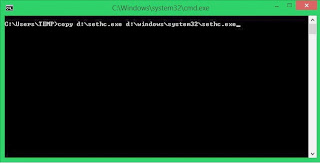
- Know first drive used windows, by default it will use drive c: but here I demonstrated when Windows is installed on drive D:
- Type the following command
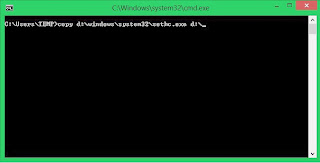
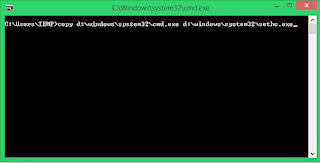
8.When finished we click Restart
9. After restarting it will reappear Login Form .. We Press the Shift key five (5) times at the keyboard until the Command Prompt again
10. Type the command like this USERNAME PASSWORD Net User (username should be the same as the username that we want to use, and for the password it will be the username new password). For more details please see the picture below.
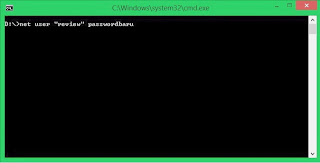
11. Please restart and enter the password that we created earlier
Friday, March 7, 2014
Facebook Password Decryptor 3 5
FacebookPasswordDecryptor is a handy utility designed to recover Facebook passwords stored by popular web browsers and messengers. Most of the applications store the Login passwords to prevent hassale of entering the password everytime by the user. Often these applications use their own proprietary encryption mechanism to store the login passwords including Facebook account passwords. FacebookPasswordDecryptor automatically crawls through each of these applications and instantly recovers the encrypted Facebook account password.

Read more »
Here is the complete list of supported applications
· Internet Explorer (all versions from 4 to 8)
· Firefox
· Google Chrome
· Opera Browser
· Paltalk Messenger
· Miranda IM
key features
· Instantly decrypt and recover stored encrypted Facebook account password from Popular Web browsers and Messengers.
· Support recovering multiple Facebook accounts stored with any of the supported applications.
· Automatically discovers the supported applications from their respective install location and recovers the password instantly.
· Sort feature to arrange the displayed password list by username and password which makes it easy to search through 100s of entries.
· Save the recovered Facebook password list to HTML/TEXT file for transferring to other system or for future use.
· Easier and faster to use with its enhanced user friendly interface.
Platform: Windows XP, 2K3, Vista, Longhorn, Windows 7, Windows 8
Version 3.5 :
New feature to recover Facebook login passwords from Chrome SXS, CoolNovo & SeaMonkey Browser.
· Internet Explorer (all versions from 4 to 8)
· Firefox
· Google Chrome
· Opera Browser
· Paltalk Messenger
· Miranda IM
key features
· Instantly decrypt and recover stored encrypted Facebook account password from Popular Web browsers and Messengers.
· Support recovering multiple Facebook accounts stored with any of the supported applications.
· Automatically discovers the supported applications from their respective install location and recovers the password instantly.
· Sort feature to arrange the displayed password list by username and password which makes it easy to search through 100s of entries.
· Save the recovered Facebook password list to HTML/TEXT file for transferring to other system or for future use.
· Easier and faster to use with its enhanced user friendly interface.
Platform: Windows XP, 2K3, Vista, Longhorn, Windows 7, Windows 8
Version 3.5 :
New feature to recover Facebook login passwords from Chrome SXS, CoolNovo & SeaMonkey Browser.
Subscribe to:
Posts (Atom)