Showing posts with label and. Show all posts

Tuesday, April 1, 2014

How to bypass and avoid writting captcha code


Today, we are going to learn how to bypass and avoid writing captcha codes that appear in each time you want to register or fill information in a website. talking about the challenge-response test used in computing as an attempt to ensure that the response is generated by a human being.


All of us are sick and tired of these codes, sometimes it is difficult for us to identify numbers and letters, which makes us disapprove of browsing, I am personally sick of the introduction of these symbols, this is why I share with you this article to avoid captcha codes easily, by making your PC counters these codes rather than you, just follow these steps:
  1. Enter on this site skipinput.com
  2. Register on the site and then activate your account by e-mail.
  3. Choose your browser and download the application as shown here:

  1. After you download and install this application you will see an icon on the top right corner of your browser, activate it:

  1. Now to use this application, right click on the captcha empty field and click “use this field to enter CAPTCHA”, after that just wait a few seconds and you’re done! Hope you like it.

Read more »

Saturday, March 22, 2014

Installing Printers and Printer Drivers

(The drivers for the printer were already copied to a folder on the Hard Drive of the PC.)

- Hook up the printer to the computer.
- When the add printer wizard comes up, let it go through the screens until it gets to a dialog asking where to look for the drivers. Check to browse on the Hard Drive and navigate to the folder where the drivers were copied.
- Go through the next screens.
- If the printer drivers installed successfully, there will be a balloon window saying so.
- It should also prompt you to print a test page.
- Print the test page, and then you know that youre good to go.
Read more »

Rename and Assign password guest account


Windows XP includes a guest account that is disabled by default. However, at some time, this account may be enabled by an application. If you have Windows XP Professional, I recommend that you disable this account using the old Windows 2000 Local User and Group application. Just in case it becomes enabled again, I recommend that you rename the guest account and also assign it a password. Follow these steps to disable the guest account:

1. Click the Start button and select Run.

2. Key in lusrmgr.msc and click OK.

3. The Local User and Group application will launch. click on user account and Right-click the Guest username and select Set Password.

4. You will be prompted with a warning screen. Just click Proceed.

5. Type a complex password in both boxes and click OK.

6. The password has now been set. Next, rename the account by right-clicking it and selecting Rename.

7. Type in a new name, such as Disabled, and click Enter to save the changes.

The vulnerable guest account is now less of a problem.
Read more »

Wednesday, March 19, 2014

Windows 7 Upgrade Tricks and Traps

By: John Dow

I was bracing for the worst based on past rollouts from Microsoft. After experiencing the pain of Vista, I was quite apprehensive about the release of Windows 7. Even though there was good press (which I dont put a lot of faith in anyway) I knew there would be some serious bumps in the road to transition.

My first 4 or 5 installs went off without a hitch. Many of my customers were upgrading old Windows XP machines that were 6 years old. The new computers with Windows 7 had fast processors, more ram, and dedicated video cards, which helped a lot. The boot and shut down times were greatly reduced and the most popular software seemed to work right out of the box.

I didnt recommend upgrades to current equipment and most people went with the advice. Life was good and customers were happy. Since all of the installs were new computers and not Vista upgrades, none of the upgrade problems were an issue. There were quite a few problems found on the Vista upgrades, especially those who downloaded the Windows 7 install. The files wouldnt unpack properly, refused the new product keys, and had some rebooting problems. Then there were the unspecified errors and directory permissions problems. But all were confined to the upgrading Vista process, many due to reformatting the hard drive before the new install.

If you are upgrading a Vista machine, dont bother to reformat the hard drive before you upgrade. It appears that this is a problem. You should do a clean install and let Windows 7 format the hard drive in the process. That method appears to have few of the issues that the clean hard drive upgrades have and you still get a new clean system.

Then it happened, I found a nasty little problem on the new computers with Windows 7. Bringing in a new Windows 7 computer into an existing network worked fine as long as you stuck with the workgroup name of workgroup. But if you had a different name (which many clients do for multiple reasons), the Windows 7 computer was seen by the others in the workgroup but couldnt connect or see any of them.

I did a little research and talked to some other techs and they were experiencing the same problem. Not good, most clients didnt want to change their workgroup name. There was a work around by making every computer also a workgroup member and the original name. But it wasnt a great solution and might come back to haunt the client and me some day.
Another big issue with Windows 7 was the way it stored files. They went to a library system, which is a common method on the Macs and Linux machines. Once you get it, its probably a better method of organizing files. But when you introduce it to the user and a bunch of older Windows XP systems it can get confusing. When you change something as basic as how you view and store files, and you have a lot of shared files, users dont always adapt quickly.

Automated backup systems have to be changed around and tracking changed files gets a little more exciting but with a little training and automation you can over come the differences. Most users are over worked these days and some arent all that willing to change. So its both an operational and an attitude you get to deal with when bringing Windows 7 computers into an existing environment.

And, dont believe what you read about the Windows XP Mode. Many older computers arent compatible with the virtual machine methods used. About one in three of the computers Ive tried to set up XP mode couldnt do it for one reason or another. New machines often have all the necessary bios settings, chip sets, and other requirements but older computer may not. When it works, its great. But dont depend on it until you have tested it on the computer you want to run it.

Most of the other issues are basic configuration changes that default on a new Windows 7 install. For example the taskbar looks and acts different and many users are complaining they cant see whats open at a glance. There is a way to change the toolbar back to what it used to be by right clicking the toolbar and selecting properties. And make any changes in appearance you want.

All in all the Windows 7 transition and open issues are no where near what the Vista debacle was and most are easy to overcome. And if you dont like a particular feature or display method, most times you can change it back to what you want it to do or look like. The speed and faster boot times are more than worth the hassle of reconstructing your desktop like you want it.

Read more »

Union Bank of India Specialist Officer Recruitment 2013 Notification Syllabus Exam Pattern and tips tricks

Union Bank of India has invited applications from Indian citizens for 349 specialist officer vacancies. Students can apply online for this post from 04-03-2013 onwards. Here i am sharing how to apply for this post, exam pattern, exam syllabus and some useful tips and tricks to solve the examination paper.

How to apply for Union bank of India Specialist Officer post

A candidate can apply online and download notification for examination from union bank of india website, click here. He has to download a challan form from the above link and take a printout of challan form. Now deposit the requisite fees  (Rs.250 for Gen and OBC, 50 for others) at any branch of union bank of india.
After depositing fees, apply online for Specialist Officer by filling all your information and payment details and submit it. Take a printout of submitted application form to be used for further references. The last date of online application submission is 24-03-2013.

Exam Pattern and Selection Process of Union bank of India Specialist Officer post

Selection of candidate will be made on basis on Written exam, Personal Interview and Group Discussion. Written exam can be online or offline decided by bank, will be informed according to that.
Written exam  consists of 250 marks carrying 250 questions in time duration of 150 minutes.

Exam Syllabus of Union bank of India Specialist Officer post

For detailed syllabus and tips tricks for exam paper keep visiting this site. i will soon update it.

Tags: Application for union band of india recruitment 2013, exam syllabus of union bank specialist officer recruitment 2013, exam pattern of union bank specialist officer recruitment 2013, last year solved paper of union bank specialist officer exam, unsolved papers of union bank specialist officer exam
Read more »

Tuesday, March 18, 2014

mPassport Seva Mobile App now available on Windows and Apple iOS platforms

mPassport Seva mobile app which was launched on Android platform is now available for both windows and iOS platforms. mPassport Seva Mobile App enables Indian Citizens to access Passport related information on their Smartphones. This application provides a wide variety of services such as status tracking, locating a Passport Office and other general information.

MPassport Seva android-app


The application provides information on various steps involved to obtain a passport related service and related phone numbers in case of queries or concerns. The users will be able to search for a Passport Seva Kendra (PSK) or District Passport Cell (DPC) in a district where a passport application can be submitted. This can also be searched based on PIN code. For certain States and Districts, the users can search for Police Stations as well.

Users can also track the status of their passport applications by providing File Number and Date of Birth. In case the passport has been dispatched, Delivery Status can also be tracked.
Read more »

Monday, March 17, 2014

Blackberry Pauses BBM Roll Out for Android and iOS Blames the Unreleased Version

The much awaited release of Blackberry Messenger (BBM) for Android and iOS that gained attention of various social networking sites and users alike on Saturday turned off many before even turning into reality.
The global roll out of the popular messaging app that was scheduled for android and iOS users on Sept 21st and Sept 22nd respectively left many users confused and disappointed before its official release with the
company later pausing its roll-out across globe.

BBM-iOS-iPhone4

Blackberry however blamed the unreleased version of the BBM for Android app that was posted online prior to its official launch. “This unreleased version caused issues, which we have attempted to address throughout the day”, said the company. The tweet on the official twitter account of  BBM reads:
“We know you’re waiting. Pausing #BBM4All rollout to fix issues caused by unreleased BBM for Android app.”

The unreleased version saw more than 1.1 million active users in the first 8 hours (as per the company’s
announcement), which clearly shows the interest of Android users in BBM. The lucky iPhone users who have already downloaded BBM will be able to continue using the messaging app.The unreleased app will however be disabled, and customers who downloaded it should visit www.BBM.com to register for updates on official BBM for Android availability.

We still don’t know the exact date when Blackberry will resume its BBM roll out services for third party platforms, but once they are able, the company will begin a staggered country roll-out of BBM for Android and continue the roll-out of BBM for iPhone.

If you are new to BBM and wondering why you should use BBM, read this post.
Read more »

Sunday, March 16, 2014

Nokia unveiled Lumia 610 and 900 Asha 302 203 and 202

Nokia has unveiled five more devices at MWC, the Lumia 610, the global Lumia 900 (previously, announced only for AT&T), and the Nokia Asha 302, 203, and 202. The two Lumia devieces will release in Q2 2012, while the Asha devices will release within the next few weeks. Nokia also unveiled an updated Nokia Drive app for Windows Phone, as well as Nokia Reading news aggregator.

Nokia has already announced the PureView 808 at MWC 2012 so far, a 41MP camera phone running Symbian Belle.

Previously expected to be announced at MWC, the Nokia Lumia 610 becomes the first low-cost Windows Phone handset around, running on an 800MHz Snapdragon S1 processor, 256MB of RAM, and 8GB of built-in storage. Other specifications Windows Phone 7.5 Mango, a 3.7-inch 800x480 pixel display, 5MP autofocus camera with LED flash, as well as the standard Bluetooth 2.1, HSDPA 7.2Mbps, HSUPA 5.76Mbps, Wi-Fi 802.11 b/g/n, stereo FM radio, and microUSB 2.0 connectivity.

The Lumia 610 features a 1,300 mAh battery rated to deliver 35 horus of continuous music play, 580 hours of standby time, and 6.5 hours of talk time. The device will ship white, cyan, magenta and black, for around €189, translating to roughly Rs. 12,500.

The top-end Nokia Windows Phone, the global-edition Lumia 900, was also introduced, featuring HSPA+ connectivity instead of LTE. For more information about the device, refer to our previous coverage of it.

Coming to the Nokia Asha devices, we see Nokia has actually launched two models (Asha 302 and 202), with one dual-SIM variant (203). The Asha 302 is a QWERTY device, with social networking and IM integration, as well as Microsoft Exchange. It runs on a 1GHz processor, and offers Wi-Fi N and 3G connectivity (HSDPA 14.4Mbps), as well as USB-on-the-Go support. It features a 1,320 mAh battery, promising over 707 hours of standby time, 9 hours of talk time, and 50 hours of music play. Nokia has priced the Asha 302 at €95, or roughly Rs. 6,500, shipping in dark grey, mid blue, plum red, white, and golden light colours.

The Nokia Asha 202 / 203 are Touch N Type offerings, with a 2.4-inch resistive touch display. Both phones come with Nokia Browser pre-installed, and feature 2MP cameras, GPRS/EDGE connectivity, as well as Bluetooth 2.1, microSD card slot expansion up to 32GB, stereo FM radio with recording, and a 1020 mAh battery rated to deliver up to 400 hours of standby time, 5 hours of talk time, and 25 hours of music play. Both devices will be priced at around €60, or roughly, Rs. 4,000, and come in dark red, black, silver white, dark grey, and golden white colours. They will also ship with roughly €75 worth of EA Games.

Source: GSMArena
Read more »

How to Overcome NTLDR is Missing on Computers and Laptops

http://.blogspot.com


The Causes Missing NTLDR on computers and laptops:

1. Computer does not boot using the bootable disk.
When booting windows access device containing a bootable disk. such as the hard drive containing the Windows operating system, or removable disk bootable cd bootable. Because a bootable disk is not accessible, it could result windows can not boot characterized by messages like the above

2. Setting boot device in the BIOS / CMOS does not lead to hard drive.
Still dealing with the above numbers, resetting the BIOS boot settings / CMOS computer with firstboot setting device on the hard drive that contained the operating system windowsnya
3. There is a problem with the usb keyboard

4. IDE or SATA hard drive cable is not appropriate or loose.
Check the cable Sata or IDE, if it is loose remove and then reinstall the correct and proper, or replace the cord

5. NTLDR and NTDETECT.COM files or corrupt.
This is the most frequent cause of terjadi.Untuk restore ntldr file or ndetect.com corrupted or lost, can be done by using the recovery console. To get into the recovery console, do the following:
     a) Set the BIOS / CMOS settings to boot using the CDROM
     b) Insert the Windows XP CD into the CDROM.
     c) When the command "press any key to boot from the CD", press any key on the keyboard (any  key)
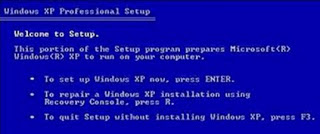
     d) After the Windows XP setup menu press the "R" on the keyboard to choose to repair a Windows XP installation using Recovery Console.

http://.blogspot.com

Choose windows that are installed by pressing the "1" (If the windows are installed only one) then press enter.
If prompted to enter your administrator password, enter the administrator password and press enter (If no password just press enter).

Copy ntldr and ntdetect.com files from the CD to your windows system by giving command like this:
COPY F: i386 NTLDR C:
COPY F: i386 NTDETECT.COM C:

note: F the sentence above is the name of the cdrom drive in the computer.
Each computer can vary. If you are dikomputer CDROM on drive D, then the writing becomes COPY D: i386 NTLDR C:
Meanwhile, C is the directory in which the windows operating system is installed.
To exit the recovery console window, type EXIT then press enter

After all files have been copied to the file system, grab your windows cd and restart the computer. (Set back so that windows boot from the hard disk)

Corrupt boot sector / master boot record
If the cause of the boot sector or master boot record, which can be done is to fix the boot sector or master boot record by giving orders FIXBOOT or FIXMBR in recovery console windows

Read more »

Samsung Galaxy Tab 620 Price and Specifications


Comparatively Samsung one of the low prices tablets, It stores up to 20 texts and images into the clipboard, one can access directly from the virtual keyboard.


 Dual camera featured for existing HD Video recording and image capturing, 3 Mega Pixel primary cameras and 2 MP secondary cameras gives wonderful capturing and recording experience. 


Bluetooth and 3G are there for the best and latest connectivity one could ever have. The Tablet is powered and accelerated by Dual core processor.


Technical Specifications
Display Type: 8.9 inch TFT 1280 x 800 pixels
Other Display Features: PLS Screen
Primary Camera: 3 megapixels
Secondary Camera: 2 megapixels
Video Recording: Yes , HD Recording at 1280 x 720
Other Camera Features: Auto Focus, Full Focus
Mail Features: Email
Document Support: Document Viewer , Document Editor
Battery Type: 6100 mAh
Wi-Fi: Yes , 802.11 a/b/g/n
3G: Yes , HSDPA 7.2 Mbps
Video Playback: Yes , HD Playback
Map Support: Google Maps
USB: Yes, USB 2.0
Bluetooth: v3
RAM: 1 GB DDR2
Internal Storage: 16 GB
Operating System: Android 3.1 (Honeycomb)
User Interface: TouchWiz 4.0 User Interface
Sensors: Accelerometer, Digital Compass, Ambient Light Sensor
Dimensions: 157.8 x 230.9 x 8.6 mm
Weight: 453 g
Series: Galaxy Tab
Processor: 1 GHz
In The Box: Tablet, Charger, Headset, Data Cable, USB Kit, Quick Start Guide


Price Rs 25449/-
Read more »

Google Overtakes Microsoft And Becomes The Second Largest Tech Company In the World

For the first time today Google surpassed Microsoft’s market evaluation and became the world’s second largest tech company after Apple.
Google now has over $249 billion in market cap, while Microsoft fell to around $248.8 billion. The two companies will probably trade positions for a certain period of time, but given Google and Microsoft’s dynamics, it’s expected that in a couple of days Google will firmly establish itself on the second place.
Still, when it comes to market valuation nobody comes even close to Apples nearly $632 billion. Thats much more than Google and Microsoft combined.
Google outgrows Microsoft to become the second-largest tech company in the world
Read more »

HANG MOST COMPUTERS WITHOUT ANY KNOWLEDGE OF CODING AND PROGRAMMING

HANG MOST COMPUTERS WITHOUT ANY KNOWLEDGE OF CODING AND PROGRAMMING


THIS IS A TRICK TO HANG MOST COMPUTERS WITHOUT ANY KNOWLEDGE OF CODING AND PROGRAMMING ( WORKS ONLY FOR PROCESSORS lower then i-7 )
open NOTEPAD and write %0|%0 and save it as
danietc.bat file and then RUN IT...   :)


Read more »

Saturday, March 15, 2014

How to get free facebook likes followers and comments

In this post I will tell you how to get real facebook followers and like.We will not use any like bot or anything else.This is very simple trick.
1.Visit this site http://Like-Ex.com/?ref=38581.
2.Make your account on this site.
3.Add your facebook page or your profile to this site.
4.As you will follow or like the posts of othr members you will get the coins.
5.You can use these coins for your page or profile.
6.As the other members see your profile or your page they will like it.
In this way it works.
Read more »

Wireless Networks An Effective and Reliable Way to Connect With the World

By: Chris Carter

A computer network that is wire free is called a wireless network. Wireless networks are those networks that are interlinked to one anther with some other wire free tools. These networks are generally associated with telecommunications and networking wherein two or more nodes are connected with one another such that the data can flow to and fro between them. These networks do not use wires and are generally implemented with a kind of remote information system which makes the use of electronic radio waves for connectivity. These networks can easily transmit data and other information to other nodes i.e. computers very easily.

A wireless network is again divided into four kinds, depending on their features and uses, they are:

• Wireless PAN: It stands for wireless personal area network; this is known as a personal area network as it covers only a small geographical area. One such example of the WPAN is the Bluetooth; it provides connectivity only to an area of 10mts and thus a wireless personal area connectivity provider.

• Wireless LAN: This is a sort of wireless network that supports local area connectivity. It stands for wireless local area network. The only difference is that it covers a larger area than pan.

• Wireless Wan: It stands for Wireless metropolitan area network. This wireless network is spread in a metropolitan area i.e. wide area than when compared to pan and LAN.

• Wireless WAN: It stands for wireless wide area network wherein a wide are is covered and the nodes are connected with one another perfectly.

• Mobile networks: This network came in to initiation with the development of mobile smart phones which are used to talk and at the same time can hold computer data with transferring abilities because they are often connected to GSM.

A wireless network eases the flow of information from one computer to the other. One can share real time information at a rapid speed and with an amazing efficiency. These networks are age old techniques to send information anywhere in the world without recognizing the geographical frontiers and language barriers. Wireless networks are in operation from a long time and are used to send, receive and communicate through radio electromagnetic signals. People are now sharing data, merging and exchanging files across borders breaking barriers. One can say that wireless networks have considerably changed the world and made it one big family.

These networks are inexpensive and a cost efficient way of communicating and sharing files, data and other info between groups of computers. These networks are used in business and other important areas where communication is important. Wireless networks offer a wide range of connectivity and that too without the hassles of wiring. All in all, wireless connectivity is reliable, superficial, fast, flexible and easy to get in. It involves a rapid speed and consumes very little time. It is an answer to all your connectivity needs and gives you instant access to the world behind your table.

Read more »

Friday, March 14, 2014

AMD Phenom II X6 1065T Processor – 2 9GHz Six Core – Price and Specifications

AMD Phenom II X6 1065T is a 2.9GHz Six-Core Desktop Processor merge high performance, low 95W TDP, and AMD Turbo CORE technology.

AMD Phenom II X6 1065T Six Core Processor Technical Specifications:

* Speed: 2.9 GHz
* Turbo Speed up to 3.4 GHz
* Total Cache: 9MB
* Number of Core: 6
* Built on 45nm Technology
* DDR3 Memory Support
* Socket: AM3
* TDP: 95 Watt

AMD Phenom II X6 1065T Price in India: 12,000/- (INR)
Read more »

Wednesday, March 12, 2014

Proxy Site and how it Works

Farrukh baig

A proxy site is a web page that enables you to surf your favorite web sites even if your access to such web sites might be blocked by some content filter, for instance Web Sense (site name) or Smart Filter. Using such proxy site will keep your visit to those sites hidden so the content filter will not know that it was unsuccessful in blocking that visit.

So how do these sites work? In this short article we will explain...

Proxy sites allow you to browse blocked websites through proxy site bypassing the internet service provider. Proxy site do that by providing its user to key in the address of that website and be directed to the page in a window in that vary site. Now the advantage here is that this window is coded as the proxy site address and not the actual site address that the user is visiting. Also the information caught in the temporary internet files will appear as the related to the proxy site not the blocked web page.

So how these sites do are blocked in the first place. Web sites are blocked using a number of programs in particular the security software. These software works with the web browsers which let users to surf World Wide Web. Now days many web browsers are coming up with their own filters which keep the blocked content from appearing. In local area networks the system administrator can also block web sites on that network level. Ninja Proxy, Ninjaproxy and Vtunnel!!! Ninja Proxy is a free browser based anonymous proxy service.

So why should one run a free proxy site one guesses but if you look the financial aspects of such service. It’s because they are very simple to advertise and one can earn up to 10$ a day. But on the other hand the cost includes a server that would allow the proxy to run on them as using a shared host would not be able to hand the web traffic and go down in days. But still when you are managing web traffic through your proxy site the earning much more then any other ordinary web page.

The question come then what you need to run a proxy site. You would need a domain name, a virtual private server, proxy script like PHP proxy and last you would add an adsense (or your own name) and adbrite (or your own name) account. When you got the domain and virtual private server you need to download the script on to your virtual private server make the necessary configurations and upload the script. When you have register for an adsense (or your own name) and adbrite (or your own name) account then insert adsense in your index page and adrite on proxy pages. Do not insert adsense on the proxy pages because it’s against the terms of the use. And last Advertise more and more.

I’ve read several news articles about proxies and how they are being used by hackers all over the world, some employed by foreign governments, to get into millions of computer systems around the world. The goal is to create what they call a boot net which allows them to use all these computers to do all sorts of nefarious things from the safety of these millions of computers. All of this activity then points to the owners of the computers through their IP address and ISP.
Read more »

Monday, March 10, 2014

M Tech Admissions 2014 Through Gate scores Good Colleges and Universities Other Than IITs And NITs Updated

M.Tech admissions 2014 in different IITs, NITs and other college through Gate score has started. Every mind is in dilemma to choose best college suitable  his gate score. A student having good gate score has many options of IITs, NITs and such good universities. But problem comes for students having low gate score. But those dont need to tense, they also have a list of good colleges or universities to get admission in M.Tech through gate score. I will share their entrance exam schedule in my next post. So please keep with us.

Here in this post i am sharing a list of good colleges or universities for M.Tech 2013, which provides you good learning scenario and placements. Students having low gate score should apply for more university to enhance their chances to get admission in M.Tech 2013. Here is the list given below-

Andra University
Anna University
BITS Pilani
Bengal engineering and science university
College of engineering Trivandrum
Delhi college of engineering
Delhi Univerisity
Gautam buddha technical university (GBTU)
Govt. college of engineering Pune (COEP)
HBTI Kanpur
ISM Dhanbad
Jadavpur University
Netaji Subhash institute of technology
Jawaharlal Nehru University
Punjab Technical University
Punjab Engineering College ( PEC)
Rajasthan Technical University (RTU)
VJTI Mumbai
West Bengal University of Technology
SV College of Engineering
University of Calicut
University Visvesvaraya College of Engineering
  
Please share your comments. It may be helpful to others.

Tags: m.tech college through gate 2014, good colleges for m.tech admission 2014, good college for m.tech 2014 through gate score, good university for m.tech 2014 other than iit and nit, good universities for m.tech admission 2014 through gate
Read more »

Sunday, March 9, 2014

Lava Iris 503 and Iris 352e launched for Rs 8 990 and Rs 4 290

Lava is one of the premium makers of budget and mid-range smartphones. Latest news is that the company has now launched its two new devices in the market. These smartphones have been named Lava Iris 503 and Lava Iris 352e. They are available at the price of Rs. 8,990 and Rs. 4,290 respectively. Let us have a quick look at some of the major features of these two smartphone devices:

Lava Iris 503
Lava-Iris-503
  • It sports a capacitive touch display of 5 inches with a resolution of 960 x 540 pixels.
  • It has been powered by a dual core processor of 1.2 Giga Hertz.
  • It runs on Android 4.2 Jelly Bean operating system.
  • It comes with a 512 MB RAM, 4 GB internal memory and up to 32 GB expandable memory.
  • It features a rear camera of 5 mega pixels with auto focus, LED flash and BSI sensor. It also comes with a front facing camera of 1.2 mega pixels.
  • It offers connectivity features, such as Bluetooth, Wi-Fi, GPS and 3G.
  • It has been equipped with a battery of 2000 mAh battery.
Lava Iris 352e
Lava-Iris-352e
  • It sports a capacitive touch display of 3.5 inches with 320 x 480 pixels resolution.
  • It has been powered by a dual core processor of 1 Giga Hertz.
  • It runs on Android 4.2 Jelly Bean operating system.
  • It comes with a 256 MB RAM, 512 MB internal memory and up to 32 GB expandable memory.
  • It features a rear camera of 2 mega pixels and front facing camera of 0.3 mega pixels.
  • It offers connectivity features, such as Bluetooth, Wi-Fi and 2G.
  • It has been equipped with a battery of 1450 mAh.

Our Take: Both the devices are pretty decent in terms of features as well as price. But the point is that there’s nothing compelling enough in either of them to give them an edge over the competition. You can get other budget quad core devices for the price of the Iris 503 but the cheaper sibling, the Iris 352e surely puts a decent case forward in its favour. 
Read more »

Saturday, March 8, 2014

Computer Laptop Sleeves Protect And Show How Unique You Are

Jeff Schuman

Every person that uses a laptop understand how essential is it to keep it protected and the best way to achieve that is with computer laptop sleeves. What most people are unaware of is that your laptop sleeve offers protection, but is can also show your own unique personality.

There are so many different options for sleeves these days that finding one that fits who you are is not going to be a problem for anyone. Most people spruce up their laptops to fit their style, so why not do the same with your laptop sleeve.

You will find sleeves that are different designs, colors or there are some that are clear. The clean sleeve is very popular with many people because it lets your laptop show through.

This way you dont have to spend time searching for the correct sleeve that fits your personality. Since you laptop has already been transformed into your own style and design, why not let it show through?

Since the clear sleeve can be zipped up, it offers good protection for your computer. Plus, if you find the right one, you can get one that has air cushion technology. This is very effective for protecting your laptop.

Many of the sleeves give you different choices for providing protection for your computer, so this is definitely something that is smart to check into. Everyone knows that protection is the number one function of the sleeve, but that doesnt mean it cant reflect you also.

Now, the first thing you have to do is to decide if you want to get a sleeve that has a design, a specific color, a clear one to let your laptop show off your personality, or if you prefer a custom sleeve.

Once you make your choice, the next step is to start looking at all of your options. Be sure to take time to check out more than one. This way you will know what your choices are, which will make it much easier for you to locate the best one for you.

Just take your time and dont rush your decision because you have to be smart and find the one that gives your laptop the vital protection needed, while at the same time making a statement about you.

Computer laptop sleeves dont have to be boring, while offering protection for your computer. You can choose one that is as unique as you are, with all of the choices these days, so when people notice it, they will know immediately who the laptop and sleeve belong to. Start looking today to locate your perfect sleeve because you will be surprised at the number of choices available.

Read more »

Thursday, March 6, 2014

Delhi Police Recruitment 2013 for SI ASI and Intelligence Officer Notification Exam syllabus Exam pattern and tips to crack exam

Staff Selection Commission (SSC) has invited applications from Indian for the post of Sub-Inspector and Intelligence Officer in Delhi police, CAPFs, CISF and NCB. 
You can check number of vacancies and grade pay for these posts, click here.

All eligible and interested candidates can apply till 12th April, 2013 upto 5.00 pm for these post of recruitment.
Candidates should be between 20-25 years as on 01 January 2013 and should hold a degree of graduation from a recognized university.

After applying for these post of SI, ASI and Intelligence Officer, one may be in dilemma what should do after applying, how to prepare for these posts of ssc, what is the exam pattern of delhi police SI and Intelligence officer recruitment exam, what is the exam syllabus for these posts of delhi police. Lets try to solve all these questions one after one.

Date of Exam: 10 May, 2013 (Paper-I) & 18 Aug, 2013 (Paper-II)


EXAM PATTERN OF SSC, DELHI POLICE EXAM FOR POST OF SI, ASI AND INTELLIGENCE OFFICER:
 
Candidates will be selected on the basis of Written examination, Interview and Personality test.
Written examination comprise of two objective papers on two different days.

Written examination Paper-I ( 10 June, 2013 ) - 200 questions of 200 marks in 2 hours duration

1. General Intelligence and Reasoning - 50 questions of 50 marks
2. General Knowledge and Awareness - 50 questions of 50 marks
3. Quantitative Aptitude - 50 questions of 50 marks
4. English Comprehension - 50 questions of 50 marks

Written examination Paper-II ( 18 Aug, 2013 ) 

English language and Comprehension - 200 questions of 200 marks in 2 hours duration
  

EXAM SYLLABUS OF SSC DELHI POLICE EXAM FOR POST OF SI, ASI AND INTELLIGENCE OFFICER:

For Syllabus of Delhi police, SSC exam for post of SI, ASI and Intelligence Officer, click here


TIPS AND TRICKS TO CRACK SSC DELHI POLICE SI, ASI RECRUITMENT EXAM :
  •  There is negative marking of 0.25 marks for wrongly answered questions, so carefully attempt all questions.
  • For General Reasoning dont try hard, have some basic idea of all types and practice a lot on questions.
  • For General awareness, i advice you to prefer Lucent book.
  • For Quantitative ability, try to solve problems upto your secondary class. clear your concepts and practice more questions.
  • I advice you to attempt all section equally by dividing seperate time for all. Try to attempt sections by pre-decided planning of time. Never run to attempt all questions.


Tags: Syllabus of Delhi police SI, ASI Recruitment 2013 | Exam Pattern of SSC SI and ASI Exam 2013 | Sub Inspector and Intelligence Officer recruitment  Exam | Tips for SSC Delhi police SI, ASI and intelligence officer Recruitment Exam 2013 | Last year solved papers of SSC Delhi police SI and Intelligence officer Recruitment exam  | Unsolved papers of SSC Delhi police SI, ASI and Intelligence officer Recruitment exam  2013
Read more »