Showing posts with label overcome. Show all posts
Showing posts with label overcome. Show all posts
Sunday, March 16, 2014
How to Overcome NTLDR is Missing on Computers and Laptops

The Causes Missing NTLDR on computers and laptops:
1. Computer does not boot using the bootable disk.
When booting windows access device containing a bootable disk. such as the hard drive containing the Windows operating system, or removable disk bootable cd bootable. Because a bootable disk is not accessible, it could result windows can not boot characterized by messages like the above
2. Setting boot device in the BIOS / CMOS does not lead to hard drive.
Still dealing with the above numbers, resetting the BIOS boot settings / CMOS computer with firstboot setting device on the hard drive that contained the operating system windowsnya
3. There is a problem with the usb keyboard
4. IDE or SATA hard drive cable is not appropriate or loose.
Check the cable Sata or IDE, if it is loose remove and then reinstall the correct and proper, or replace the cord
Check the cable Sata or IDE, if it is loose remove and then reinstall the correct and proper, or replace the cord
5. NTLDR and NTDETECT.COM files or corrupt.
This is the most frequent cause of terjadi.Untuk restore ntldr file or ndetect.com corrupted or lost, can be done by using the recovery console. To get into the recovery console, do the following:
a) Set the BIOS / CMOS settings to boot using the CDROM
b) Insert the Windows XP CD into the CDROM.
c) When the command "press any key to boot from the CD", press any key on the keyboard (any key)
d) After the Windows XP setup menu press the "R" on the keyboard to choose to repair a Windows XP installation using Recovery Console.
This is the most frequent cause of terjadi.Untuk restore ntldr file or ndetect.com corrupted or lost, can be done by using the recovery console. To get into the recovery console, do the following:
a) Set the BIOS / CMOS settings to boot using the CDROM
b) Insert the Windows XP CD into the CDROM.
c) When the command "press any key to boot from the CD", press any key on the keyboard (any key)
d) After the Windows XP setup menu press the "R" on the keyboard to choose to repair a Windows XP installation using Recovery Console.
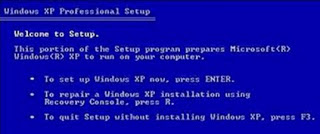
Choose windows that are installed by pressing the "1" (If the windows are installed only one) then press enter.
If prompted to enter your administrator password, enter the administrator password and press enter (If no password just press enter).
Copy ntldr and ntdetect.com files from the CD to your windows system by giving command like this:
COPY F: i386 NTLDR C:
COPY F: i386 NTDETECT.COM C:
note: F the sentence above is the name of the cdrom drive in the computer.
Each computer can vary. If you are dikomputer CDROM on drive D, then the writing becomes COPY D: i386 NTLDR C:
Meanwhile, C is the directory in which the windows operating system is installed.
To exit the recovery console window, type EXIT then press enter
After all files have been copied to the file system, grab your windows cd and restart the computer. (Set back so that windows boot from the hard disk)
Corrupt boot sector / master boot record
If the cause of the boot sector or master boot record, which can be done is to fix the boot sector or master boot record by giving orders FIXBOOT or FIXMBR in recovery console windows
If prompted to enter your administrator password, enter the administrator password and press enter (If no password just press enter).
Copy ntldr and ntdetect.com files from the CD to your windows system by giving command like this:
COPY F: i386 NTLDR C:
COPY F: i386 NTDETECT.COM C:
note: F the sentence above is the name of the cdrom drive in the computer.
Each computer can vary. If you are dikomputer CDROM on drive D, then the writing becomes COPY D: i386 NTLDR C:
Meanwhile, C is the directory in which the windows operating system is installed.
To exit the recovery console window, type EXIT then press enter
After all files have been copied to the file system, grab your windows cd and restart the computer. (Set back so that windows boot from the hard disk)
Corrupt boot sector / master boot record
If the cause of the boot sector or master boot record, which can be done is to fix the boot sector or master boot record by giving orders FIXBOOT or FIXMBR in recovery console windows

Thursday, March 13, 2014
5 Steps How to Overcome Computer Virus

Step-by-steps:
1. Sign in to safe mode by pressing F8 several times until the screen appears black and white. Select the safe mode option and then press enter
2. After successfully booting the computer, clean and optimize the browser installed on your computer. Highly recommended to clear all browser are you using when browsing or downloading files or programs from the internet. Remove all download history and browsing history, including the active log, cache and cookies.
3. Close all open windows, and find my computer icon on the desktop. Right click and select properties, then recover or select the System Restore tab in the System Protection option on the left and select System restore and select or tick the checkbox "Turn off System Restore". Aims to stop the virus re-install when you restart the computer, because many viruses are copying files to the System Restore folder.
4. Close all open windows and then click "Start" and then type WinMSD (Win + R). Select the software environment and select "Startup Programs". Perform scanning or delete any unknown programs manually (found in the search engines lists of existing malware), virus program name usually starts with "HKLM ".
5. Or you can use your own powerful anti-virus
1. Sign in to safe mode by pressing F8 several times until the screen appears black and white. Select the safe mode option and then press enter
2. After successfully booting the computer, clean and optimize the browser installed on your computer. Highly recommended to clear all browser are you using when browsing or downloading files or programs from the internet. Remove all download history and browsing history, including the active log, cache and cookies.
3. Close all open windows, and find my computer icon on the desktop. Right click and select properties, then recover or select the System Restore tab in the System Protection option on the left and select System restore and select or tick the checkbox "Turn off System Restore". Aims to stop the virus re-install when you restart the computer, because many viruses are copying files to the System Restore folder.
4. Close all open windows and then click "Start" and then type WinMSD (Win + R). Select the software environment and select "Startup Programs". Perform scanning or delete any unknown programs manually (found in the search engines lists of existing malware), virus program name usually starts with "HKLM ".
5. Or you can use your own powerful anti-virus
Subscribe to:
Posts (Atom)