Showing posts with label laptops. Show all posts
Showing posts with label laptops. Show all posts
Sunday, March 16, 2014
How to Overcome NTLDR is Missing on Computers and Laptops

The Causes Missing NTLDR on computers and laptops:
1. Computer does not boot using the bootable disk.
When booting windows access device containing a bootable disk. such as the hard drive containing the Windows operating system, or removable disk bootable cd bootable. Because a bootable disk is not accessible, it could result windows can not boot characterized by messages like the above
2. Setting boot device in the BIOS / CMOS does not lead to hard drive.
Still dealing with the above numbers, resetting the BIOS boot settings / CMOS computer with firstboot setting device on the hard drive that contained the operating system windowsnya
3. There is a problem with the usb keyboard
4. IDE or SATA hard drive cable is not appropriate or loose.
Check the cable Sata or IDE, if it is loose remove and then reinstall the correct and proper, or replace the cord
Check the cable Sata or IDE, if it is loose remove and then reinstall the correct and proper, or replace the cord
5. NTLDR and NTDETECT.COM files or corrupt.
This is the most frequent cause of terjadi.Untuk restore ntldr file or ndetect.com corrupted or lost, can be done by using the recovery console. To get into the recovery console, do the following:
a) Set the BIOS / CMOS settings to boot using the CDROM
b) Insert the Windows XP CD into the CDROM.
c) When the command "press any key to boot from the CD", press any key on the keyboard (any key)
d) After the Windows XP setup menu press the "R" on the keyboard to choose to repair a Windows XP installation using Recovery Console.
This is the most frequent cause of terjadi.Untuk restore ntldr file or ndetect.com corrupted or lost, can be done by using the recovery console. To get into the recovery console, do the following:
a) Set the BIOS / CMOS settings to boot using the CDROM
b) Insert the Windows XP CD into the CDROM.
c) When the command "press any key to boot from the CD", press any key on the keyboard (any key)
d) After the Windows XP setup menu press the "R" on the keyboard to choose to repair a Windows XP installation using Recovery Console.
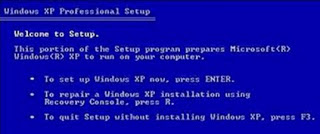
Choose windows that are installed by pressing the "1" (If the windows are installed only one) then press enter.
If prompted to enter your administrator password, enter the administrator password and press enter (If no password just press enter).
Copy ntldr and ntdetect.com files from the CD to your windows system by giving command like this:
COPY F: i386 NTLDR C:
COPY F: i386 NTDETECT.COM C:
note: F the sentence above is the name of the cdrom drive in the computer.
Each computer can vary. If you are dikomputer CDROM on drive D, then the writing becomes COPY D: i386 NTLDR C:
Meanwhile, C is the directory in which the windows operating system is installed.
To exit the recovery console window, type EXIT then press enter
After all files have been copied to the file system, grab your windows cd and restart the computer. (Set back so that windows boot from the hard disk)
Corrupt boot sector / master boot record
If the cause of the boot sector or master boot record, which can be done is to fix the boot sector or master boot record by giving orders FIXBOOT or FIXMBR in recovery console windows
If prompted to enter your administrator password, enter the administrator password and press enter (If no password just press enter).
Copy ntldr and ntdetect.com files from the CD to your windows system by giving command like this:
COPY F: i386 NTLDR C:
COPY F: i386 NTDETECT.COM C:
note: F the sentence above is the name of the cdrom drive in the computer.
Each computer can vary. If you are dikomputer CDROM on drive D, then the writing becomes COPY D: i386 NTLDR C:
Meanwhile, C is the directory in which the windows operating system is installed.
To exit the recovery console window, type EXIT then press enter
After all files have been copied to the file system, grab your windows cd and restart the computer. (Set back so that windows boot from the hard disk)
Corrupt boot sector / master boot record
If the cause of the boot sector or master boot record, which can be done is to fix the boot sector or master boot record by giving orders FIXBOOT or FIXMBR in recovery console windows

Sunday, February 2, 2014
Best Laptops From Samsung Under Rs30000 With Price And Specification 2013
Nowadays you do not need to spend lot of money in buy a laptop with decent configuratiions.
As there are lot of options available in the market from various big brands.
Samsung has already established its reputation in the league of smartphones and now its is try its hands on laptop by bringing such good laptops at a reasonable price with decent configurations.

So here is a list of best samsung laptops with their price and specifications
1. Samsung NP300E5V-A02IN Laptop
Price - Rs.29,000
Key Specifications - 3rd Gen Ci3/ 2GB/ 500GB/ DOS
2. Samsung NP300E5C-A0CIN Laptop
Price - Rs.28,000
3. Samsung NP300E5X-A0BIN Laptop
Price - Rs.25,500
4. Samsung NP355E5C-A01IN Laptop
Price - Rs.23,900
5. Samsung NP355E5X-A01IN Laptop
Price - Rs.21,000
Click here to see latest dual seem mobiles of Samsung
Most of these laptops (except first one) have same design like alphanumeric keyboard same number of ports, same LCD screen and hardware design.
Subscribe to:
Posts (Atom)