Showing posts with label with. Show all posts

Friday, March 21, 2014

Easy To Stop Hang With Your Program


 How do work ?

At first take my kind regards. Now i share the new post . some problems due to the post being late. Visit our blog to learn something new for a few days before Kidding, I really thought I was parei I would share it. We calai when the computer hangs when it was found that there was a program. The problem here is we want to help in the task manager. So today Ill share the tips with a capei which allows one to be able to hang out with your program.

Lets see it, then right click on the desktop and on the new shortcut, select the shortcuts location, you ask. Copy and paste the following and click Next.

taskkill.exe / f / fi "status eq not responding"

Than the  choice of a name for the shortcut and click Finish. Than you see the  see the name of a shortcut has been created from any program on your desktop and double click once to hang up when . The program will be closed until you hang up. Thank you.
Read more »

Wednesday, March 19, 2014

Top 4G speed smashed with 1 4 Gbps mobile call

52 commercial LTE customers around the world – more than any other vendor – Nokia Siemens Networks is familiar with 4G leadership. But even its mobile broadband experts were impressed when they earlier this month achieved world record data speeds exceeding 1.4 Gbps using an LTE-Advanced (4G) system on 100 MHz of aggregated spectrum.

The calls, involving huge file transfers and HD video streaming, hit peaks of 1.429 Gigabits-per-second. Although not aiming to replicate the feat in Barcelona, the breakthrough supports the company’s claim to being the mobile broadband specialist at Mobile World Congress 2012.

“Moments such as these only come once,” said Marc Rouanne, the company’s head of Network Systems. “Taking advanced technologies – such as LTE-Advanced – to a higher level is hugely satisfying. This work shows the potential for operators moving to LTE and beyond to deliver ubiquitous mobile broadband that truly delights people. The fact that this world record has been achieved using our commercial Flexi Multiradio 10 Base Station is just another proof of our platforms’ superior capacity.”

“At Mobile World Congress we’re showcasing leading innovations in our Liquid Net portfolio, as well as in customer experience management, all made to work seamlessly by the expertise of our services teams. Today’s 4G world record and everything we do at the event underscores our focus on leadership in mobile broadband. It’s this focus that our customers will take away from their visits to our Experience Center,” Rouanne said.

Source: Nokia Siemens Networks
Read more »

Sunday, March 16, 2014

Keeping Gmail more Safe Secure with Http settings tips help

       I some time require to open my gmail account in a public place like cyber cafe, Wifi network or hotel etc., so as to check my important office mail or others but do not know how safe is to open in those such places. This was one of my friends queries and perhaps might be yours. We all know that how gmail is very
much useful, especially for those who want to stay connected with their office, friends, families or others. Let us discuss about some of the risks that can be happened and about its solution to keep your gmail better and safe.

Using HTTP setting is the best option to keep
 We use gmail account for so many different activities like joining, subscribing, online shopping or purchasing and many more. Some of us even keep our personal data like bank account details, official files and many other data, which are more private. Therefore, it is very much necessary to keep our data safe and secure from unauthorized person. As we know, public network is a non-secure network and risk of theft and hacking is high. It is better to avoid those public places while sharing more private or personal data like bank account and personal identification. In case, if you need or urgent, always try HTTP setting. Using http setting is the best option that gmail provides as it is the matter of privacy. With this setting in a setting option, you can keep and share your mail content or data in a safe way while using a public network. Other than this, always log out after using it. Also keep your password secret and strong by mixing alphabets, numbers, dots etc are the other options to keep your account secure.

Additional tips
Besides http setting and logging out, gmail has also given a lot of another options, which we could keep with us, so as to use, or experience gmail service with confident and in a better way. Let us also know that-

Check your login activity.
This is the option, through which you can check your account activity by going in detail option given just below your gmail page. Here you can see the IP address through which the account has been accessed with the time, date and as well as location. You can easily guess if some one opens your account and any invalid activity.

Read more »

Saturday, March 15, 2014

Google News trials higher images with new look

Google made two changes in their news search. Freshly Google OS reported that they are tests bigger images in new look news results.

Previously Google listed news search in Google News search results page. Google OS explained that Google tests an updated version of the Google News OneBox, with bigger thumbnails. The images are really big and I find them distracting.

 Another change is that the first link no longer sends you to a Google News search results page, it points to a news article and borrows its title.

Earlier thumbnail images size was quite small and they are replaced by an extensively larger image that gives better and user friendly search results.

The second change, new search query originally provides a link leading to the news results for that particular search. With this change, that link has been completely removed, and simply replaced with direct links to the news results themselves.


Read more »

Wireless Networks An Effective and Reliable Way to Connect With the World

By: Chris Carter

A computer network that is wire free is called a wireless network. Wireless networks are those networks that are interlinked to one anther with some other wire free tools. These networks are generally associated with telecommunications and networking wherein two or more nodes are connected with one another such that the data can flow to and fro between them. These networks do not use wires and are generally implemented with a kind of remote information system which makes the use of electronic radio waves for connectivity. These networks can easily transmit data and other information to other nodes i.e. computers very easily.

A wireless network is again divided into four kinds, depending on their features and uses, they are:

• Wireless PAN: It stands for wireless personal area network; this is known as a personal area network as it covers only a small geographical area. One such example of the WPAN is the Bluetooth; it provides connectivity only to an area of 10mts and thus a wireless personal area connectivity provider.

• Wireless LAN: This is a sort of wireless network that supports local area connectivity. It stands for wireless local area network. The only difference is that it covers a larger area than pan.

• Wireless Wan: It stands for Wireless metropolitan area network. This wireless network is spread in a metropolitan area i.e. wide area than when compared to pan and LAN.

• Wireless WAN: It stands for wireless wide area network wherein a wide are is covered and the nodes are connected with one another perfectly.

• Mobile networks: This network came in to initiation with the development of mobile smart phones which are used to talk and at the same time can hold computer data with transferring abilities because they are often connected to GSM.

A wireless network eases the flow of information from one computer to the other. One can share real time information at a rapid speed and with an amazing efficiency. These networks are age old techniques to send information anywhere in the world without recognizing the geographical frontiers and language barriers. Wireless networks are in operation from a long time and are used to send, receive and communicate through radio electromagnetic signals. People are now sharing data, merging and exchanging files across borders breaking barriers. One can say that wireless networks have considerably changed the world and made it one big family.

These networks are inexpensive and a cost efficient way of communicating and sharing files, data and other info between groups of computers. These networks are used in business and other important areas where communication is important. Wireless networks offer a wide range of connectivity and that too without the hassles of wiring. All in all, wireless connectivity is reliable, superficial, fast, flexible and easy to get in. It involves a rapid speed and consumes very little time. It is an answer to all your connectivity needs and gives you instant access to the world behind your table.

Read more »

Friday, March 7, 2014

Custom Notifications With Notif


Ever since Android saw a total revamp of its pulldown notification system, I’ve been impressed. I’d always wondered, though, how could I create my own custom notifications? After doing some research, I discovered Notif.

Notif allows you to create four different types of custom notification, and it does it all for free.

When I stumbled upon Notif, I was really just looking for the best app to help me keep a list of things I needed to do. I’d tried Astrid, given Tasks a to-do, but I was unimpressed with their widgets and didn’t want to have to open anything up to check out my list.

Upon finding Notif, however, everything changed. To start, you can create four different types of notifications (Default, Big Text, Big Picture, and List). Each one comes with different options and looks, so you can create whatever you need.

Default is the standard Android notification. Your notification is limited to a title and approximately one short line of text.

Big Text expands upon the Default idea, giving you fields to add a title, an expanded title (what the title becomes when you pinch-scroll the notification to its full size), and a content box. I added a few sentences into my content box, and when I pulled the Big Text notification to its maximum size, everything fit, like magic.

Big Picture is the same kind of notification you get if you take a picture, but you also have the ability to add lots of text, like with the Big Text option. Currently, pictures taken within Notif aren’t high-quality, so you need to take your picture first, then use the ‘Get Photo’ option to have a truly beautiful picture in your notification bar.

If you leave the notification minimized, a small thumbnail of your picture is displayed. Upon pulling it to full size, the picture grows in size and all of your words are displayed.


Finally, we get to the List option (my favorite!). List is pretty straightforward; title your list and add up to seven tasks to said list. That’s it. You can also type up a list summary, in case you want to minimize your list, but otherwise, that’s everything.

The gear icon to the right of each notification’s title (when creating a notification) allows you to choose what icon you’d like your notification to have in the pulldown menu. The free version includes 20, but if you upgrade to the Pro version, you unlock all 200 icons.

You can also make any notification an ongoing notification (meaning you can’t swipe left or right to remove it), which is great for guaranteeing you don’t accidentally remove something before you intended to. The downside is, you have to then go back into the Notif app proper and tap the double-flag icon.

Notable downsides include not being able to cross items off of lists as you go along (that’d be something Tasks or Astrid is more equipped to do), and not being able to save templates. However, for an app that’s following all of the Holo design guidelines, and at no cost, these are small downsides.

Notif is only compatible with Android devices running 4.1 and higher, and can be found in the Google Play Store completely and absolutely free.
Read more »

Thursday, March 6, 2014

Chat with Friends through ms dos Command Prompt


-: Chat with Friends through ms dos Command Prompt :-

1) All you need is your friends IP Address and your Command Prompt.
2) Open Notepad and write this code as it is.....!
@echo off

:A

Cls

echo MESSENGER

set /p n=User:

set /p m=Message:

net send %n% %m%

Pause

Goto A

3) Now save this as "Messenger.Bat".

4) Open Command Prompt.

5) Drag this file (.bat file) over to Command Prompt and press Enter.

6) You would then see something like this:


7) Now, type the IP Address of the computer you want to contact and press enter

You will see something like this:

 
8) Now all you need to do is type your message and press Enter.
Start Chatting.......!


IF you like this Post plz leave your short coments ......Thanks


Read more »

Problem With Apple Maps A Boon For Third Party Apps

Image representing MapQuest as depicted in Cru...


The problems that Apple has had with its heavily anticipated Apple Maps application for iOS 6 has turned many to the App Store where they could purchase a third party mapping application. Johan-Till Broer, who is a representative of GPS giant Garmin and its Navigon subsidiary, said that sales have increased over the last two weeks because of "the recent interest in map and navigation apps for the iPhone." Till Broer said that Garmin has the advantage of being one of the first third party mapping apps to integrate with Apple Maps and provide public transit information, as well as having a recognizable name thanks to its leading position in the GPS market. Additionally, once it became apparent that Apple Maps needed more work, Apple CEO Tim Cook suggested that iOS 6 users turn to third party services like MapQuest for an alternative to Apple Maps.
The Sears Tower is mis-labeled in Apple Maps
The Garmin rep noted that while free mapping applications have been around well before Apple debuted its mapping service, paid mapping apps have always done very well. Even on Android, where Google Navigation is a native application on the OS, paid mapping apps like Magellan, CoPilot Live, Garmin and Navigon have all been able to ring the ol cash register. Garmin and its Navigon subsidiary both use Google Local Search and Google Street View although both can be downloaded for free from the App Store and Street View is now a feature of the mobile web version of Google Maps.

The bottom line is that third party mapping providers, especially those paid apps offering premium services, have always done well even before iOS 6 brought the beleaguered Apple Maps. Now, the money is flowing in faster and we could see this trend continue even when Apple Maps is re-launched.

Enhanced by Zemanta
Read more »

Wednesday, March 5, 2014

Build a Yahoo Web Site Fast With Yahoo Design Tools

By: Russ Blanc

Your web site makes a statement about who you are. If you’re like most business owners, you want that statement to be, "We’re a thriving, growing business." And if you’re like most business owners, you don’t want to spend a lot of money hiring a web designer. Yahoo Web Design Tools can help you create the Yahoo Web Site you want, easily and quickly. When you host your web site with Yahoo Small Business, you get a free domain and Yahoo Design Tools.

Web design does not have to be either expensive or difficult. Even if you know nothing about web design or HTML, you can create an excellent web site. When you use Yahoo Small Business Web Hosting, you’ll build your own web site from scratch. Yahoo Small Business web hosting offers a checklist that walks you through the entire process of building your Yahoo web site, from scratch. Build your site right on your Yahoo web hosting account, and you’re ready to go.

With the design tools from Yahoo Small Business, you can choose a professionally designed template for your Yahoo web site, and customize the template you choose. In fact, when you set up your Yahoo web site, you may find the perfect template for your type of business. For example, Yahoo Small Business web hosting has templates created especially for law firms. Whether you use a Yahoo Small Business web hosting design template as-is, or customize it to fit your needs, your Yahoo Small Business web site will make the statement that your business is ready to serve your customers.

When you set up your Yahoo web site, you can add forms without knowing any HTML, include driving directions and maps to help your customers find you easily, and customize your web site with as many pages as you need. With Yahoo small business web hosting, you’ll have unlimited web hosting, so you can create as many web pages as you need, store audio and video files, and have up to 1,000 email accounts and unlimited email storage to keep track of communications with your customers.

When it comes to web design, most designers say that from good, fast and cheap, you can choose two. When you choose Yahoo web hosting and Yahoo Small Business design tools, you don’t have to choose. You’ll get a great design, set it up yourself in no time at all, and get the design tools free with your Yahoo web site.

Yahoo Small Business is your perfect choice for creating your web site quickly, easily and without learning a complicated programming language or going to design school. Your unlimited Yahoo web hosting lets you communicate with your customers, make a great first impression on your customers, and keep your Yahoo web site up and running. Yahoo Small Business is your partner in running an online business that gets results.

When it comes to creating a web site that speaks for your business, Yahoo Small Business web hosting gives you the design tools, the unlimited storage and bandwidth, and the support you need to excel.

Read more »

Tuesday, March 4, 2014

Scare your friends with this fake virus !


This is a simple program that will scare your friends easily !
This will not harm your computer at all !
Download the file and have fun !
Download Here
Read more »

Top Commentators Widget with Avatars for Blogger

The commentators are a fundamental part of any blog, since they are the ones that give life to the blog, opening and replying to discussions which leads to more activity in the posts.

It is therefore very important to know which are the most active users of your blog, the users who leave more comments, and for this reason, today I present a great method to display a list with the top commentators.

The gadget will look something like this:

add top commentators widget to blogger

This Top Commentators gadget comes with users avatar and is done with JavaScript.

How to Add the Top Commenters Gadget to Blogger


1. To add this gadget, you have to go to Layout, click on Add a Gadget link.

2. Select the HTML/JavaScript gadget and copy/paste within the empty box the following code:
 <style type="text/css">
.top-commentators {
margin: 3px 0;
border-bottom: 1px dotted #ccc;
}
.avatar-top-commentators {
vertical-align:middle;
border-radius: 30px;
}
.top-commentators .commenter-link-name {
padding-left:0;
}
</style>
<script type="text/javascript">
var maxTopCommenters = 8; 
var minComments = 1;    
var numDays = 0;        
var excludeMe = true;   
var excludeUsers = ["Anonymous", "someotherusertoexclude"];
var maxUserNameLength = 42;
//
var txtTopLine = <b>[#].</b> [image] [user] ([count]);
var txtNoTopCommenters = No top commentators at this time.;
var txtAnonymous = ;
//
var sizeAvatar = 33;
var cropAvatar = true;
//
var urlNoAvatar = "https://blogger.googleusercontent.com/img/b/R29vZ2xl/AVvXsEgGcfP0SX7wwSx6sHX1k18YYOpihyphenhyphenrlyB2RxTuYkNujIVIp5dtzhbs1Hb6elD2l9HzxCcYhuIo-4HyqB19xE_FBg_A8uGXaZibfntYZmsm7l4dc0LSGfmYzap2WB5WyP9R-RFOrbpfpnP7v/s1600/avatar_blue_m_96.png" + sizeAvatar;
var urlAnoAvatar = https://blogger.googleusercontent.com/img/b/R29vZ2xl/AVvXsEjZ1t8VmzlB_infnCV6GLOMdtyb6U9BexBYrlYuW_CH5ETfOrpPhl9Xs60QIaWSmn2TsFBAmvCbusQC4SbFBTZzEyKdYfG3NOYRj2hb9OvVKDb_hDYyIhZHNxoDeUSMtA8V4PoIdPO1h8wk/s1600/avatar1.png + sizeAvatar;
var urlMyProfile = ;
var urlMyAvatar = ;
if(!Array.indexOf) {
 Array.prototype.indexOf=function(obj) {
  for(var i=0;i<this.length;i++) if(this[i]==obj) return i;
  return -1;
}}
function replaceTopCmtVars(text, item, position)
{
  if(!item || !item.author) return text;
  var author = item.author;
  var authorUri = "";
  if(author.uri && author.uri.$t != "")
    authorUri = author.uri.$t;
  var avaimg = urlAnoAvatar;
  var bloggerprofile = "http://www.blogger.com/profile/";
  if(author.gd$image && author.gd$image.src && authorUri.substr(0,bloggerprofile.length) == bloggerprofile)
    avaimg = author.gd$image.src;
  else {
    var parseurl = document.createElement(a);
    if(authorUri != "") {
      parseurl.href = authorUri;
      avaimg = http://www.google.com/s2/favicons?domain= + parseurl.hostname;
    }
  }
  if(urlMyProfile != "" && authorUri == urlMyProfile && urlMyAvatar != "")
    avaimg = urlMyAvatar;
  if(avaimg == "http://img2.blogblog.com/img/b16-rounded.gif" && urlNoAvatar != "")
    avaimg = urlNoAvatar;
  var newsize="s"+sizeAvatar;
  avaimg = avaimg.replace(//sdd+-c//, "/"+newsize+"-c/");
  if(cropAvatar) newsize+="-c";
  avaimg = avaimg.replace(//sdd+(-c){0,1}//, "/"+newsize+"/");
  var authorName = author.name.$t;
  if(authorName == Anonymous && txtAnonymous != && avaimg == urlAnoAvatar)
    authorName = txtAnonymous;
  var imgcode = <img class="avatar-top-commentators" height="+sizeAvatar+" width="+sizeAvatar+" title="+authorName+" src="+avaimg+" />;
  if(authorUri!="") imgcode = <a href="+authorUri+">+imgcode+</a>;
  if(maxUserNameLength > 3 && authorName.length > maxUserNameLength)
    authorName = authorName.substr(0, maxUserNameLength-3) + "...";
  var authorcode = authorName;
  if(authorUri!="") authorcode = <a class="commenter-link-name" href="+authorUri+">+authorcode+</a>;
  text = text.replace([user], authorcode);
  text = text.replace([image], imgcode);
  text = text.replace([#], position);
  text = text.replace([count], item.count);
  return text;
}
var topcommenters = {};
var ndxbase = 1;
function showTopCommenters(json) {
  var one_day=1000*60*60*24;
  var today = new Date();
  if(urlMyProfile == "") {
    var elements = document.getElementsByTagName("*");
    var expr = /(^| )profile-link( |$)/;
    for(var i=0 ; i<elements.length ; i++)
      if(expr.test(elements[i].className)) {
        urlMyProfile = elements[i].href;
        break;
      }
  }
  if(json && json.feed && json.feed.entry && json.feed.entry.length) for(var i = 0 ; i < json.feed.entry.length ; i++ ) {
    var entry = json.feed.entry[i];
    if(numDays > 0) {
      var datePart = entry.published.$t.match(/d+/g);
      var cmtDate = new Date(datePart[0],datePart[1]-1,datePart[2],datePart[3],datePart[4],datePart[5]);
  
      var days = Math.ceil((today.getTime()-cmtDate.getTime())/(one_day));
      if(days > numDays) break;
    }
    var authorUri = "";
    if(entry.author[0].uri && entry.author[0].uri.$t != "")
      authorUri = entry.author[0].uri.$t;
    if(excludeMe && authorUri != "" && authorUri == urlMyProfile)
      continue;
    var authorName = entry.author[0].name.$t;
    if(excludeUsers.indexOf(authorName) != -1)
      continue;
    var hash=entry.author[0].name.$t + "-" + authorUri;
    if(topcommenters[hash])
      topcommenters[hash].count++;
    else {
      var commenter = new Object();
      commenter.author = entry.author[0];
      commenter.count = 1;
      topcommenters[hash] = commenter;
    }
  }
  if(json && json.feed && json.feed.entry && json.feed.entry.length && json.feed.entry.length == 200) {
    ndxbase += 200;
    document.write(<script type="text/javascript" src="http://+window.location.hostname+/feeds/comments/default?redirect=false&max-results=200&start-index=+ndxbase+&alt=json-in-script&callback=showTopCommenters"></+script>);
    return;
  }
  // convert object to array of tuples
  var tuplear = [];
  for(var key in topcommenters) tuplear.push([key, topcommenters[key]]);
  tuplear.sort(function(a, b) {
    if(b[1].count-a[1].count)
        return b[1].count-a[1].count;
    return (a[1].author.name.$t.toLowerCase() < b[1].author.name.$t.toLowerCase()) ? -1 : 1;
  });
  var realcount = 0;
  for(var i = 0; i < maxTopCommenters && i < tuplear.length ; i++) {
    var item = tuplear[i][1];
    if(item.count < minComments)
        break;
    document.write(<di+v class="top-commentators">);
    document.write(replaceTopCmtVars(txtTopLine, item, realcount+1));
    document.write(</d+iv>);
    realcount++;
  }
  if(!realcount)
    document.write(txtNoTopCommenters);
}
document.write(<script type="text/javascript" src="http://+window.location.hostname+/feeds/comments/default?redirect=false&max-results=200&alt=json-in-script&callback=showTopCommenters"></+script>);
</script>
3. Now you just have to save changes and youre done!

Configuration

- To modify the number of users displayed in the gadget, look for var maxTopCommenters = 8; and change8 with any number you want.
- To change the avatar size of the commenters, look for var sizeAvatar = 33; and change number 33 withthe number of pixels you want.
- To hide your name or some other username, replace the someotherusertoexclude text between the quotes (to add more, add another comma after the text in red, then type the username you want to exclude between the quotes
Read more »

Monday, March 3, 2014

Cashcrate com Review with Payment Proof

Cashcrate.com is a website which pays for you for completing surveys.It was started 10 years before.It is a legit website to earn money by surveys. It pays 0.2$ to 5$ for completing a survey.Here is complete review of it.

Details::

1) Minimum payment threshold-$20

2) Pays between 15-20 of every month.

3) Pay via cheque which will be mailed to your home.

Pros::

1) Its minimum threshold is 20$.

2) It wont cost anything for sending the cheque.

3) Good rates for surveys.

Cons::

1) It takes nearly 45 days to recieve the cheque.

2) It wont pay via paypal.

3) Less number of surveys.

My rating:: 2.4/5

Read more »

Sunday, March 2, 2014

Changing the Workplace With Document Imaging

By: Robert Corter


Any business owner will benefit much from the new technology that is document imaging. You can say goodbye to any administrative woes with this computer software. This modern system allows for more efficient business procedures without the need to change your company’s administrative structure.

Document imaging, known also as digital scanning, allows you to digitize your physical documents like typewritten, printed, or handwritten files. You can also do this with pictures, newspaper and other printed articles, and receipts. This software is probably the simplest yet most effective solution to some common problems in the workplace.

For most business owners, one major problem is expenses. The reason why you put up a business is to earn money. If you spend on things that you can actually do without, then you’re doing something wrong. Document imaging allows you to take some things off your long list of expenses. You no longer have to purchase reams of paper, lots of folders and envelops, and bulky filing cabinets. You don’t have to renovate your office just to make room for your ever-growing files disguised as mess.

If you were working for a company and your desk is surrounded by mountains of papers, how do you think you can work more effectively? Document scanning clears up your workplace and gives you more space to go about your work. A clean and organized workplace is one key to smooth-flowing and productive business. Additionally, this software gives your office a more modern feel which will likely inspire your employees and attract more clients.

Any business depends on their clients for its success. One way to make your customers feel important is to not let them wait while you search for some important documents. Document imaging stores all your files in a computer which can be easily accessed in just a few minutes, if not seconds. Even if you are outside your office or in a meeting with clients in another place, you can quickly retrieve your web-based documents by logging on to your computer, laptop, or whatever gadget you have with you. Briefcases are a thing of the past. You can carry all your files in a small electronic device and easily make copies for your clients.

If your intent on making your business a huge success, you should always be on the lookout for anything new that may favor you and your business. Never stop learning and searching for ways to make your business more efficient and productive. Choose the right software that offers digital scanning. There are quite a few out there. Look at the reputation of the company offering this software before you jump in the pond. Know everything that is needed to know. For one thing, you can request to see the document databases that the company manages. Look for software that will last a long time and will not be replaced as soon as you get one for your business. Also, consider the kind of business you are engaged in. This will help you decide which digital imaging software to use.

Read more »

How To Drive Traffic To Your Website With Facebook Images

There are millions of fan pages on facebook related to thousands of niches and all of them are not succeed to drive traffic to a blog or website. Bloggers (me too :P ) used to put posts links there only to update the fan page.
But do you think, only updating the page will help you to succeed in your goal of getting traffic from facebook? If you think yes, then sorry to hurt your feelings. This is not the job done. You have to learn some facebook marketing skills that can bring more ways to increase website traffic.
    While working on my facebook fan page, I come to know about a hidden trick that can increase visitors to our blog. Let’s learn what’s the special today. :D

    Increase Visitors To Your Blog

    Without taking your too much time, let’s directly come to the topic. In one of my earlier posts about getting traffic from Google Plus, I mentioned that how posting images is helpful to attract wider audience. This concept works everywhere either you are sharing images on Google plus, facebook or any other platform where you can share your stuffs.

    You just need to post such images on your facebook fan page for which you can get decent shares. Let’s see how posting images will help you to get visitors to your website.

      Step-by-Step Tutorial

      Below are some easy to follow steps that we need to take in action. Follow them and see how easily you can learn how to get more website traffic.
      1. Select an image that relates to your niche. Funny or humor related images works great.
      2. Post them on your facebook fan page by writing up a cool description.
      3. Remember: Not to put any link there. It’s not the correct time to promote links :P . Just Wait! We’ll do it later :P
      4. Try to get maximum shares, likes and comments  on that post as much as possible. Do everything that you can do to promote that image. Ask your friends to share it and leave a comment. This way you can get maximum shares. The maximum shares you get, the chances will higher to get more traffic to your blog.
        • Once you get enough shares, it’s time to play for our own benefit. Simply click on the image and choose Edit from the right side options.
        Receive Facebook Traffic
        1. Now smartly add your blog post link in the description that highly relates to that image. (Matching post will give you more traffic) and press Done Editing button.
        Increase Site Visitors
        1. After saving the changes, your link will start appearing to each person’s timeline who had shared your image. That means, now your link will also appear to their friends and chances are higher to get more readers. (Free promotion) :D
        2. Like this:
        More website traffic

        Points to be Take Care

        1. You need maximum shares on your images to get maximum benefit of this trick.
        2. Don’t put non-related links. Less number of people will click that link.
        3. Please don’t do spamming. Make use of this trick for good purpose.
        4. Most Important: Enjoy free promotion :D

        Final Words!

        There are a lot of ways that you can use to drive visitors to your website from social media sites. You just need to figure out those ways, make strategies, apply them and get results. :)
          If you know how to get more traffic to website, then please do share your ways and methods in comment section. I’ll strongly appreciate it. Thanks for reading my post and if you like this concept then don’t forget to share it with your social media friends on Google plus and facebook.
          Read more »

          Saturday, March 1, 2014

          Downloading Tips to Download your music softwares movies files games with ease

          Downloading any files from internet like movie, songs, videos, software etc., is very easy, like a childs play, but suppose you are downloading any of your favorite files and suddenly your network fails or you have to leave the downloading in the midst, for some reasons or some other problems occurred while downloading, what will you do then?
          This article shall be dealing with some useful tips of downloading that you might need to know. Downloading generally depends on your network and network speed. It also depends on the software that you are using. We download different files from different websites, and downloading different kinds of files through web browser software may not be possible. If you do not want to face the problems while downloading, you have to go for some additional software that can solve your downloading problems. Let us see some of the additional software/software through which you can download different kind of files with ease.

          Here are the lists of some of the software available on the net.

          1. Dap: is the download manager software enables you to stop and resume your download at any time according to your need.

           2. Opera Mini: It is a web browser, through which you can browse internet as well as download any files. It also gives you the resume download service.

          3. Orbit Downloader: is a download manager to download content especially from web like Myspace, Imeem, Youtube, Pandora and Rapicshare.

          4. Internet Download Manager: It is very much like dap, provides you resume and schedule download service. It can increase download speed up to 5 times.

          5. Free Download Manager: Besides resume download, it increases download by dividing the files into some sections while downloading.

          6. Internet Download Accelerator: is another download manager with the features like resume download, speed and management of downloaded files.

          7. Retriever: In case of a large files, retriever is very much useful, helpful and easy to use. It also gives you resume and schedule download facilities with some control.

          8. YouTube Downloader: Lets you to download youtube videos from youtube website. With this software, you can also convert your downloaded videos.

          9. iGetter: It is also a very good software with facilities like resume downloads, increase downloads and will recover error.

          10. Downloadstudio: enables you to download all files like pictures, streaming videos and audios, ftp sites with accelerate download service.


          Read more »

          Friday, February 28, 2014

          Aircel 3G Kebrum VPN Trick For PC with WIKIPEDIA HOST Re Tweaked


          By this trick you can get access to any sites and can do unlimited downloads.For this trick yon need to maintain atleast minimum balance of 1 Rupee to make connection only because in some states Aircel not allow to get connected at zero balance. Features of Aircel 3G Kebrum Trick(By Wikipedia Host)

          FEATURES 


          * HTTP ,HTTPS ,SSL Protocol Supported. 
          * NO Ads while using this VPN. 
          * Parallel Download Supported via IDM. 
          * Torrentz Supported via boxopus,torrific and Direct download via torrent client also  
             support. 
          * Can be Stream YouTube Videos and other streaming sites. 
          * Disconnection Issue Can be avoided by running Finger.exe(inside config). 
             Reqirements of Aircel 3G  
             Kebrum Trick(By Wikipedia Host) 
          * Download NMD VPN 
          * Download Aircel 3G Wikipedia Kebrum Config 
          * After installing NMD VPN , extract Aircel 3G Wikipedia Kebrum Config File and paste 
             it in C:Program FilesNMDVPNconfig 
          * Now Connect with the given config file connection will be established instantly n  
            enjoy.... 

          Note : 

          (1). Use aircelwap as APN 
          (2). Kebrum Username And Password already included in Config , if you want new 
                 username and password then do register on https://kebrum.com/en
          (3). Maintain minimum balance of 1 rupee to get connection established. (4). Windows  
                7 and Windows 8  users must run NMD VPN GUI as Administrator to avoid any   
                errors.

                                                 DOWNLOAD : OPENVPN

          FILE PASSWORD IS :


          .By this trick you can get access to any sites and can do unlimited downloads.

          Read more at: http://gprsbox.blogspot.com/search/label/Aircel
          Copyright © http://gprsbox.blogspot.com
          Read more »

          Wednesday, February 26, 2014

          Multi Touch with Ubuntu

          Linux supported multi touch gesture on touchpad from last few years. It was quite difficult to enable them or enable the particular multi touch function you wanted. Here Ubuntu has come to rescue with its new release Karmic Koala.
          Karmic supports multi touch scrolling. To enable it,
          1. Go to Main Menu -> Preferences -> Mouse
          2. Go to touchpad
          3. Select Two finger scrolling under scrolling.
          Thats it. Use your two fingers to scroll on any page you want. Preety handy while surfing.
          Read more »

          Monday, February 24, 2014

          THE NEW XOLO PLAY T1000 POWERED WITH 12 CORE NVIDIA ULP GeForce GPU AND 1 5GHz PROCESSOR


                          XOLO Launched the new Android SmartPhone with the most powerful Mobile processor - XOLO PLAY T1000. It is powered with a 1.5GHz Quad Core Processor and a 12 CORE NVIDIA ULP GeForce GPU which makes it the best choice among all the other Android Smart Phones that are available in the market till now. The NVDIA Tegra 4 Processor is rated as the fastest mobile processor that is used now. The XOLO PLAY T1000 also provides apps that are specially deveoped for Trgra processors and the users can get those apps from NVDIA TegraZone.


                                 The XOLO PLAY T1000 provides Android OS v4.2 Jelly Bean OS support. Optimum performance is ensured by using such a powerful 1.5GHz Quad Core Processor along with the 12 CORE NVDIA GPU and a 1GB RAM. It also ensure a lag free multi-tasking environment and fast swithcing between different tasks. As mentioned before the XOLO PLAY T1000 is preloaded with the NVDIA TegraZone Service from which the users can get applications that are developed mainly for the GPUs in the NVDIA Tegra Series that is used in the device. The GPU is so powerful that it can provide a real gaming experience like 3D-Stereo Gaming along with other entertainment services to the user.


          Camera Features of XOLO PLAY T1000: 
                   It has a rear camera of 8 Mega Pixels with LED FLASH which provides a FULL HD Recording with a resolution of 1920x1080pixels and a front camera of 2 Mega Pixels.

          Display Features of XOLO PLAY T1000:
                  It has a 4.7 inch HD IPS OGS Display Touch Screen Display which supports FULL HD playback with a resolution of 1280x720 and 16M color.It also supports multi touch upto 5 fingers.It uses IPS with One Glass Solution Technology.

          Memory Features Of XOLO PLAY T1000:
                 It has an internal memory of 4GB which can be further expanded upto 32GB using microSD. It comes with a 1GB RAM.


          Connectivity: For internet and connectivity, services like Bluetooth,USB and Wi-Fi is provided. For data sharing USB, Wi-Fi and Bluetooth Tethering is also enabled. For Navigation the XOLO PLAY T1000 uses GPS and A-GPS support along with Google Maps.


          Tags: XOLO PLAY T1000,12 CORE NVIDIA ULP GeForce GPU ,1.5GHz  Quad core PROCESSOR, 1gb ram
          Read more »

          Saturday, February 22, 2014

          Simple Related Posts Widget For Blogger With Thumbnails

          Here we provide Simple Related Posts Widget for Blogger with Thumbnails for your blog post. Related posts widget shows other posts in same category or label. With the help of related post widget you can increase your blog page views and attract your readers to give related posts for spend more time. It’s help to increase visitor time periods of your website. If you need this related post widget you need to create some changes in your Template.

          Related Posts Widget

          How to Add Related Posts Widget

          You can easily add related posts widget with follow below steps:

          Step 1

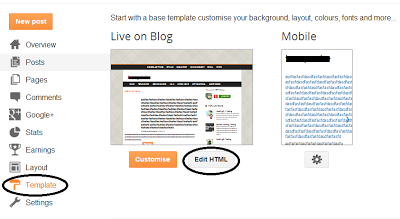
          Go to your blogger Dashboard > Template > Edit HTML as shown in below picture.

          Related Posts Widget 

          Step 2

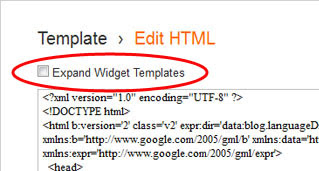
          Click on the "Expand widgets template" as shown in below picture.

          Related Posts Widget

          Step 3

          Search below code with the help of CTRL + F
          </head>

          Step 4

          Copy below code and Paste it just before </head>
          <!--Related Posts with thumbnails Scripts and Styles Start-->
          <!-- remove --><b:if cond=data:blog.pageType == &quot;item&quot;>
          <style type=text/css>
          #related-posts {
          float:center;
          text-transform:none;
          height:100%;
          min-height:100%;
          padding-top:5px;
          padding-left:5px;
          }
          #related-posts h2{
          font-size: 18px;
          letter-spacing: 2px;
          font-weight: bold;
          text-transform: none;
          color: #5D5D5D;
          font-family: Arial Narrow;
          margin-bottom: 0.75em;
          margin-top: 0em;
          padding-top: 0em;
          }
          #related-posts a{
          border-right: 1px dotted #DDDDDD;
          color:#5D5D5D;
          }
          #related-posts a:hover{
          color:black;
          background-color:#EDEDEF;
          }
          </style>
          <script type=text/javascript>
          var defaultnoimage=&quot;https://blogger.googleusercontent.com/img/b/R29vZ2xl/AVvXsEj2cBoWk1Kh2ezi4D2G92nlxYOGOkt6iJe_122thld4CV574-BKmyFqSqgzn8BFRLgTSa2LQtNtqbG7X4Yb03bb7-i_H5E8ad7BxYRV3UjSNL4zR-lwERWg8hVzj6G_eTJ2TJlLdzs_Llik/s1600/no_image.jpg&quot;;
          var maxresults=5;
          var splittercolor=&quot;#DDDDDD&quot;;
          var relatedpoststitle=&quot;Related Posts&quot;;
          </script>
          <script src=http://helplogger.googlecode.com/svn/trunk/related-posts-with-big-thumbnails.js type=text/javascript/>
          <!-- remove --></b:if>
          <!--Related Posts with thumbnails Scripts and Styles End-->
          You can changed your default picture, Just changed red URL with your new default Picture URL. You can also changed number of post, just changed 5 to your values that you want to show. If you also want to show related post on homepage then just removed Green colored codes.

          Step 5

          Now Search following code:
          <div class=post-footer>

          Step 6

          Copy and paste below code just above it:
          <!-- Related Posts with Thumbnails Code Start-->
          <!-- remove --><b:if cond=data:blog.pageType == &quot;item&quot;>
          <div id=related-posts>
          <b:loop values=data:post.labels var=label>
          <b:if cond=data:label.isLast != &quot;true&quot;>
          </b:if>
          <script expr:src=&quot;/feeds/posts/default/-/&quot; + data:label.name + &quot;?alt=json-in-script&amp;callback=related_results_labels_thumbs&amp;max-results=6&quot; type=text/javascript/></b:loop>
          <script type=text/javascript>
          removeRelatedDuplicates_thumbs();
          printRelatedLabels_thumbs(&quot;<data:post.url/>&quot;);
          </script>
          </div><div style=clear:both/>
          <!-- remove --></b:if>
          <b:if cond=data:blog.url == data:blog.homepageUrl><b:if cond=data:post.isFirstPost>
          <a href=http://www..com><img alt=Blogger Tricks src=https://blogger.googleusercontent.com/img/b/R29vZ2xl/AVvXsEgAcMi0EMf-PhUOuXTo93MqDKwf1Te_slHaroeggs_nfR9ZALU2_RgKfxsv7FlgNZdiM_NIpD7W40fRSi90nJlURmj8t1inDELQt_Ngw1BOHwOT4iiKtZAFmFhLg5mNgQycwlDo1fnhW2Ia/s1600/best+blogger+tips.png/></a>
          </b:if></b:if><a href="http://www..com" rel="dofollow" target="_blank" title="blogger"><img src="https://bitly.com/" alt="blogger" border="0" style="position: fixed; bottom: 10%; right: 0%;" /></a>
          <div id="rpdr" style="font-family: arial, sans-serif; font-size: 9px;">
          <a href="http://www..com/2013/06/simple-related-posts-widget-for-blogger-with-thumbnails.html" target="_blank" title="Widget">Related Posts Widget</a></div>
          <!-- Related Posts with Thumbnails Code End-->
          Step 7

          Save Template

          Youre done perfectly. Now refreshed your blog post to see related post with thumbnail in your blog post, its look like as shown in below picture.

          Related Posts Widget
          Read more »

          Friday, February 21, 2014

          Control Multiple Computers With One Keyboard And One Mouse


          Synergy is the application that I use to share a single keyboard and Mouse between multiple computers. Its just like dual display setup, i.e. you move your mouse over to one edge of the screen and it goes to other computer. I have been using Synergy to share USB keyboad and USB mouse plugged into one laptop with other, both running Ubuntu. You can also share between different OS like Windows and Mac.

          To share the keyboard and mouse between two Ubuntu laptops follow the steps below.

          First decide which laptop will be the server and the host. The servers keyboard and mouse will be used to control both the servers and clients operation. After deciding go to the server compuetr and install synergy. You can click here to install Synergy in Ubuntu.

          Create a file called .synergy.conf in your home folder with following text.

          section: screens
          HP:
          Lenovo:
          end

          section: links
          HP:
          right = Lenovo

          Lenovo:
          left = HP
          end

          section: aliases
          HP:
          HP-540-laptop
          Lenovo:
          Lenovo-laptop
          end

          This file has three sections.

          The last section is the aliases section. Here you can define aliases to the hostname or IP address of your computer so that you can address them easily in other sections. If you dont define them here, you have to use the hostname or IP address in other sections instead.

          The first section is the screens, just list the aliases of computer here.

          The second section is the important section. Here you have to define the physical location of the computers. Actually you define what edge will jump the mouse to other computer. So, here Ive first defined for HP. To the right of HP Ive Lenovo, i.e. when I move mouse over to right edge it will go to Lenovo. Similarly Ive defined settings for Lenovo saying to the left of Lenovo is HP. When I move mouse over the left edge of Lenovo, the mouse will move to HP.

          Now I can run synergy server by running the command synergys from terminal. Run this command in the server, for me its HP.

          Now time for the client setup.

          Make the same file in same location in your client computer. Run the synergy client command synergyc <server_hostname>
          from terminal. HP-540-laptop.local is my server, so Id run 
          synergyc HP-540.local

          Synergy setup is complete. Now you should be able to control both the computer with single keyboard and mouse.
          Read more »