Showing posts with label program. Show all posts
Showing posts with label program. Show all posts
Friday, March 21, 2014
Easy To Stop Hang With Your Program
How do work ?
At first take my kind regards. Now i share the new post . some problems due to the post being late. Visit our blog to learn something new for a few days before Kidding, I really thought I was parei I would share it. We calai when the computer hangs when it was found that there was a program. The problem here is we want to help in the task manager. So today Ill share the tips with a capei which allows one to be able to hang out with your program.
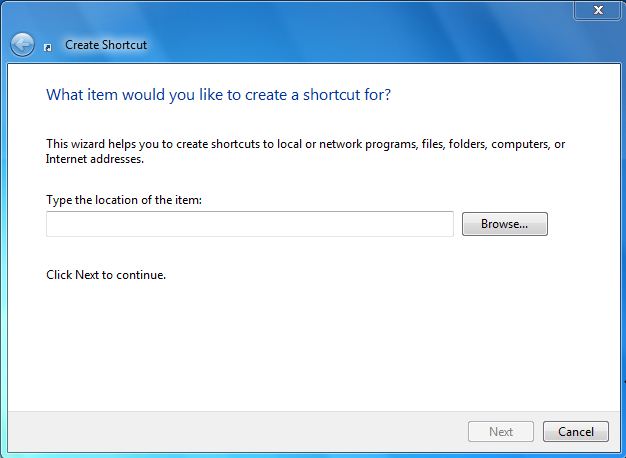
Lets see it, then right click on the desktop and on the new shortcut, select the shortcuts location, you ask. Copy and paste the following and click Next.
taskkill.exe / f / fi "status eq not responding"

Saturday, February 8, 2014
Upside down cam fix for Flash and other program
First read this http://.blogspot.com/2010/02/upside-down-web-cam-simple-fix.html
If you have same problem but in other program like Flash and so, then the fix is same. Just run the executable of the desire program instead of Skype.
For eg. if you have problem with upside down cam in flash and you are using some browser(lets say Google Chrome) to video chat then:
Read more »
If you have same problem but in other program like Flash and so, then the fix is same. Just run the executable of the desire program instead of Skype.
For eg. if you have problem with upside down cam in flash and you are using some browser(lets say Google Chrome) to video chat then:
- Close the browser.
- Run in terminal:
LD_PRELOAD=/usr/lib32/libv4l/v4l1compat.so google-chrome
- or if it is 32 bit system
LD_PRELOAD=/usr/lib/libv4l/v4l1compat.so google-chrome
Wednesday, January 22, 2014
Enable Tray Icon For All Program In Natty Narwhal
You wont see tray icons for application that doesnt use app indicator.
To enable tray icons in Ubuntu 11.04 Natty Narwhal you can run the following command in terminal:
gsettings set com.canonical.Unity.Panel systray-whitelist " [ all ] "
It will white list all the application for tray icon.
If you want to enable tray icon in only some of the application you can use:
gsettings set com.canonical.Unity.Panel systray-whitelist "[Wine, Dropbox]"
Here it will enable tray icon for Wine and Dropbox.
Subscribe to:
Posts (Atom)