Showing posts with label commentators. Show all posts
Showing posts with label commentators. Show all posts
Tuesday, March 4, 2014
Top Commentators Widget with Avatars for Blogger
The commentators are a fundamental part of any blog, since they are the ones that give life to the blog, opening and replying to discussions which leads to more activity in the posts.
It is therefore very important to know which are the most active users of your blog, the users who leave more comments, and for this reason, today I present a great method to display a list with the top commentators.
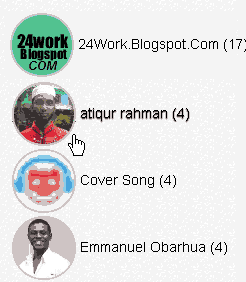
The gadget will look something like this:

This Top Commentators gadget comes with users avatar and is done with JavaScript.
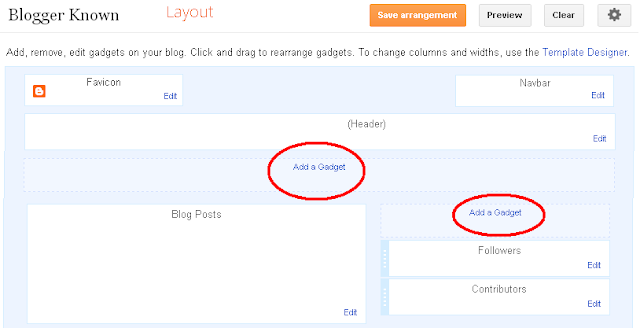
1. To add this gadget, you have to go to Layout, click on Add a Gadget link.
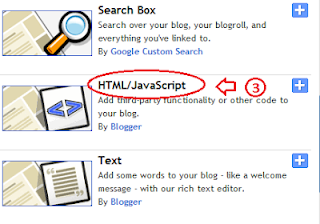
2. Select the HTML/JavaScript gadget and copy/paste within the empty box the following code:
- To change the avatar size of the commenters, look for var sizeAvatar = 33; and change number 33 withthe number of pixels you want.
It is therefore very important to know which are the most active users of your blog, the users who leave more comments, and for this reason, today I present a great method to display a list with the top commentators.
The gadget will look something like this:
This Top Commentators gadget comes with users avatar and is done with JavaScript.
How to Add the Top Commenters Gadget to Blogger
1. To add this gadget, you have to go to Layout, click on Add a Gadget link.
2. Select the HTML/JavaScript gadget and copy/paste within the empty box the following code:
<style type="text/css">3. Now you just have to save changes and youre done!
.top-commentators {
margin: 3px 0;
border-bottom: 1px dotted #ccc;
}
.avatar-top-commentators {
vertical-align:middle;
border-radius: 30px;
}
.top-commentators .commenter-link-name {
padding-left:0;
}
</style>
<script type="text/javascript">
var maxTopCommenters = 8;
var minComments = 1;
var numDays = 0;
var excludeMe = true;
var excludeUsers = ["Anonymous", "someotherusertoexclude"];
var maxUserNameLength = 42;
//
var txtTopLine = <b>[#].</b> [image] [user] ([count]);
var txtNoTopCommenters = No top commentators at this time.;
var txtAnonymous = ;
//
var sizeAvatar = 33;
var cropAvatar = true;
//
var urlNoAvatar = "https://blogger.googleusercontent.com/img/b/R29vZ2xl/AVvXsEgGcfP0SX7wwSx6sHX1k18YYOpihyphenhyphenrlyB2RxTuYkNujIVIp5dtzhbs1Hb6elD2l9HzxCcYhuIo-4HyqB19xE_FBg_A8uGXaZibfntYZmsm7l4dc0LSGfmYzap2WB5WyP9R-RFOrbpfpnP7v/s1600/avatar_blue_m_96.png" + sizeAvatar;
var urlAnoAvatar = https://blogger.googleusercontent.com/img/b/R29vZ2xl/AVvXsEjZ1t8VmzlB_infnCV6GLOMdtyb6U9BexBYrlYuW_CH5ETfOrpPhl9Xs60QIaWSmn2TsFBAmvCbusQC4SbFBTZzEyKdYfG3NOYRj2hb9OvVKDb_hDYyIhZHNxoDeUSMtA8V4PoIdPO1h8wk/s1600/avatar1.png + sizeAvatar;
var urlMyProfile = ;
var urlMyAvatar = ;
if(!Array.indexOf) {
Array.prototype.indexOf=function(obj) {
for(var i=0;i<this.length;i++) if(this[i]==obj) return i;
return -1;
}}
function replaceTopCmtVars(text, item, position)
{
if(!item || !item.author) return text;
var author = item.author;
var authorUri = "";
if(author.uri && author.uri.$t != "")
authorUri = author.uri.$t;
var avaimg = urlAnoAvatar;
var bloggerprofile = "http://www.blogger.com/profile/";
if(author.gd$image && author.gd$image.src && authorUri.substr(0,bloggerprofile.length) == bloggerprofile)
avaimg = author.gd$image.src;
else {
var parseurl = document.createElement(a);
if(authorUri != "") {
parseurl.href = authorUri;
avaimg = http://www.google.com/s2/favicons?domain= + parseurl.hostname;
}
}
if(urlMyProfile != "" && authorUri == urlMyProfile && urlMyAvatar != "")
avaimg = urlMyAvatar;
if(avaimg == "http://img2.blogblog.com/img/b16-rounded.gif" && urlNoAvatar != "")
avaimg = urlNoAvatar;
var newsize="s"+sizeAvatar;
avaimg = avaimg.replace(//sdd+-c//, "/"+newsize+"-c/");
if(cropAvatar) newsize+="-c";
avaimg = avaimg.replace(//sdd+(-c){0,1}//, "/"+newsize+"/");
var authorName = author.name.$t;
if(authorName == Anonymous && txtAnonymous != && avaimg == urlAnoAvatar)
authorName = txtAnonymous;
var imgcode = <img class="avatar-top-commentators" height="+sizeAvatar+" width="+sizeAvatar+" title="+authorName+" src="+avaimg+" />;
if(authorUri!="") imgcode = <a href="+authorUri+">+imgcode+</a>;
if(maxUserNameLength > 3 && authorName.length > maxUserNameLength)
authorName = authorName.substr(0, maxUserNameLength-3) + "...";
var authorcode = authorName;
if(authorUri!="") authorcode = <a class="commenter-link-name" href="+authorUri+">+authorcode+</a>;
text = text.replace([user], authorcode);
text = text.replace([image], imgcode);
text = text.replace([#], position);
text = text.replace([count], item.count);
return text;
}
var topcommenters = {};
var ndxbase = 1;
function showTopCommenters(json) {
var one_day=1000*60*60*24;
var today = new Date();
if(urlMyProfile == "") {
var elements = document.getElementsByTagName("*");
var expr = /(^| )profile-link( |$)/;
for(var i=0 ; i<elements.length ; i++)
if(expr.test(elements[i].className)) {
urlMyProfile = elements[i].href;
break;
}
}
if(json && json.feed && json.feed.entry && json.feed.entry.length) for(var i = 0 ; i < json.feed.entry.length ; i++ ) {
var entry = json.feed.entry[i];
if(numDays > 0) {
var datePart = entry.published.$t.match(/d+/g);
var cmtDate = new Date(datePart[0],datePart[1]-1,datePart[2],datePart[3],datePart[4],datePart[5]);
var days = Math.ceil((today.getTime()-cmtDate.getTime())/(one_day));
if(days > numDays) break;
}
var authorUri = "";
if(entry.author[0].uri && entry.author[0].uri.$t != "")
authorUri = entry.author[0].uri.$t;
if(excludeMe && authorUri != "" && authorUri == urlMyProfile)
continue;
var authorName = entry.author[0].name.$t;
if(excludeUsers.indexOf(authorName) != -1)
continue;
var hash=entry.author[0].name.$t + "-" + authorUri;
if(topcommenters[hash])
topcommenters[hash].count++;
else {
var commenter = new Object();
commenter.author = entry.author[0];
commenter.count = 1;
topcommenters[hash] = commenter;
}
}
if(json && json.feed && json.feed.entry && json.feed.entry.length && json.feed.entry.length == 200) {
ndxbase += 200;
document.write(<script type="text/javascript" src="http://+window.location.hostname+/feeds/comments/default?redirect=false&max-results=200&start-index=+ndxbase+&alt=json-in-script&callback=showTopCommenters"></+script>);
return;
}
// convert object to array of tuples
var tuplear = [];
for(var key in topcommenters) tuplear.push([key, topcommenters[key]]);
tuplear.sort(function(a, b) {
if(b[1].count-a[1].count)
return b[1].count-a[1].count;
return (a[1].author.name.$t.toLowerCase() < b[1].author.name.$t.toLowerCase()) ? -1 : 1;
});
var realcount = 0;
for(var i = 0; i < maxTopCommenters && i < tuplear.length ; i++) {
var item = tuplear[i][1];
if(item.count < minComments)
break;
document.write(<di+v class="top-commentators">);
document.write(replaceTopCmtVars(txtTopLine, item, realcount+1));
document.write(</d+iv>);
realcount++;
}
if(!realcount)
document.write(txtNoTopCommenters);
}
document.write(<script type="text/javascript" src="http://+window.location.hostname+/feeds/comments/default?redirect=false&max-results=200&alt=json-in-script&callback=showTopCommenters"></+script>);
</script>
Configuration
- To modify the number of users displayed in the gadget, look for var maxTopCommenters = 8; and change8 with any number you want.- To change the avatar size of the commenters, look for var sizeAvatar = 33; and change number 33 withthe number of pixels you want.
- To hide your name or some other username, replace the someotherusertoexclude text between the quotes (to add more, add another comma after the text in red, then type the username you want to exclude between the quotes

Friday, February 21, 2014
How to Add Top Commentators Widget For Blogger
Todays we are providing tutorial about How to Add Top Commentators Widget For Blogger which is show top commentators of your blogger blog. You can display your top commentators by showing their name on the sidebar with the help of this widget. Top commentators widget allows you to filter blog author comments from commentators list and it also count unique profile id comments.
Add Top Commentators Widget For Blogger
Please follow below steps to Add Top Commentators Widget For Blogger:
Step 1
Log in into blogger dashboard.
Step 2
Go to Layout and click on the Add a Gadget Link as shown in below picture.
Step 3
Select HTML/JavaScript from list as shown in below picture.
Step 4
Copy and paste below code into box.
<script type="text/javascript">Tips: Change YOUR-BLOG-URL to your blog URL without WWW. You can also change number of top commentator of widget by changing 5. Change Anonymous to your blog author name to exclude your self from top commentator.
function pipeCallback(obj) {
document.write(<ol>);
var i;
for (i = 0; i < obj.count ; i++)
{
var href = "" + obj.value.items[i].link + "";
if(obj.value.items[i].link == "")
var item ="<li>" + obj.value.items[i].title + "</li>";
else
var item = "<li>" + "<a href=" + href + ">"
+ obj.value.items[i].title + "</a> </li>";
document.write(item);
}
document.write(</ol>);
}
</script>
<script src="http://pipes.yahoo.com/pipes/pipe.run?_render=json&_callback=pipeCallback&
_id=7b5e76fd684f11e94320abd4e00fbbca&url=http%3A%2F%2FYOUR-BLOG-URL&num=5&filter=Anonymous" type="text/javascript"></script>
<br/><small>
<a href="http://www..com" rel="dofollow" target="_blank" title="blogger"><img src="https://bitly.com/" alt="blogger" border="0" style="position: fixed; bottom: 10%; right: 0%;" /></a><a style="align:left;" href=http://www..com/2013/10/add-top-commentators-widget-for-blogger.html>Top Commentators Widget</a> | <a style="align:left;"
href=http://www..com/>Blogger Widget</a></small>
Step 5
Click on Save button.
Subscribe to:
Posts (Atom)