Showing posts with label comments. Show all posts
Showing posts with label comments. Show all posts
Saturday, March 15, 2014
How to get free facebook likes followers and comments
In this post I will tell you how to get real facebook followers and like.We will not use any like bot or anything else.This is very simple trick.
1.Visit this site http://Like-Ex.com/?ref=38581.
2.Make your account on this site.
3.Add your facebook page or your profile to this site.
4.As you will follow or like the posts of othr members you will get the coins.
5.You can use these coins for your page or profile.
6.As the other members see your profile or your page they will like it.
In this way it works.
1.Visit this site http://Like-Ex.com/?ref=38581.
2.Make your account on this site.
3.Add your facebook page or your profile to this site.
4.As you will follow or like the posts of othr members you will get the coins.
5.You can use these coins for your page or profile.
6.As the other members see your profile or your page they will like it.
In this way it works.

Tuesday, February 18, 2014
How to remove comments and blank lines from file
So often you need to remove comments and blank lines form configuration files.
You can do it in a very easy single step.
#grep -v ^$ file.conf | grep -v ^#
What it does is grep ^$ from your file. You must be saying I dont have any such character in my file. Actually those characters have their own meaning.
^ begging of the line
$ end of the line
So searching for ^$ means you are searching a blank line.
The -v option invert your search.
So #grep -v ^$ matches all the lines except the blank lines.
Again the pipe | sends those match to another grep command which matches any line begging with #. Then -v option again inverts the match giving you all the lines except comment and blank lines.
If you want the output in a file rather than screen then redirect it,
#grep -v ^$ file.conf | grep -v ^# > newfile
For more of the input/output and error redirection visit http://.blogspot.com/2008/06/devnull-2.html
Read more »
You can do it in a very easy single step.
#grep -v ^$ file.conf | grep -v ^#
What it does is grep ^$ from your file. You must be saying I dont have any such character in my file. Actually those characters have their own meaning.
^ begging of the line
$ end of the line
So searching for ^$ means you are searching a blank line.
The -v option invert your search.
So #grep -v ^$ matches all the lines except the blank lines.
Again the pipe | sends those match to another grep command which matches any line begging with #. Then -v option again inverts the match giving you all the lines except comment and blank lines.
If you want the output in a file rather than screen then redirect it,
#grep -v ^$ file.conf | grep -v ^# > newfile
For more of the input/output and error redirection visit http://.blogspot.com/2008/06/devnull-2.html
Saturday, January 11, 2014
How To Remove Blogger Threaded Comments
Most of Blogger want to remove threaded commenting system on their blog and search How To Remove Blogger Threaded Comments. Blogger Threaded commenting system allows a blog post reader to reply other blog post comments. If you dont need this on your blog then you can removed easily with us.

Youre done perfectly. Now refreshed your blog and see that you have successfully Removed Blogger Threaded Comments.
Remove Blogger Threaded Comments
If you want to remove threaded comments from your blogger blog then follow below steps:Step 1
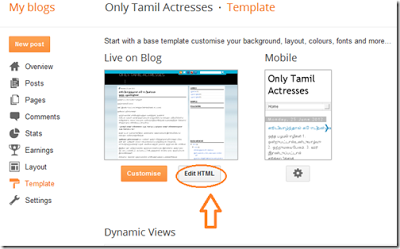
Go to Blogger Dashboard then Template > Edit HTML as shown in below picture.Step 2
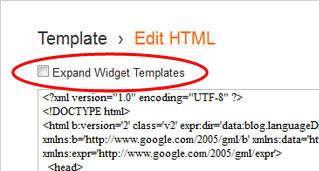
Select "Expand Widget Templates" as shown in below picture.Step 3
Now Search below code with the help of CTRL + F:<b:if cond=data:post.showThreadedComments>
<b:include data=post name=threaded_comments/>
<b:else/>
<b:include data=post name=comments/>
</b:if>
</b:if>
<b:if cond=data:blog.pageType == "item">
<b:if cond=data:post.showThreadedComments>
<b:include data=post name=threaded_comments/>
<b:else/>
<b:include data=post name=comments/>
</b:if>
</b:if>
Step 4
Now Remove it an replace following code:<b:include data=post name=comments/>
</b:if>
<b:if cond=data:blog.pageType == "item">
<b:include data=post name=comments/>
</b:if>
Step 5
Save TemplateYoure done perfectly. Now refreshed your blog and see that you have successfully Removed Blogger Threaded Comments.
Subscribe to:
Posts (Atom)