Saturday, January 11, 2014
How To Remove Blogger Threaded Comments
Most of Blogger want to remove threaded commenting system on their blog and search How To Remove Blogger Threaded Comments. Blogger Threaded commenting system allows a blog post reader to reply other blog post comments. If you dont need this on your blog then you can removed easily with us.

Youre done perfectly. Now refreshed your blog and see that you have successfully Removed Blogger Threaded Comments.
Remove Blogger Threaded Comments
If you want to remove threaded comments from your blogger blog then follow below steps:Step 1
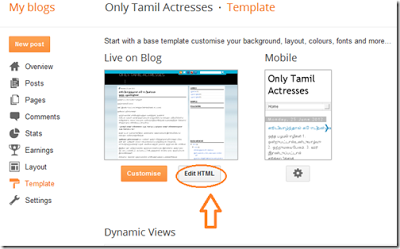
Go to Blogger Dashboard then Template > Edit HTML as shown in below picture.Step 2
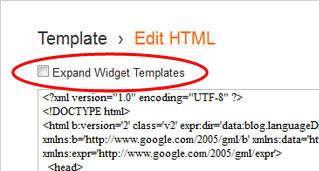
Select "Expand Widget Templates" as shown in below picture.Step 3
Now Search below code with the help of CTRL + F:<b:if cond=data:post.showThreadedComments>
<b:include data=post name=threaded_comments/>
<b:else/>
<b:include data=post name=comments/>
</b:if>
</b:if>
<b:if cond=data:blog.pageType == "item">
<b:if cond=data:post.showThreadedComments>
<b:include data=post name=threaded_comments/>
<b:else/>
<b:include data=post name=comments/>
</b:if>
</b:if>
Step 4
Now Remove it an replace following code:<b:include data=post name=comments/>
</b:if>
<b:if cond=data:blog.pageType == "item">
<b:include data=post name=comments/>
</b:if>
Step 5
Save TemplateYoure done perfectly. Now refreshed your blog and see that you have successfully Removed Blogger Threaded Comments.
alternative link download

Subscribe to:
Post Comments (Atom)
No comments:
Post a Comment
Note: Only a member of this blog may post a comment.