Showing posts with label threaded. Show all posts
Showing posts with label threaded. Show all posts
Thursday, February 27, 2014
Threaded Commenting In Blogger No More Disqus Needed
Blogger has rolled out threaded commenting. That means well no longer need third party system like Disqus. Though it doesnt have all the feature of services like Disqus, having ability to reply to comments serves the ultimate purpose.

To get this make sure that you have following setting in blogger:
- Settings
- Posts and Comments
- "Embedded" in "Comment Location" drop down
- Settings
- Other
- "Full" in "Allow Blog Feed" drop down.
Happy Blogging.

Saturday, January 11, 2014
How To Remove Blogger Threaded Comments
Most of Blogger want to remove threaded commenting system on their blog and search How To Remove Blogger Threaded Comments. Blogger Threaded commenting system allows a blog post reader to reply other blog post comments. If you dont need this on your blog then you can removed easily with us.

Youre done perfectly. Now refreshed your blog and see that you have successfully Removed Blogger Threaded Comments.
Remove Blogger Threaded Comments
If you want to remove threaded comments from your blogger blog then follow below steps:Step 1
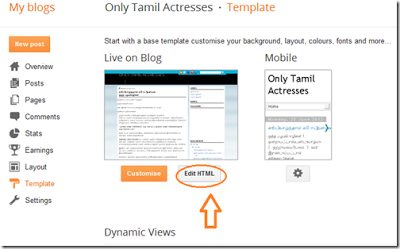
Go to Blogger Dashboard then Template > Edit HTML as shown in below picture.Step 2
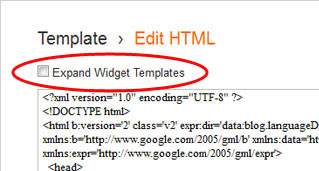
Select "Expand Widget Templates" as shown in below picture.Step 3
Now Search below code with the help of CTRL + F:<b:if cond=data:post.showThreadedComments>
<b:include data=post name=threaded_comments/>
<b:else/>
<b:include data=post name=comments/>
</b:if>
</b:if>
<b:if cond=data:blog.pageType == "item">
<b:if cond=data:post.showThreadedComments>
<b:include data=post name=threaded_comments/>
<b:else/>
<b:include data=post name=comments/>
</b:if>
</b:if>
Step 4
Now Remove it an replace following code:<b:include data=post name=comments/>
</b:if>
<b:if cond=data:blog.pageType == "item">
<b:include data=post name=comments/>
</b:if>
Step 5
Save TemplateYoure done perfectly. Now refreshed your blog and see that you have successfully Removed Blogger Threaded Comments.
Subscribe to:
Posts (Atom)