Showing posts with label without. Show all posts
Showing posts with label without. Show all posts
Sunday, March 16, 2014
HANG MOST COMPUTERS WITHOUT ANY KNOWLEDGE OF CODING AND PROGRAMMING
HANG MOST COMPUTERS WITHOUT ANY KNOWLEDGE OF CODING AND PROGRAMMING
THIS IS A TRICK TO HANG MOST COMPUTERS WITHOUT ANY KNOWLEDGE OF CODING AND PROGRAMMING ( WORKS ONLY FOR PROCESSORS lower then i-7 )
open NOTEPAD and write %0|%0 and save it as
danietc.bat file and then RUN IT... :)
open NOTEPAD and write %0|%0 and save it as
danietc.bat file and then RUN IT... :)


Sunday, March 9, 2014
How to Remove New Folder Virus Without Software
Everybody know about this virus, when you click on any Folder then automatically creating another folder by same name.
When you press alt+ctrl+delete, that time no reaction in the window task manager because that time window task manager has disable due to this vius. Your window work very slowly and also Drives not open in quick time.
Today, I will solve this problem without any softwere, so see the below.
First of all Restart your PC and go to Start Menu.
Now click on Search
when Search Result Window has open then on the left side, click on All Files And Folders
now write this command in the search box
.exe
and click on on search.
When search has complete, so then you will see some folders in the search result.
That time brings your mouse pointer on these folder one by one, that time folder show file version and if the value 1.1.0.0 or 3.3.0.0 are include in the information of file version? So select all these folder and Delete all of them.
Now restart your PC. The new folder virus has been finished.
NOTE: When you will select all the folder so dont double click on any folder because the virus expand again.
When you press alt+ctrl+delete, that time no reaction in the window task manager because that time window task manager has disable due to this vius. Your window work very slowly and also Drives not open in quick time.
Today, I will solve this problem without any softwere, so see the below.
First of all Restart your PC and go to Start Menu.
Now click on Search
when Search Result Window has open then on the left side, click on All Files And Folders
now write this command in the search box
.exe
and click on on search.
When search has complete, so then you will see some folders in the search result.
That time brings your mouse pointer on these folder one by one, that time folder show file version and if the value 1.1.0.0 or 3.3.0.0 are include in the information of file version? So select all these folder and Delete all of them.
Now restart your PC. The new folder virus has been finished.
NOTE: When you will select all the folder so dont double click on any folder because the virus expand again.
How To Submit Blogger Sitemap To Bing Yahoo Without Any Errore 2013
 Optimizing blogger blog on a search engine is essential for any blog owner, the real wealth of any blog is measure in terms of a how many visitors your blog is having, In todays scenario if you are a good blogger, that is not only important but also you need to start marketing your own blog. Search engines provides us a Free directory submission on Bing, yahoo, Google,For the Purpose of making our blogger Search Engine Optimization Friendly, We must have to Submit Sitemap to search engine, We all are know that Google is the Best player in search engine submitting sitemap to Google. That is important but we must have to deal with other search engine also like Yahoo and Bing, By submitting sitemap to search engine we are indirectly informing search engine to index our new update in search engine.
Here is a tutorial for submitting sitemap to bing and yahoo this both are integrated with each other and hence you need to just add your sitemap to bing only , yahoo will automatically starts indexing your pages.
Step 1: Go To Bing.com To Submit Your Site Click Here.
Step 2: Enter Your Blog URL And Type Characters, Click on Submit Button.

Step 3: You will find New Page Like Below Screenshot Click on Sign Me UP.

Step 4: You need to create Microsoft Account to Use Bing, Create Account and sign in with that account.
Step 5: Here be carefull type your blog URL.
In field of Sitemap you are required to copy and paste
- If your blog having is Up to 500 post That use following Sitemap.
http://Your Blog URL/atom.xml?redirect=false&start-index=1&max-results=500
- If your blog having more than 500 post That use following Sitemap.
http://Your Blog URL/atom.xml?redirect=false&start-index=501&max-results=500
- If your blog having more than 1000 post That use following Sitemap.
http://Your Blog URL/atom.xml?redirect=false&start-index=1001&max-results=500
Note:
Click on "ADD" Button.

Step 6: There are Three method to verify your ownership of website, here i will go to second option, Copy selected meta tag (you will find it in following screenshot).

Step 7: Go To Blogger Dashboard > Template > Edit HTML and find <head> tag by pressing Ctrl+F. just below <head> tag paste copied meta tag which we have copied in previous Step. And than click on save template.

Step 8: Than click on Verify Button.

Congratulation your site map is now submitted to Bing and yahoo, That set.
Thursday, March 6, 2014
Use Kaspersky internet security 2012 Lifetime without license key

HOW IT WORKS JUST FOLLOW THESE 7 STEPS:-
- First of all disconnect your internet connection and Remove modem or Disconnect that Ethernet Cable. it is very necessary that to get lifetime Key of Kasper sky internet security 2012 .(copy thispost and save it to notepad)
- Delete the existing key (If You Have)
- Now Open Kaspersky 2012 product Then Click on (Either KIS or KAV) settings
- Un-check the “Enable protection” Check box
- Go Then “Options’ In the settings window itself , And uncheck Below Line
- a) “Enable Self-Defense”
- ”Disable External service control”
- Goto Start>Run>Type “regedit”>
HKEY_LOCAL_MACHINE>SOFTWARE>KasperskyLab>environment.
From Right list >> double click on “ProductStatus”
Then , in the “Value Data” Field . replace “Released” with “Beta” and click OK
- Now again Open Kaspersky 2012 product And Go settings Now Check Below these check boxes :-
- i)”Enable protection” (In “Protection” sub menu)
- ii)”Enable Self-Defense” (In “Options” sub menu)
- iii)”Disable External service control” (In “Options” sub menu)
- Click on “OK”
- Close the error message saying that “Protection is not running” .
Couse ot Error massage that, you have not installed any key and the product is not registered also
- Restart your PC !
NOTE:- You must Restart your PC Other then it will not work properly
Now , after restart , Open Your Kaspersky product .
Then click On License” (Somewhat in the middle in the bottom)
Click on “Activate new license”
then click on “Activate Beta License”
then click on “Next”
From Now You will Not Blacklist you will get 30 Days Genuine Key .Just click on Activate beta license and click on .Next . Thats it The kaspersky server will give u an new 30 days genuine key . So Enjoy!!!
Wednesday, February 26, 2014
How To Restore Your iPhone To Factory Data Reset Without Using iTunes On Computer
iPhone is the best mobile available in the market as it fulfill the needs of all people. But some time it happens that your iPhone is not working properly due to various reasons such as you might have installed to many applications or there are many unused processes running in background. Or you just want to use you phone as it is new one or there might be some other reason like you are selling it to some other person.
In these cases the best option is to do a factory data reset which will erase all settings and data including your contacts and messages on your mobile and make it as new one like you have just unboxed it.
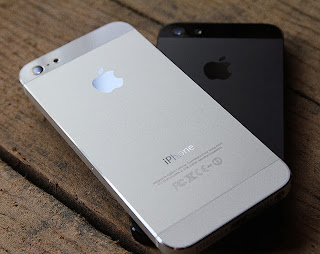
Note: Please make sure you have backup of all the information in your mobile on either on your computer or on icloud servers.
Just follow these steps to restore your iPhone to factory settings
Step 1: Tap on Settings
Step 2: Select General
Step 3: Scroll down to bottom and tap Reset
Step 4: Now click on Erase All content And Settings
Step 5: After that click on Erase iPhone
And after some further processes your iPhone will be restored to factory settings
OR View This Video
For any Suggestions or Queries comment below or contact us.
In these cases the best option is to do a factory data reset which will erase all settings and data including your contacts and messages on your mobile and make it as new one like you have just unboxed it.
Note: Please make sure you have backup of all the information in your mobile on either on your computer or on icloud servers.
Just follow these steps to restore your iPhone to factory settings
Step 1: Tap on Settings
Step 2: Select General
Step 3: Scroll down to bottom and tap Reset
Step 4: Now click on Erase All content And Settings
Step 5: After that click on Erase iPhone
And after some further processes your iPhone will be restored to factory settings
OR View This Video
For any Suggestions or Queries comment below or contact us.
Wednesday, February 19, 2014
Wearnes LitePad LP 811 tablet 3D without glasses
Although not the first time introduced but growth tabletPC that has been expanded to the three-dimensional (3D) will be the main attraction, it is recommended Wearnes, which carry the tablet 3D without glasses.
The presence of product Wearnes LitePad LP-811 course can count as a fresh breeze tabletPC increasingly competitive growth.
 For display screen, Wearnes LitePad LP-811 can be said as a general with 8 inch screen resolution of 1280 x 768 Operating System used is the Android 4.0 Ice Cream Sandwich, 1GB DDR3 memory and data storage with a 8GB Nand Flash, plus additional Micro SD Card slot up to 32GB and a mini USB 2.0 slot.
Access Wi-Fi 802.11 b / g / n, Gravity Sensor, Bluetooth, Dual Camera: VGA + 2.0 MP, Mini HDMI Port and supported by services external 3G USB Modem 3G.
Wearnes LitePad LP-811 specifications:
Read more »
The presence of product Wearnes LitePad LP-811 course can count as a fresh breeze tabletPC increasingly competitive growth.
Access Wi-Fi 802.11 b / g / n, Gravity Sensor, Bluetooth, Dual Camera: VGA + 2.0 MP, Mini HDMI Port and supported by services external 3G USB Modem 3G.
Wearnes LitePad LP-811 specifications:
- Android 4.0 Ice Cream Sandwich
- Cortex A9, 1Ghz CPU, Mali-400 GPU 128KB L2 Cache
- Screen 8 Inch 16:9, 1280X768 Resolution
- Five Point Capacitive Touch Screen
- Memory 1GB DDR3
- Storage 8GB Nand Flash
- Micro SD Card up 32GB, mini USB 2.0 slot
- Wi-Fi Access 802.11 b/g/n
- Gravity Sensor, Bluetooth
- Dual Camera: VGA + 2.0 MP
- Mini HDMI Port
- Support 3G: External 3G USB Modem
- Battery Li-ion 5000mAH
Saturday, February 8, 2014
How to Hide Private Photo And Videos Without Any Applications In Android SmartPhones 2015
This summary is not available. Please
click here to view the post.
Read more »
Subscribe to:
Posts (Atom)