Showing posts with label sitemap. Show all posts
Showing posts with label sitemap. Show all posts
Wednesday, March 12, 2014
How to add sitemap of webs com website to google webmaster tools
Hello everyone !! Here today im going to give you a simple tutorial about submitting a sitemap of your free webs website. Just follow these simple steps .
1) Go to www.xml-sitemaps.com and paste your webs website URL. After sometime , you can download the Sitemap of your website. Save the Downloaded file of your websites sitemap in your PC.
2) Now, go to Webs Dashboard
3) Click edit site and select single file uploader.
4) Locate the sitemap file in your pc and upload it.
Q::How to Submit it to Search engines??
Ans:: 1) Locate the sitemap file in the dashboard of your webs account.
2) Copy the link address and paste it in the required field in search engines.
Thats it. Thank you....!!
1) Go to www.xml-sitemaps.com and paste your webs website URL. After sometime , you can download the Sitemap of your website. Save the Downloaded file of your websites sitemap in your PC.
2) Now, go to Webs Dashboard
3) Click edit site and select single file uploader.
4) Locate the sitemap file in your pc and upload it.
Q::How to Submit it to Search engines??
Ans:: 1) Locate the sitemap file in the dashboard of your webs account.
2) Copy the link address and paste it in the required field in search engines.
Thats it. Thank you....!!

Sunday, March 9, 2014
How To Submit Blogger Sitemap To Bing Yahoo Without Any Errore 2013
 Optimizing blogger blog on a search engine is essential for any blog owner, the real wealth of any blog is measure in terms of a how many visitors your blog is having, In todays scenario if you are a good blogger, that is not only important but also you need to start marketing your own blog. Search engines provides us a Free directory submission on Bing, yahoo, Google,For the Purpose of making our blogger Search Engine Optimization Friendly, We must have to Submit Sitemap to search engine, We all are know that Google is the Best player in search engine submitting sitemap to Google. That is important but we must have to deal with other search engine also like Yahoo and Bing, By submitting sitemap to search engine we are indirectly informing search engine to index our new update in search engine.
 Here is a tutorial for submitting sitemap to bing and yahoo this both are integrated with each other and hence you need to just add your sitemap to bing only , yahoo will automatically starts indexing your pages.
Step 1: Go To Bing.com To Submit Your Site Click Here.
Step 2: Enter Your Blog URL And Type Characters, Click on Submit Button.

Step 3: You will find New Page Like Below Screenshot Click on Sign Me UP.

Step 4: You need to create Microsoft Account to Use Bing, Create Account and sign in with that account.
Step 5: Here be carefull type your blog URL.
In field of Sitemap you are required to copy and paste
- If your blog having is Up to 500 post That use following Sitemap.
http://Your Blog URL/atom.xml?redirect=false&start-index=1&max-results=500
- If your blog having more than 500 post That use following Sitemap.
http://Your Blog URL/atom.xml?redirect=false&start-index=501&max-results=500
- If your blog having more than 1000 post That use following Sitemap.
http://Your Blog URL/atom.xml?redirect=false&start-index=1001&max-results=500
Note:
Click on "ADD" Button.

Step 6: There are Three method to verify your ownership of website, here i will go to second option, Copy selected meta tag (you will find it in following screenshot).

Step 7: Go To Blogger Dashboard > Template > Edit HTML and find <head> tag by pressing Ctrl+F. just below <head> tag paste copied meta tag which we have copied in previous Step. And than click on save template.

Step 8: Than click on Verify Button.

Congratulation your site map is now submitted to Bing and yahoo, That set.
Thursday, February 6, 2014
How To Submit Your Blogger Sitemap To Google
Every blogger wants more organic traffic on their blog and need submit a site map to Google. We provide you How to Submit Your Blogger Sitemap to Google in this tutorial. If you are new blogger than need to know about Google Webmaster Tools. This is very good tool to introduced your site to Google and improve its crawling rate. This tool provided by Google itself. You just need to verify your blog ownership in Google Webmaster Tools. It’s very important to verify website and add submit a sitemap to Google. Please read our post How to Add Blogger Blog to Google Webmaster Tool to get more information on adding site in Webmaster tools. We provide how to add site map to Google in this post.

What are Sitemaps?
Sitemaps are text files which containing a list of all web pages that exist in your website. This sitemap helps search engine bots to find pages on website and this is help to index pages in Google search engine. If your blog hosted on Blogspot.com or if you are using a custom domain hosted on blogger then you need to find sitemap URL which content only 26 most recent pages of your blog. We provide solution to find all pages of your website in sitemap and submit to Google webmaster tools.
How to add Sitemap for your Blogger Blog?
We provide step by step guide to add sitemap for your blogger blog to Google Webmaster Tools.
Step 1
Go to Google Webmaster tools and add your blog. Check tutorial how to add a blog to Google for more details to add your site to webmaster Tools.
Step 2
Go to Webmaster Dashboard and click on your site
Step 3
Go to Site Configuration > Sitemaps then click on add sitemap.
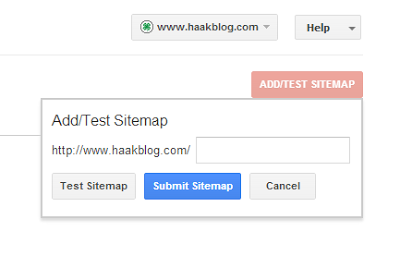
Add following codes one by one
/atom.xml?redirect=false&start-index=1&max-results=500
/atom.xml?redirect=false&start-index=501&max-results=500
/atom.xml?redirect=false&start-index=1001&max-results=500
If you have more pages than change number to next 500 pages like replace 1001 to 1501 and so on.
Demo: How To Submit Your Blogger Sitemap To Google
Subscribe to:
Posts (Atom)