Airtel, Vodafone India and Idea Cellular partnered to form an alliance to offer pan India 3G services, though none of them has pan India 3G spectrum. DoT tried to close this deal by the three telcos, but they didn’t follow the order rather questioned it.
Airtel had to move to Delhi High Court yesterday to get a stay order; the case hearing is on 18th. If Airtel can not get a relief order, it has to shut down 3G services in those 7 circles with immediate effect.
Similar orders are going to be landed on other partners of Airtel i.e. Vodafone India and Idea Cellular.
With the 3G roaming being cancelled, only operators providing high speed internet on pan India basis remain Reliance Communications (over CDMA EvDO) and Reliance Jio Infocomm (yet to launch 4G services).
Showing posts with label 7. Show all posts
Showing posts with label 7. Show all posts
Wednesday, March 19, 2014
Windows 7 Upgrade Tricks and Traps
By: John Dow
Read more »
 I was bracing for the worst based on past rollouts from Microsoft. After experiencing the pain of Vista, I was quite apprehensive about the release of Windows 7. Even though there was good press (which I dont put a lot of faith in anyway) I knew there would be some serious bumps in the road to transition.
My first 4 or 5 installs went off without a hitch. Many of my customers were upgrading old Windows XP machines that were 6 years old. The new computers with Windows 7 had fast processors, more ram, and dedicated video cards, which helped a lot. The boot and shut down times were greatly reduced and the most popular software seemed to work right out of the box.
I didnt recommend upgrades to current equipment and most people went with the advice. Life was good and customers were happy. Since all of the installs were new computers and not Vista upgrades, none of the upgrade problems were an issue. There were quite a few problems found on the Vista upgrades, especially those who downloaded the Windows 7 install. The files wouldnt unpack properly, refused the new product keys, and had some rebooting problems. Then there were the unspecified errors and directory permissions problems. But all were confined to the upgrading Vista process, many due to reformatting the hard drive before the new install.
If you are upgrading a Vista machine, dont bother to reformat the hard drive before you upgrade. It appears that this is a problem. You should do a clean install and let Windows 7 format the hard drive in the process. That method appears to have few of the issues that the clean hard drive upgrades have and you still get a new clean system.
Then it happened, I found a nasty little problem on the new computers with Windows 7. Bringing in a new Windows 7 computer into an existing network worked fine as long as you stuck with the workgroup name of workgroup. But if you had a different name (which many clients do for multiple reasons), the Windows 7 computer was seen by the others in the workgroup but couldnt connect or see any of them.
I did a little research and talked to some other techs and they were experiencing the same problem. Not good, most clients didnt want to change their workgroup name. There was a work around by making every computer also a workgroup member and the original name. But it wasnt a great solution and might come back to haunt the client and me some day.
Another big issue with Windows 7 was the way it stored files. They went to a library system, which is a common method on the Macs and Linux machines. Once you get it, its probably a better method of organizing files. But when you introduce it to the user and a bunch of older Windows XP systems it can get confusing. When you change something as basic as how you view and store files, and you have a lot of shared files, users dont always adapt quickly.
Automated backup systems have to be changed around and tracking changed files gets a little more exciting but with a little training and automation you can over come the differences. Most users are over worked these days and some arent all that willing to change. So its both an operational and an attitude you get to deal with when bringing Windows 7 computers into an existing environment.
And, dont believe what you read about the Windows XP Mode. Many older computers arent compatible with the virtual machine methods used. About one in three of the computers Ive tried to set up XP mode couldnt do it for one reason or another. New machines often have all the necessary bios settings, chip sets, and other requirements but older computer may not. When it works, its great. But dont depend on it until you have tested it on the computer you want to run it.
Most of the other issues are basic configuration changes that default on a new Windows 7 install. For example the taskbar looks and acts different and many users are complaining they cant see whats open at a glance. There is a way to change the toolbar back to what it used to be by right clicking the toolbar and selecting properties. And make any changes in appearance you want.
All in all the Windows 7 transition and open issues are no where near what the Vista debacle was and most are easy to overcome. And if you dont like a particular feature or display method, most times you can change it back to what you want it to do or look like. The speed and faster boot times are more than worth the hassle of reconstructing your desktop like you want it.

Sunday, March 16, 2014
Get ready for the 7 inch Kindle
Get ready for the 7-inch Kindle

The launch of a new Amazon Kindle Fire tablet is probably just around the corner, judging by an official-looking press render, which appeared online this weekend.
The leak, from the super-prolific @evleaks Twitter account, shows what looks to be a refreshed version of the 7-inch Amazon Kindle Fire, rather than the HD version.
The render, which does not showcase a front-facing camera on the device, was posted along with the simple message "Another upcoming Kindle," on Sunday.
Recent reports and leaks have pointed to an upcoming Kindle Fire refresh, with rumours suggesting there could be three new devices on the way before the end of the year.
Expectations
Expectations are that the devices will be launched in September or October - a year from the outing of the current generation, and in plenty of time for the Christmas rush.The HD version(s) of the device is expected to pack a Qualcomm Snapdragon 800 processor plus an Adreno 330 graphics chip. Speculation also mentions a memory bump to 2GB RAM.
Naturally, youll be the first to know when anything official goes down.
Wednesday, March 12, 2014
How To Disable Startup programs In Windows 7
 Startup programs will automatically starts whenever you start up your PC. There are many unnecessary programs which takes so much memory and you rarely use that (slowdown your pc). By disabling startup programs unnecessary your PC performance will improve much better than before. For some example of startup programs like yahoo messenger, MSN messenger, Skye, utorrent, AOL messenger and other programs
If You Need To Disable Your Unnecessary Start Up Programs To
Speedup Your pc Follow This Easy Steps
- Click on start button of you pc
- Type msconfig in the search box "For xp user type msconfig on run"
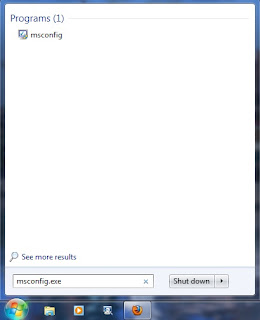
3. Click on msconfig then after opened system configuration dialog box go to startup tab
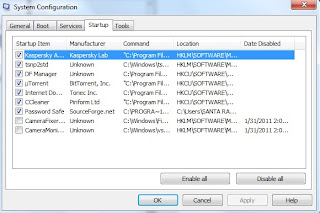
4. Unchecked unnecessary startup programs that you want to disable. If you found any program that
you are not sure then just leave it enabled for just safe.
5. Then click on apply and ok. After you disable your startup programs it wont run from you next
reboot.
Tuesday, March 11, 2014
7 Mostwanted Things About SEO you should know before starting a blog
Hello everyone !! Before starting to create a blog, you should know about some basic principles and some tools.
1) Unique Content makes all....
Before starting a blog, make sure that your blogs posts are unique(i.e never seen in a website). Choose a good niche (Making money online etc..) and post some interesting and unique content.
2) Search engine optimization..
This is what all bloggers try to make. SEO or search engine optimization means making your website visible in all the search engines (google,bing etc..). This SEO makes your blog get more traffic. More the traffic, more you can earn.
3) Google Adsense...
This is an ad network from google which places ads in your blog and with that you can earn.
4) Wordpress Blog is Better Than Blogger..
Blogger and wordpress are theblogging platforms by which you can create a blog. In wordpress, there are many seo friendly options where as even blogger has them but upto some limit.
But you have to invest some money before starting a blog in wordpress. But wordpress is best choice for the bloggers. So , spending money during start gives large benefits after,,
5) Google Pagerank..
Many bloggers dont care this but its most important tool to improvise your blog. This page rank makes your blog more searchable in search engines.
6) Be updated daily..
Update your blog daily and help the commentors who comments in your blog. Update different and unique posts..
7) Be concentrated and dont give up..
A blogger should have huge concentration can be able to run blog most succesfully . Dont give up blogging once you started.
These are tips i can give to new bloggers. Thats all for this post .Hope you like it. Thank you....
Friday, March 7, 2014
Airtel is Asked to Stop 3G Roaming Services in 7 Circles DoT Fines Rs 350cr
 Government of India has ordered country’s largest cellular player Bharti Airtel to stop providing 3G services in Kolkata, Maharastra, Uttar Pradesh East, Kerala, Madhya Pradesh, Gujarat and Haryana and slapped with Rs 350 crore penalty.
Wednesday, March 5, 2014
How to Optimize Windows 7
I will try to instruct you step-by-step, how to boost the performance of Windows 7. Providing the knowledge about some simple fixes and tweaks. In this post Ill try to show you the steps how to improve disk performance, optimize your display settings, power settings and eliminate desktop load. You will also know how to keep Windows 7 healthy by staying update.
UPDATING WINDOWS 7
I am discussing it earlier because your PC (COMPUTER) need it before tweaking the operating system Windows 7 to make PC faster. You must know the following steps in order to update your Windows 7.
- The Action Center.
- Try to locate Action center, which is on the task bar at the bottom right corner showed as flag. Click the flag and open action center. The Action center is the tool used for the system security, control tools & managing Windows 7. In the Action Center, you can check and run security settings, Windows Update, Backup feature, get problem reports, troubleshoot the non-responding hardware or software.
- You might see the warnings in the Action centre about anti virus or anti spyware has been turned off or out of their security databases are out of dated. Try to respond it as soon as possible and solve the issue aroused in it.
- Windows Update.
- It is the utility which checks & updates (Install) the Windows files & hardware drivers, bring your computer update and patches the files if necessary and keep Windows 7 improved.
- It is essential to update Windows 7 periodically. To avoid non responsiveness of the PC. Try Automatic update, It will automatically update "Important updates", "Recommended updates". There is also "Optional updates" which will not update automatically, you have to install it manually if needed.
- You can go there at Windows Update by, selecting Start > All Programs > Windows Update.
Management of Background Applications
When you open or run a program, it open window to display the contents of such program on your PC screen. Minimizing or maximizing doesnt change the behavior of memory. It appears in the task bar. On the other hand background applications runs in the PC as a background process without showing any recognized signs of its activity to the user.
A background program could be verified, if it is running, in the task manager or it might have an icon in the notification area on the right-hand side of the task bar.
The Minimising a program window does not effect on the processor and memory resources are being using less. Playing videos, music, games online, and Anti virus scans uses a lot of system resources. Try to schedule Anti virus programs scans your PC at when your not using your computer for a while and also stop Internet (WLAN/Internet router) connection. Terminating non-essential programs makes Windows 7 act more efficiently.
There are so many essential background processes of Windows 7, which you dont have to disable. It would might stop Windows 7 to run properly. Anti virus processes must also not to be stopped. So, try not to disable all the background applications or programs, you have to be very careful & clear what is safe to disable.
Heres how to check & view what programs are running in the foreground & background processes.
Start Task manager
By clicking start >type "task manager" in the search box and press enter. Task manager will run. The Applications tab show you the programs which are currently running and also they are visible in the task bar. Select the Processes tab. It will show you all the processes of the current user which are running as a program or parts of the programs. Most of them are background of Windows 7 processes and many are the utilities which run in the background like Anti virus, Network processes, Display adapters processes,etc.
Next start Msconfig by typing it in the search box at start menu. The System Configuration Utility window shows up. Go to the Start-up tab, it shows the items with their manufacturer, Command and location. Un-check the boxes next to programs list which you think are not essential to run Windows 7. If you are not sure about what happened if the item has been unchecked the do a little research about it on the net. It will surely bring some more resources to your PC but dont unchecked any item if your not well informed about it, that what would it could do to your PC start-up. If any thing went wrong, your PC wont boot normally or working properly or Windows 7 failed to boot or start then try to boot it in the safe mode by pressingF8 at the computer start up. Start Msconfig select normal start-up close the application press "Restart". Every thing will become normal again and all the items youve unchecked will run again normally.
Monday, March 3, 2014
How to Change Windows 7 logon screen
In other versions of windows you have to use some hacks of third-party tools to change the logon screen. But in win7 you can officially customize your logon screen to your wish.
Follow these steps to change your Windows 7 logon screen.
1) The image should be a .JPG and no more than 245 KB.
2) Image resolution can be your choice.
3) Now download the reg file from here and extract it to your hard drive and double-click on the file to enable this feature (Alternative method: right-click, select Merge).
4) Now navigate to C:WindowsSystem32oobe and here, create a new folder named "Info". Again, create a new folder inside the Info folder and rename it as "backgrounds".
5) Now copy your .JPG pic to this "backgrounds" folder and rename it to "backgroundDefault".
6) Thats it. Reboot your system and see the change.
The following files (sorted by width-to-height ratio) are supported in C:WindowsSystem32oobeInfoBackgrounds folder:
► backgroundDefault.jpg
► background768×1280.jpg (0.6)
► background900×1440.jpg (0.625)
► background960×1280.jpg (0.75)
► background1024×1280.jpg (0.8)
► background1280×1024.jpg (1.25)
► background1024×768.jpg (1.33-)
► background1280×960.jpg (1.33-)
► background1600×1200.jpg (1.33-)
► background1440×900.jpg (1.6)
► background1920×1200.jpg (1.6)
► background1280×768.jpg (1.66-)
► background1360×768.jpg (1.770833-)
Hope this helps you! pls pass your comments.
Sunday, March 2, 2014
CyanogenMod 7 CM7 Build 3 for Samsung Galaxy Wonder GT I8150

Whats working:
- Phone Call & Messaging
- Headset
- Camera
- Video Recording with 3rd-party-app
- Audio
- Bluetooth
- GPS
- Compass
- Wifi (Turn off make error, restart your phone to re-turn-on wifi)
- Proximity sensor
- USB mass storage
- HW accelerated video
- USB Tethering
- And more...
- FM Radio


How to Install ?
- Put the file youve downloaded to SDCard (Including GApps)
- Reboot to Clockworkmod Recovery Mod
- Install ZIP from SDCard
- Choose the CM7 firstly
- After flash this, flash GApps next
- Enjoy
- Build 3:
[1] - 90.02 MB - Build 2: [1]
MD5 Sum: 6d2a07fadb085a50774bb6c6fb7beda4 - Build 1 : [1]
MD5 Sum: 9a6e16b0afea29cd23cc619adde29942 - GApps: [1]
MD5 Sum: 1647897d8ac3efb04723d2ad2c361a3f

Saturday, March 1, 2014
Delhi HC Temporarily Stays DOT Order Against Airtel’s 3G Service In 7 Circles
Delhi High Court Temporarily stayed Department Of Telecom’s (DOT) order to Bharti Airtel asking them to stop their 3G service in 7 telecom circles. Court has also said that Airtel need not pay the penality of Rs.350 Crore asked by DOT immediately.
Airtel was providing 3G in 7 circles where they have no licence by entering in roaming agreements with Idea and Vodafone.
The court will hear the case again on May 8th. Till then Airtel can continue providing 3G in all these circles without any issues.
If final verdict is against Airtel they may have to stop their 3G service in these circles namely Kolkata, Maharastra, Kerala, Madhya Pradesh, Gujarat , Haryana and Uttar Pradesh (East).
Saturday, February 22, 2014
Windows 7 to salvage Vista train wreck

SAN FRANCISCO - Microsoft is scheduled to release Windows 7 to the world on Thursday as the US software giant tries to regain its stride after an embarrassing stumble with the previous generation operating system Vista.
"Its a big deal for Microsoft," analyst Rob Enderle of Enderle Group in Silicon Valley said of the Windows 7 launch. "Windows Vista was a train wreck."
While computer users may not give much thought to operating systems that serve as the brains of their machines, the programs are at the heart of Microsofts global software empire.
Microsoft operating systems run more than 90 percent of the computers on Earth.
Importantly for Microsoft, versions of its popular programs such as Office, Outlook and Excel evolve to work better with successive Windows releases.
Winning users of new Windows systems translates into increased sales of other packaged software for the Redmond, Washington-based company.
Vistas dismal reception in the market broke Microsofts rhythm regarding hooking people on upgraded software.
Computer users held firm to Windows XP, shunning much-maligned Vista.
"Microsoft is still a packaged software company," Enderle said. "If people dont buy their updated packages, they feel it."
Microsoft apparently learned a lesson from Vista and worked closely with computer makers, users and software developers while crafting Windows 7.
More than eight million people have dabbled with Windows 7 since Microsoft began a beta test phase in January, according to Parri Munsell, director of consumer product management for the Windows client group.
Early reviews praise Windows 7 for being everything Vista should have been.
"We always listen to our customers, but we took an even more thoughtful and pragmatic process this time around," Munsell told AFP. "We feel really good that people have been trying it for themselves."
Windows 7 features winning raves include enabling computers, television, radios, digital picture frames and other "smart" devices in homes to talk to each other.
Windows 7 also lets people use PCs to record television programmes and then watch shows "on demand" at any Internet-linked computer using Microsofts Live service.
Touch-screen capabilities built into Windows 7 should give birth to monitors that further blur lines between television sets and PCs, according to Munsell.
Microsofts primary objective with Windows 7 was to simplify the lives of PC users, according to Munsell.
"This is going to be the next XP where it sticks around for a very long time,"
said analyst Matt Rosoff of Directions On Microsoft, a private firm focused on tracking the software firm.
"It performs well with a lot of hardware and software, and then it gets out of the way. It is not flashy, but it is solid."
He added that Windows 7 works "surprisingly well" on netbooks -- low-cost bare-bones laptop computers that have devoured market share in the recent grim economic times.
Windows 7 will be available pre-loaded on personal computers as of Thursday, and people who bought Vista machines in recent months will be able to upgrade free.
Upgrading a home computer to Windows 7 will cost from 120 US dollars to 220 US dollars, depending on the version.
As well-built as Windows 7 is, it probably wont boost consumer PC purchases, which depend heavily on the economy, according to Rosoff.
A lot of corporations clinging to Windows XP are expected to upgrade to Windows 7, but after Microsofts new Office 2010 suite of business applications is released next year.
"This kind of gets Microsoft back on track with its core business," Rosoff said. "It is not going to be something that takes the world by storm, but it is a solid operating system that people will be relying on for years."
The failure of Vista to catch on hurt Microsoft competitively, giving Apple the opportunity to woo PC users to Macintosh computers.
Apple could benefit anew if PC users faced with switching operating systems go for Macintosh machines instead of Windows 7, according to analysts.
Microsoft has been faulted in the past for lacking the type of marketing pizzazz for which longtime rival Apple is famous. Microsoft has devoted an ample budget to advertising Windows 7.
Microsoft has already been lambasted for hokey online videos describing how people can throw Windows 7 launch parties in their homes.
Microsoft and television studio Fox announced that Windows 7 will be the theme of an animated "Family Guy" television show featuring "musical numbers, comedy sketches, and celebrity guests."
"The fact that Microsoft is trying new things is actually pretty unique," Enderle said. "They are going to try to show that Microsoft and innovative marketing is not an oxymoron."
http://www.channelnewsasia.com/stories/technologynews/view/1012090/1/.html
Thursday, February 20, 2014
OfficeSuite Pro 7 PDF HD v7 0 1186 APK
+fullapk4free.png)
Description
The world’s No. 1 mobile workplace today!# Installed on over 100 million devices in far more than 205 countries# More than 40,000 registrations per day
# No. 1 app in Google Play Company category
Made by MobiSystems, OfficeSuite Pro makes it possible for you to view, develop, edit, print and share Word, Excel and PowerPoint files on the go. You can also open attachments and see PDF files on an Android based phone or tablet with our feature-wealthy mobile office remedy.
OfficeSuite Pro contains a File Browser and integration with Cloud service leaders: Box, DropBox, Google Drive, SkyDrive and SugarSync to give customers a multitude of options on how to manage files and attachments.
---OfficeSuite Pro 7 Out Now! New Attributes---
* New and improved UI
* Side bar navigation in the File Browser for quick access to diverse folders and remote third celebration cloud services
* Templates - OfficeSuite Pro 7 users can benefit from a wide range of templates, from Resume and Invoice templates to Travel Planner and Weight Loss Tracker templates, amongst other individuals
* Extended Cloud assistance - now compatible with Microsoft SkyDrive. Google Drive help has been improved, by adding folder help, as a result allowing for optimized document view
Docs Editor:
* Designs - apply MS Word styles or designs used in the document
* Table design and style – capacity to fashion an inserted table as per our library of tailor-created styles
* Formulas (display only)
* Format painter
Spreadsheet Editor:
* Improved selection of parameters in functions
Slides Editor:
* Animations
PDF Viewing:
* A new PDF engine using library from Adobe, providing instant opening of large PDF files
* Uncover/Discover Subsequent
--File Formats Supported--
* Text format - DOC, DOCX, DOCM, RTF, TXT, LOG
* Spreadsheet - XLS, XLSX, XLSM, CSV
* Presentation - PPT, PPTX, PPS, PPSX, PPTM, PPSM
* Other formats - PDF, EML, ZIP
--Easy File Access and Sharing--
* With the integrated File Browser you can simply access, modify and share your nearby or Cloud stored files. OfficeSuite integrates with Google Drive, DropBox, Box, SugarSync and SkyDrive
* Simply open email attachments
* Function with Outlook EML files
* Share documents via E-mail or Bluetooth
--Intuitive and Intelligent Design and style--
* OfficeSuite 7 comes with new intuitive design and style and user encounter enabling quick and intuitive workflow although you manage your files or generate and modify documents.
* New side bar provides immediate access to nearby and cloud stored files.
* Two-finger zoom, multi-touch assistance, context toolbars and popup menus make your function with OfficeSuite swift and enjoyable.
--OfficeSuite Extensions--
* QuickSpell – fully integrated with OfficeSuite Pro QuickSpell will assist you drastically increase your typing accuracy.
* Font Pack – makes it possible for you to use Microsoft most utilised fonts in OfficeSuite text documents.
* Note that OfficeSuite Extensions are sold separately. Buying any of the extensions is optional.
Compatible with Sony Ericsson LiveDock™ Multimedia station.
com.sonyericsson.extras.ATTACHED
Play Shop
.png)
Download :
Click right here for Download Hyperlinks
Sunday, February 16, 2014
7 Faces of Optimus Prime Part 3
When I first started watching the Transformers Animated series, I wasnt too taken in by the style of the art. After all, they gave my favourite Optimus Prime a face, and made him flunk out of Autobot Academy!
But slowly, upon realizing that the story and plot was like nothing Id ever seen in a Transformers series, Animated started to grow on me. The characters were rich and diverse, and the universe made sense. And Opimus Prime also did have a mouth guard like in the original series from the 80s--but only in combat mode. How cool was that?
So now I had to get a toy of Animated Prime. And since I wanted the earth mode version, my choices were between The Battle Begins 2-pack (with DVD and Megatron), the Voyager Class, and the Supreme Rollout Command too-big-and-clunky-but-with-too-cool-features Optimus Primes.
So Supreme was out, and Voyager was too large and had too big of a chest to be show accurate (Hes much slimmer in Animated). And if I were to buy some Voyager Class Decepti-baddies, theyd be in-scale with my deluxe sized Prime. So Battle Begins it was. I found a 2-pack for a good deal at OG, where they had a huge stock.
I was thrilled at the amount of effort put into the engineering of the toy, and the tightness of its vehicle mode. In short, It was better than the G1 Optimus Prime that looked too square in robot mode. The truck looked like a truck, and the robot mode, well, was just too awesome and poseasble!
And then my wonderful gal, seeing how much I love Transformers Animated and especially Prime, goes out and gets me a Cybertron Mode deluxe Prime! Now I could re-enact scenes on Earth and do flashbacks on Cybertron! Woot!

Now despite being from the same mould mostly, there were so many tiny details on them that made them distinct.
In robot mode:
Cybertron Prime is a lighter red and blue and has a clear blue chest.
Earth mode is darker red with a dark blue and has a "truck wind shields" chest
Earth mode has battle armour mouth piece on and has smoke-stacks, while the Cybertron mode doesnt. And of course the battle damage and the little detail paint apps.
In vehicle mode:
Here they differ slightly in their transformation. Cybertron mode uses the shield as a roof (while giving him a taller, more angular vehicle mode), while Earth mode uses the little backpack flap to cover up.
Both roll wonderfully, and have great eye light piping. (Double click on pics for better view! :] )

So while these two figures were the 3rd and 4th Primes I had acquired over the past few months, they were also the beginning of my Transformers Animated collection, which will appear here in later posts (hopefully, I might add, lol.)
Well, I highly recommend these guys. Cybertron mode can be found for S$17 dollars in nice new cylindrical packaging at Toys R Us (Along with Bumblebee and Ratchet, sold separately--I sound like an ad).
Heres how I rate them.

Earth Mode Prime
Show Accuaracy: 8/10 - Hes more a tribute to 80s G1 Prime with smoke stacks and colour. Axe is too big (more suited for Voyager Prime. But its all good. :)
Poseability: 9/10 - these deluxes bend like no Transformers should have a right to bend! :P
Aesthetic: 8/10 - A very great looking truck mode, but robot modes wheels are a bit prominent on shoulders, while his chest almost falls to his belly! :P
Overall: 8.33/10

Cybertron Mode Prime
Show Accuaracy: 10/10 - Slim, sharp, colour is spot on. So is his face and paint apps. Axe is the right size, but what up with the shield?? Ah well, it makes for one more accesory. :)
Poseability: 9/10 - these deluxes bend like no Transformers should have a right to bend! :P
Aesthetic: 8/10 - A very great looking robot mode with great lines and overall form. But vehicle mode is an acquired taste--its Cybertronian, after all. ;)
Overall: 9/10
Read more »
But slowly, upon realizing that the story and plot was like nothing Id ever seen in a Transformers series, Animated started to grow on me. The characters were rich and diverse, and the universe made sense. And Opimus Prime also did have a mouth guard like in the original series from the 80s--but only in combat mode. How cool was that?
So now I had to get a toy of Animated Prime. And since I wanted the earth mode version, my choices were between The Battle Begins 2-pack (with DVD and Megatron), the Voyager Class, and the Supreme Rollout Command too-big-and-clunky-but-with-too-cool-features Optimus Primes.
So Supreme was out, and Voyager was too large and had too big of a chest to be show accurate (Hes much slimmer in Animated). And if I were to buy some Voyager Class Decepti-baddies, theyd be in-scale with my deluxe sized Prime. So Battle Begins it was. I found a 2-pack for a good deal at OG, where they had a huge stock.
I was thrilled at the amount of effort put into the engineering of the toy, and the tightness of its vehicle mode. In short, It was better than the G1 Optimus Prime that looked too square in robot mode. The truck looked like a truck, and the robot mode, well, was just too awesome and poseasble!
And then my wonderful gal, seeing how much I love Transformers Animated and especially Prime, goes out and gets me a Cybertron Mode deluxe Prime! Now I could re-enact scenes on Earth and do flashbacks on Cybertron! Woot!
Now despite being from the same mould mostly, there were so many tiny details on them that made them distinct.
In robot mode:
Cybertron Prime is a lighter red and blue and has a clear blue chest.
Earth mode is darker red with a dark blue and has a "truck wind shields" chest
Earth mode has battle armour mouth piece on and has smoke-stacks, while the Cybertron mode doesnt. And of course the battle damage and the little detail paint apps.
In vehicle mode:
Here they differ slightly in their transformation. Cybertron mode uses the shield as a roof (while giving him a taller, more angular vehicle mode), while Earth mode uses the little backpack flap to cover up.
Both roll wonderfully, and have great eye light piping. (Double click on pics for better view! :] )
So while these two figures were the 3rd and 4th Primes I had acquired over the past few months, they were also the beginning of my Transformers Animated collection, which will appear here in later posts (hopefully, I might add, lol.)
Well, I highly recommend these guys. Cybertron mode can be found for S$17 dollars in nice new cylindrical packaging at Toys R Us (Along with Bumblebee and Ratchet, sold separately--I sound like an ad).
Heres how I rate them.
Earth Mode Prime
Show Accuaracy: 8/10 - Hes more a tribute to 80s G1 Prime with smoke stacks and colour. Axe is too big (more suited for Voyager Prime. But its all good. :)
Poseability: 9/10 - these deluxes bend like no Transformers should have a right to bend! :P
Aesthetic: 8/10 - A very great looking truck mode, but robot modes wheels are a bit prominent on shoulders, while his chest almost falls to his belly! :P
Overall: 8.33/10
Cybertron Mode Prime
Show Accuaracy: 10/10 - Slim, sharp, colour is spot on. So is his face and paint apps. Axe is the right size, but what up with the shield?? Ah well, it makes for one more accesory. :)
Poseability: 9/10 - these deluxes bend like no Transformers should have a right to bend! :P
Aesthetic: 8/10 - A very great looking robot mode with great lines and overall form. But vehicle mode is an acquired taste--its Cybertronian, after all. ;)
Overall: 9/10
Thursday, February 6, 2014
HTC 7 Surround Price Specs And Review

HTC 7 Surround Full Specification
GENERAL
2G Network - GSM 850 / 900 / 1800 / 1900
3G Network - HSDPA 900 / 2100
Announced - 2010, October
SIZE
Dimensions - 119.7 x 61.5 x 12.97 mm
Weight - 165 gm
DISPLAY
Type - Capacitive touchscreen, 16M colors
Size - 480 x 800 pixels, 3.8 inches
- Accelerometer sensor for UI auto-rotate
- Proximity sensor for auto turn-off
SOUND
Alert types - Vibration, MP3, WAV ringtones
Speakerphone - Yes
- 3.5 mm audio jack
MEMORY
Phonebook - Practically unlimited entries and fields, Photocall
Call records - Practically unlimited
Internal - 8 GB
Card slot - No
DATA
GPRS - Class 12 (4+1/3+2/2+3/1+4 slots), 32 - 48 kbps
EDGE - Class 12
3G - HSDPA, HSUPA
WLAN - Wi-Fi 802.11 b/g/n
Bluetooth - Yes, v2.1 with A2DP
Infrared port - No
USB - Yes, microUSB v2.0

CAMERA
Primary - 5 MP, 2592х1944 pixels, autofocus, LED flash
Features - Geo-tagging
Video - Yes, 720p
Secondary - No
HTC 7 Surround FEATURES
OS - Microsoft Windows Phone 7
CPU - Qualcomm Snapdragon QSD8250 1 GHz processor
Messaging - SMS (threaded view), MMS, Email, Push Email
Browser - WAP 2.0/xHTML, HTML
Games - Yes
Colors - Black
GPS - Yes, with A-GPS support
Java - Yes, MIDP 2.0
- Digital compass
- MP3/WAV/WMA/eAAC+ player
- MP4/WMV/H.264/H.263 player
- Facebook and Twitter integration
- YouTube client
- Pocket Office (Word, Excel, PowerPoint, OneNote, PDF viewer)
- Voice memo
- T9
BATTERY
Standard battery, Li-Ion 1230 mAh
Price:- Rs. 35,000/- (Expected)
Read More On Upcoming HTC Mobiles...............
Tags:-HTC 7 SURROUND review,HTC 7 SURROUND overview,HTC 7 SURROUND specifications, HTC 7 SURROUND colours,HTC 7 SURROUND price,HTC 7 SURROUND features,HTC 7 SURROUND pictures,HTC 7 SURROUND wallpapers,HTC 7 SURROUND stills,HTC 7 SURROUND details, HTC 7 SURROUND colour details, HTC 7 SURROUND pictures, HTC 7 SURROUND price details, HTC 7 SURROUND review, HTC 7 SURROUND users view,other details, HTC 7 SURROUND interior details, HTC 7 SURROUND exterior details. HTC 7 SURROUND Features,HTC 7 SURROUND stills,HTC 7 SURROUND launch date,HTC 7 SURROUND features,HTC 7 SURROUND pics, HTC 7 SURROUND mileage,HTC 7 SURROUND specs, HTC 7 SURROUND in india,HTC 7 SURROUND launch in india,HTC 7 SURROUND release details,HTC 7 SURROUND ,HTC 7 SURROUND photogallery, HTC 7 SURROUND colors,HTC 7 SURROUND available colours,HTC 7 SURROUND warranty, HTC 7 SURROUND specifications, HTC 7 SURROUND price
Tuesday, February 4, 2014
Magic W3 Tablet PC with Windows 7 OS
The development of the Tablet PC is now faster, since the emergence of the iPad, many vendors competing to issue a tablet, especially after iPad 2 official realease. AdvanceTC based in Petaling Jaya, Selangor, Malaysia, released tablet itself. With the size screen of 4.8 inches, this device is well-deserved entry into the tablet PC. Surprisingly, this manufacturer not to use Android for its operating system, but using Windows 7. Advance seems to be agreed dubbed as a microcomputer equipped with a telephony function using GSM network.

The price is set at 1350 dollars. When compared with other tablet product, clearly spelled out very expensive, lets see if this expensive price equal to its features?
Magic W3, so the device is called, using the OS Windows 7 Home Premium. Using the Intel Atom processor Z530 series that have a computing speed of 1.6 GHz. System Memory 1GB DDR2 RAM is supplied by the capacity to 32 GB of disk space plus a microSD external memory space.
For the needs of the wireless connection, bluetooth supported by older versions (2.0), 3.5 G network, and of course the wi-fi. An embedded GPS transceiver for connection map. The device dimensions 141 x 81.5 x 22 mm and weighs 260 grams offers a 1.3 MP resolution camera. This camera is really more intended for the purposes of video conferencing.
One specialty is the introduction of its own UI theme Magic Telephony Touch and the ability of the HDMI (high definition multimedia interface) because it is able to produce a video recording of himself with a resolution of 720p.
To operate this device, a large-capacity battery was used (3200 mAh). Advance will release Magic W3 this June.
Specifications of Magic W3 Windows Tablet Smartphone:
- Dimensions: 141 x 81.5 x 22 mm
- Weight: 260 g
- Processor: Intel Atom Z530 1.6 GHz
- Operating System: Windows 7 Home Premium
- Network: GSM Quad Band, 3.5G HSPA
- Display: a 4.8-inch touchscreen display with 800 x 480 pixels resolution
- RAM: 1GB DDR2
- Capacity: up to 32 GB SSD
- Camera: 1.3 MP Camera for Video Conferencing
- Connectivity: Wi-Fi b/g, Bluetooth 2.0 + EDR, GPS Transceiver
- Port: mini HDMI, mini USB, MicroSD, USB port, 3.5mm audio jack, Charging & Docking I/O
- Features : Accelerometer, Vibrate Alert, voice capability
- Battery: 3200 mAh 3.7V
Read more »
The price is set at 1350 dollars. When compared with other tablet product, clearly spelled out very expensive, lets see if this expensive price equal to its features?
Magic W3, so the device is called, using the OS Windows 7 Home Premium. Using the Intel Atom processor Z530 series that have a computing speed of 1.6 GHz. System Memory 1GB DDR2 RAM is supplied by the capacity to 32 GB of disk space plus a microSD external memory space.
For the needs of the wireless connection, bluetooth supported by older versions (2.0), 3.5 G network, and of course the wi-fi. An embedded GPS transceiver for connection map. The device dimensions 141 x 81.5 x 22 mm and weighs 260 grams offers a 1.3 MP resolution camera. This camera is really more intended for the purposes of video conferencing.
One specialty is the introduction of its own UI theme Magic Telephony Touch and the ability of the HDMI (high definition multimedia interface) because it is able to produce a video recording of himself with a resolution of 720p.
To operate this device, a large-capacity battery was used (3200 mAh). Advance will release Magic W3 this June.
Specifications of Magic W3 Windows Tablet Smartphone:
- Dimensions: 141 x 81.5 x 22 mm
- Weight: 260 g
- Processor: Intel Atom Z530 1.6 GHz
- Operating System: Windows 7 Home Premium
- Network: GSM Quad Band, 3.5G HSPA
- Display: a 4.8-inch touchscreen display with 800 x 480 pixels resolution
- RAM: 1GB DDR2
- Capacity: up to 32 GB SSD
- Camera: 1.3 MP Camera for Video Conferencing
- Connectivity: Wi-Fi b/g, Bluetooth 2.0 + EDR, GPS Transceiver
- Port: mini HDMI, mini USB, MicroSD, USB port, 3.5mm audio jack, Charging & Docking I/O
- Features : Accelerometer, Vibrate Alert, voice capability
- Battery: 3200 mAh 3.7V
Sunday, January 26, 2014
HTC Titan with Windows Phone 7 5 Mango OS

General
2G Network : GSM 850 / 900 / 1800 / 1900
3G Network : HSDPA 850 / 900 / 2100
Announced : 2011, August
Size
Dimensions : 131.5 x 70.7 x 9.9 mm
Weight : 160 g
Display
Type : S-LCD capacitive touchscreen, 16M colors
Size : 480 x 800 pixels, 4.7 inches (~199 ppi pixel density)
- Accelerometer sensor for UI auto-rotate
- Proximity sensor for auto turn-off
- Multi-touch input method
- Gyroscope sensor
Sound
Alert types : Vibration, MP3, WAV ringtones
Loudspeaker : Yes
3.5mm jack : Yes
- Dolby Mobile and SRS sound enhancement
Memory
Phonebook : Practically unlimited entries and fields, Photocall
Call records : Practically unlimited
Internal : 16 GB storage, 512 MB RAM
Card slot : No
Data
GPRS : Class 32
EDGE : Class 32
3G : HSDPA, 14.4 Mbps; HSUPA, 5.76 Mbps
WLAN : Wi-Fi 802.11 b/g/n, DLNA
Bluetooth : Yes, v2.1 with A2DP, EDR
Infrared port : No
USB : Yes, microUSB v2.0
Camera
Primary : 8 MP, 3264x2448 pixels, autofocus, LED flash
Features : Geo-tagging
Video : Yes, 720p
Secondary : Yes, 1.3 MP
HTC Titan Features
OS : Microsoft Windows Phone 7.5 Mango
CPU : 1.5 GHz Scorpion processor, Adreno 205 GPU, Qualcomm MSM8255 chipset
Messaging : SMS (threaded view), MMS, Email, Push Email
Browser : WAP 2.0/xHTML, HTML
Radio : Stereo FM radio with RDS
Games : Yes
Colors : Carbon Gray
GPS : Yes, with A-GPS support; Bing Maps
Java : No
- Digital compass
- Active noise cancellation with dedicated mic
- MP3/WAV/WMA/eAAC+ player
- MP4/WMV/H.264/H.263 player
- Facebook and Twitter integration
- YouTube client
- Pocket Office (Word, Excel, PowerPoint, OneNote, PDF viewer)
- Voice memo
- Predictive text input
Battery
Standard battery, Li-Ion 1600 mAh
Stand-by : Up to 360 h (2G) / Up to 460 h (3G)
Talk time : Up to 11 h 50 min (2G) / Up to 6 h 50 min (3G)
Tags:-HTC Titan review,HTC Titan overview,HTC Titan specifications, HTC Titan colours,HTC Titan price,HTC Titan features,HTC Titan pictures,HTC Titan wallpapers,HTC Titan stills,N-okia Oro details, HTC Titan colour details, HTC Titan pictures, HTC Titan price details, HTC Titan review, HTC Titan users view,other details, HTC Titan interior details, HTC Titan exterior details. HTC Titan Features,HTC Titan stills,HTC Titan launch date,HTC Titan features,HTC Titan pics, HTC Titan mileage,HTC Titan specs, HTC Titan in india,HTC Titan launch in india,HTC Titan release details,HTC Titan ,HTC Titan photogallery, HTC Titan colors,HTC Titan available colours,HTC Titan warranty, HTC Titan specifications, HTC Titan price, 3g
Wednesday, January 22, 2014
Specs Samsung Gloria Tablet with Microsoft’s Windows 7 OS
Many competitors iPad dominated by wearing one of the Android OS Samsung Galaxy Tab, but Samsung plans to issue a device to block success the iPad but not on Android OS it will using Microsoft’s Windows 7 OS, this device will be called the Samsung Gloria tablet, it will equipped with a screen 10 inch touchscreen display
Samsung-made this tablets similar to the iPad in size and shape. Its just mentioned this tablet will have a slide out QWERTY keyboard for easy typing.
 The processor of Samsung Gloria tablet will use 1.8GHz processor with 2GB of RAM, 128GB of flash storage drive, and has a front-facing camera and standart battery. Samsung Gloria tablet expected on March or April 2011.
The features of Samsung Gloria Tablet are:
Read more »
Samsung-made this tablets similar to the iPad in size and shape. Its just mentioned this tablet will have a slide out QWERTY keyboard for easy typing.
The processor of Samsung Gloria tablet will use 1.8GHz processor with 2GB of RAM, 128GB of flash storage drive, and has a front-facing camera and standart battery. Samsung Gloria tablet expected on March or April 2011. The features of Samsung Gloria Tablet are:
- Network: 3G
- 1.8 GHz processor
- 10-inch touchscreen display
- Microsoft’s Windows 7 OS
- Social networking services
- Bluetooth 3.0, Wi-Fi connectivity
- 2 gigs of RAM and 128GB of flash storage
- Slide-out QWERTY keyboard
- 3.5mm audio jack, HDMI Port, & USB 2.0 port
- Custom UI layer, Customer user interface, Integrated 3G support
- Audio player
- Video player
- Trackball
- Camera
- Standard Battery
7 Popular Android malware
 Some malicious programs/malware try to hit the Android OS is higher popularity. Here are some of the most famous Android malware detected so far, reported by InformationWeek:
 1. Android.PjappsM
Beginning in 2010, an attacker unauthorized downloading programs from Android Market and the malware infects Android.Pjapps. Modified version was redistributed to a third-party Android Marketplace. Besides siphoning pulse by sending an SMS premium, this malware by Symantec aims to steal personal user data that the device is infected.
2. Android.Geinimi
Trojans are known named Geinimi is spreading mainly in China. He infects the Android game and once installed on the users device, the device was so mobile that the botnet can be controlled from the remote attacker.
3. AndroidOS.FakePlayer
According to Symantec, this malicious program disguised himself as a media player application. If installed, it will silently send SMS premium on the number in Russia.
4. DroidDream (aka, Android.Rootcager)
DroidDream including malware that infects the craze with about 60 different applications in the Android Market and infecting hundreds of thousands of users in the first quarter of 2011. Malware-infected device is changed into a botnet, Android penetrate security, installing additional software and steal data.
5 Android.Bgserv
Moments after the brunt of DroidDream, Google released a tool to cure the infected device. But the cyber criminals also mendompleng this moment by releasing a fake version of the evil. Luckily not too dangerous but still able to steal data.
6. GGTracker
GGTracker otherwise quite sophisticated threats. Cyber criminals to trick users by creating a mobile web page that looks like the Android Market, where some users are stuck downloading a fake battery saver application. If installed, this malware will send a premium SMS at a cost of up to USD 40 per SMS.
7. DroidKungFu
Tactics by malware authors are distributing legitimate applications in the Android Market, waiting for many users to download it, then menginjeksinya with malware when user do an update over the air (OTA). Luckily, DroidKungFu already known crimes before infecting a user so that it did not go into the Android Market.
Tuesday, January 21, 2014
7 Faces of Optimus Prime Part 5
You just gotta love re-boots. And in this case, the re-booting and re-adaptation of G1 Transformers (and most of the Transformers continuity) into Transformers Animated.
So here he is, the 7th Optimus Prime I own: TFA Voyager Class Prime!

I wasnt initially planning on getting this guy, let alone any other of the Animated line. I had my 2 Deluxe Class Prime figures (from Part 3 below) and I was more than happy. But I had to turn 30 and whaddaya know? My girlfriend, Melissa, surprises me with everyones favourite Autobot leader.
Ok, so I kinda guessed shed gotten it for me--shes not very good at hiding her surprise when I guess her gifts correctly. :P But tell me Im not the luckiest guy on the planet. First the Henkei Prime, now the TFA Voyager! Woohoo!
 I have to confess, I didnt think Id like Voyager Prime as much as Deluxe Cybertron mode. But heres the thing: the Voyager Class TFA figures have nice tight alt modes and pretty show accurate robot modes, on top of being pretty darn poseable.
Granted, this guy maybe a little chunkier (in the chest) than how he appears in the show, but we like our Primes buff!
Hes got great paint apps all over, especially the red, and light piping for his eyes. Now he doesnt come with the axe in the pic. That weapon belongs to Battle Begins Deluxe Prime. But it fits his hands perfectly and makes him show accurate.

 One of the simple but most fun features he has is his sliding chin guard--Slide up for battle mode, slide down for his face in regular mode. Hes the only TFA Prime so far that can do this. :)
The other feature involves his transformation:


Ok I lied, nothing there but fancy pictures :P However, when he transforms back from truck mode, theres a little switch located on his back that lets Primes legs and waist spin down into place under his upper torso. Thats quite a feature--you sorta get to see your Prime transform at least partly by himself. Awesome. :)
Now the axe that comes with him may seem a little big. It also seems a weird colour for an axe, and completely not show accurate. Also if you remove the water cannon from it, theres a big hole in the weapon.

But the beauty of it is that it transforms to Primes "trailer" and fits nicely on the back in truck mode. And it can also double up as Optimus backpack/jetpack when hes in robot mode--it fits snugly on his back.

His final feature is sort of an Easter Egg. I was pleasantly surprised when I discovered it. Its not on the back of the box or in the instructions.
Primes cannon that can also be held in his hand can shoot water by depressing the nozzle. Just fill er up via the rubber stopper at the bottom of the cannon and then fire away!


And size-wise, this guy fits perfectly with the other TFA Voyagers. Check it out:


So heres how I rate TFA Optimus Prime:
Show Accuaracy: 9/10 - Spot on in robot mode, right down to the moveable chin guard. Less sleek than in the show, but Prime can be as buff as he wants as leader of the Autobots. ;) His axe is way too big, but swapping in with the Battle Begins Primes axe works.
Poseability: 9/10 - His waist and head rotate 360 degrees as do his knees. His shoulders too, but they have 2 more hinge joints there (primarily for transformation) that give him even more flexibility with the arms. Elbows can bend up to 90 degrees but wrists are fixed. His lower body, though, is a little disappointing. Legs bend less than 90 deg at the knees, but hyper extend. His feet can point and "flex." The upper thigh can move forward and back less than 180 deg but they move out to the side pretty much all the way.
But I was still surprised how poseable he was! :)
Aesthetic: 9.5/10 - Great looking robot mode. Nice clear blue windows with circuitry. Vehicle mode is nice and seamless, and pieces snap together to make the truck mode tight. Paint apps are applied realy well, and his red is a smooth matte. He doesnt have an Autobot sign in any mode though!
Overall: 9.2/10 - Its a must have for any TFA or Optimus Prime fan! :) (You can now get him for $29.90 at any of the major department stores--if you can find him. ;])
Read more »
So here he is, the 7th Optimus Prime I own: TFA Voyager Class Prime!
I wasnt initially planning on getting this guy, let alone any other of the Animated line. I had my 2 Deluxe Class Prime figures (from Part 3 below) and I was more than happy. But I had to turn 30 and whaddaya know? My girlfriend, Melissa, surprises me with everyones favourite Autobot leader.
Ok, so I kinda guessed shed gotten it for me--shes not very good at hiding her surprise when I guess her gifts correctly. :P But tell me Im not the luckiest guy on the planet. First the Henkei Prime, now the TFA Voyager! Woohoo!
I have to confess, I didnt think Id like Voyager Prime as much as Deluxe Cybertron mode. But heres the thing: the Voyager Class TFA figures have nice tight alt modes and pretty show accurate robot modes, on top of being pretty darn poseable.Granted, this guy maybe a little chunkier (in the chest) than how he appears in the show, but we like our Primes buff!
Hes got great paint apps all over, especially the red, and light piping for his eyes. Now he doesnt come with the axe in the pic. That weapon belongs to Battle Begins Deluxe Prime. But it fits his hands perfectly and makes him show accurate.
One of the simple but most fun features he has is his sliding chin guard--Slide up for battle mode, slide down for his face in regular mode. Hes the only TFA Prime so far that can do this. :)The other feature involves his transformation:
Ok I lied, nothing there but fancy pictures :P However, when he transforms back from truck mode, theres a little switch located on his back that lets Primes legs and waist spin down into place under his upper torso. Thats quite a feature--you sorta get to see your Prime transform at least partly by himself. Awesome. :)
Now the axe that comes with him may seem a little big. It also seems a weird colour for an axe, and completely not show accurate. Also if you remove the water cannon from it, theres a big hole in the weapon.
But the beauty of it is that it transforms to Primes "trailer" and fits nicely on the back in truck mode. And it can also double up as Optimus backpack/jetpack when hes in robot mode--it fits snugly on his back.
His final feature is sort of an Easter Egg. I was pleasantly surprised when I discovered it. Its not on the back of the box or in the instructions.
Primes cannon that can also be held in his hand can shoot water by depressing the nozzle. Just fill er up via the rubber stopper at the bottom of the cannon and then fire away!
And size-wise, this guy fits perfectly with the other TFA Voyagers. Check it out:
So heres how I rate TFA Optimus Prime:
Show Accuaracy: 9/10 - Spot on in robot mode, right down to the moveable chin guard. Less sleek than in the show, but Prime can be as buff as he wants as leader of the Autobots. ;) His axe is way too big, but swapping in with the Battle Begins Primes axe works.
Poseability: 9/10 - His waist and head rotate 360 degrees as do his knees. His shoulders too, but they have 2 more hinge joints there (primarily for transformation) that give him even more flexibility with the arms. Elbows can bend up to 90 degrees but wrists are fixed. His lower body, though, is a little disappointing. Legs bend less than 90 deg at the knees, but hyper extend. His feet can point and "flex." The upper thigh can move forward and back less than 180 deg but they move out to the side pretty much all the way.
But I was still surprised how poseable he was! :)
Aesthetic: 9.5/10 - Great looking robot mode. Nice clear blue windows with circuitry. Vehicle mode is nice and seamless, and pieces snap together to make the truck mode tight. Paint apps are applied realy well, and his red is a smooth matte. He doesnt have an Autobot sign in any mode though!
Overall: 9.2/10 - Its a must have for any TFA or Optimus Prime fan! :) (You can now get him for $29.90 at any of the major department stores--if you can find him. ;])
Wednesday, January 15, 2014
Creative Gigaworks S750 7 1 Speaker System
The Gigaworks S750 is "the" speaker system today. Being the most powerful 7.1 speaker system that one can lay their hands on, this THX certified beast boasts of 700 Watts RMS of total system power. Yes, it does seem more like a proper full-fledged home theatre system, and dont be surprised if it makes your existing home theatre sound like a wimp. So lets get on with it and experience the Gigaworks S750.
Out of the box
The Gigaworks arrived in a huge heavy box, which looked more like a television or a monitor package rather than a speaker system box. The box houses seven satellites, a huge subwoofer, all the connecting wires, a control pod, a wireless remote, manuals, and the speaker stands. The build quality of the speaker sets is very good; the satellites have a sturdy construction with high quality materials used.
Specifications
With a massive 700 Watts RMS total system power at its disposal, the individual power rating for each of the satellites is almost as good as that of a complete decent 5.1 system. Each of the seven satellites boast of 70 Watts RMS, while the subwoofer is rated at 210 Watts RMS. Each satellite is rated at 8 ohms at 0.1% THD at 1 KHz and the subwoofer is rated at 8 ohms at 0.2% THD at 70 Hz. The S750 has a frequency response of 25 Hz to 40 KHz and an impressive signal-to-noise-ratio of 99 dB.
Design and components
The satellites are built upon the two-way speaker architecture, with dedicated drivers for the mids and the highs. Each tuned two-way satellite speaker features a 1" Titanium super-tweeter and a high-precision 3.5" midrange driver for clear, detailed response up to 40 KHz. As far the subwoofer goes, the huge dual-flared ported wooden subwoofer features an 8" down-firing long-throw woofer. The wires are not fixed and there are clip-on connections behind the satellites, giving an option to extend the wire length or changing the default set of wires with some high quality ones. All the cables for connecting the speakers to the sound card are color coded. The back of the subwoofer houses all the connections and the power options with the on/off switch. A huge heatsink behind the subwoofer keeps the PSU and the amplifier cool, but it does play a big part in adding the extra weight, making the subwoofer the heaviest of the lot.
Tags:-Creative Gigaworks S750 7.1 Speaker System,Creative Gigaworks S750,7.1 Speaker System,Creative Gigaworks,Creative Gigaworks S750 7.1 Speaker System pics,Creative Gigaworks S750 7.1 Speaker System photos,S750 7.1 Speaker System.
Read more »

Out of the box
The Gigaworks arrived in a huge heavy box, which looked more like a television or a monitor package rather than a speaker system box. The box houses seven satellites, a huge subwoofer, all the connecting wires, a control pod, a wireless remote, manuals, and the speaker stands. The build quality of the speaker sets is very good; the satellites have a sturdy construction with high quality materials used.
Specifications
With a massive 700 Watts RMS total system power at its disposal, the individual power rating for each of the satellites is almost as good as that of a complete decent 5.1 system. Each of the seven satellites boast of 70 Watts RMS, while the subwoofer is rated at 210 Watts RMS. Each satellite is rated at 8 ohms at 0.1% THD at 1 KHz and the subwoofer is rated at 8 ohms at 0.2% THD at 70 Hz. The S750 has a frequency response of 25 Hz to 40 KHz and an impressive signal-to-noise-ratio of 99 dB.

Design and components
The satellites are built upon the two-way speaker architecture, with dedicated drivers for the mids and the highs. Each tuned two-way satellite speaker features a 1" Titanium super-tweeter and a high-precision 3.5" midrange driver for clear, detailed response up to 40 KHz. As far the subwoofer goes, the huge dual-flared ported wooden subwoofer features an 8" down-firing long-throw woofer. The wires are not fixed and there are clip-on connections behind the satellites, giving an option to extend the wire length or changing the default set of wires with some high quality ones. All the cables for connecting the speakers to the sound card are color coded. The back of the subwoofer houses all the connections and the power options with the on/off switch. A huge heatsink behind the subwoofer keeps the PSU and the amplifier cool, but it does play a big part in adding the extra weight, making the subwoofer the heaviest of the lot.
Tags:-Creative Gigaworks S750 7.1 Speaker System,Creative Gigaworks S750,7.1 Speaker System,Creative Gigaworks,Creative Gigaworks S750 7.1 Speaker System pics,Creative Gigaworks S750 7.1 Speaker System photos,S750 7.1 Speaker System.
Subscribe to:
Posts (Atom)