Showing posts with label disable. Show all posts
Showing posts with label disable. Show all posts
Friday, March 14, 2014
How to Disable New Categories Tabs In Gmail
We receives a lot of different types of emails from friends, social, deals, offers, confirmations and receipts etc. all of these mails are delivered to you in your gmail into only one section. we have to find important mails by checking one by one and it very hard to find a mail which we need to get done. 
But, now gmail introduced new feature for desktop and mobile that will be very useful for us to manage all different mails easily.
On the desktop, the new inbox gatherings your mail into categories which show up as diverse tabs. You basically pick which categories you need and voilà! Your inbox is formed in a manner that gives you a chance to see what’s new at a look and choose which messages you need to read when.

What you can do with the new inbox :
Personally, I like that feature but after reading this forum I found that many people unliked this feature and they want to remove/disable this feature from their gmail account. So, if you one of them and you want to disable this feature from your gmail account, then follow the introduction below. Actually, there is an option to disable these tabs and get old look right away and the good thing is that option is officially available by Gmail. so, you don’t need to download or install any kind of app or add-on to do this.

But, now gmail introduced new feature for desktop and mobile that will be very useful for us to manage all different mails easily.
On the desktop, the new inbox gatherings your mail into categories which show up as diverse tabs. You basically pick which categories you need and voilà! Your inbox is formed in a manner that gives you a chance to see what’s new at a look and choose which messages you need to read when.
What you can do with the new inbox :
- Select the tabs you need from each of the five to none.
- Drag-and-drop to move messages between tabs.
- Set certain senders to dependably show up in a specific tab.
- Star messages so they additionally show up in the Primary tab.
Personally, I like that feature but after reading this forum I found that many people unliked this feature and they want to remove/disable this feature from their gmail account. So, if you one of them and you want to disable this feature from your gmail account, then follow the introduction below. Actually, there is an option to disable these tabs and get old look right away and the good thing is that option is officially available by Gmail. so, you don’t need to download or install any kind of app or add-on to do this.
- First of all you have to open gmail.com > Click on setting gear icon and choose Configure Inbox. (It will help you to configure your tabs settings.)
- Now, New pop-up will apprear with all the option like below.
- Now, Uncheck all items except Primary (which you cannot uncheck)
- That’s it.
![configure-inbox-gmail[3]](https://lh3.googleusercontent.com/blogger_img_proxy/AEn0k_vLFP_LdmB3pJhs7OziJRIEi6th7VM8XVbqxrUKTs1oaN1zVIBkwSIdZ5Anj-7jSMd-aCipbIgzS9z6c6bY71ekDZrBO1W_3igO6VXm25TrpzTz8AfBmpZkHeN4OvjeAPD5m0mXo6x8zMVtjSmwLUv8DMxrF8l_mA=s0-d)

Wednesday, March 12, 2014
How To Disable Startup programs In Windows 7
 Startup programs will automatically starts whenever you start up your PC. There are many unnecessary programs which takes so much memory and you rarely use that (slowdown your pc). By disabling startup programs unnecessary your PC performance will improve much better than before. For some example of startup programs like yahoo messenger, MSN messenger, Skye, utorrent, AOL messenger and other programs
If You Need To Disable Your Unnecessary Start Up Programs To
Speedup Your pc Follow This Easy Steps
- Click on start button of you pc
- Type msconfig in the search box "For xp user type msconfig on run"
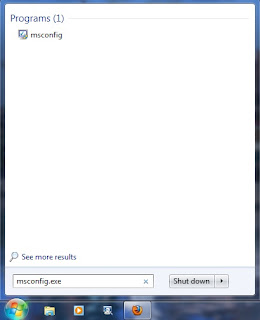
3. Click on msconfig then after opened system configuration dialog box go to startup tab
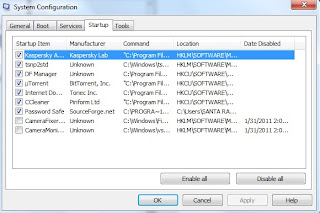
4. Unchecked unnecessary startup programs that you want to disable. If you found any program that
you are not sure then just leave it enabled for just safe.
5. Then click on apply and ok. After you disable your startup programs it wont run from you next
reboot.
Subscribe to:
Posts (Atom)