Showing posts with label programs. Show all posts
Showing posts with label programs. Show all posts
Monday, March 24, 2014
Identifying The Auto Startup Programs
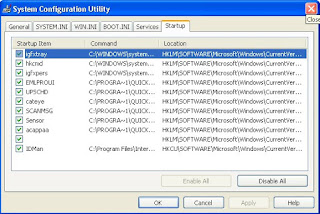
The first step in stopping the auto startup is identifying exactly what is starting up and what its purpose is. To do so, you will use a cool little program called the system configuration utility, which is built into Windows XP, and the Google search engine (www.google.com), which can look up what the entries are for. First, you will need to start up the system configuration utility and write down what programs are listed. To do so, follow these directions:
1. Start up the System Configuration Utility by clicking the Start Menu and selecting Run. Then key in msconfig and click OK.
2. Once the System Configuration Utility has loaded, click the Startup tab.
3. Now that the list of the active startup programs is visible, make a list of all of the items listed with the name as well as the file that is loaded, which is listed under the command column.
4. Once you have your list made, you can start researching which programs should be removed from the list and which programs should stay. Because almost every computer has different programs starting up after logon, I recommend that you browse the Web and look for a specific program and what will happen if it is removed from startup. One interesting site to visit is a database of common startup programs called Answers That Work. It is located at cant present you with recommendations for each of the programs listed. If you can not find one of your programs listed on that site, just do a quick search on Google and most likely you will find several Web sites telling you what that program does and what removing it will do.

Wednesday, March 12, 2014
How To Disable Startup programs In Windows 7
 Startup programs will automatically starts whenever you start up your PC. There are many unnecessary programs which takes so much memory and you rarely use that (slowdown your pc). By disabling startup programs unnecessary your PC performance will improve much better than before. For some example of startup programs like yahoo messenger, MSN messenger, Skye, utorrent, AOL messenger and other programs
If You Need To Disable Your Unnecessary Start Up Programs To
Speedup Your pc Follow This Easy Steps
- Click on start button of you pc
- Type msconfig in the search box "For xp user type msconfig on run"
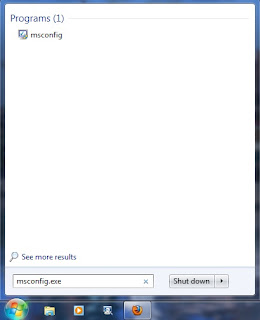
3. Click on msconfig then after opened system configuration dialog box go to startup tab
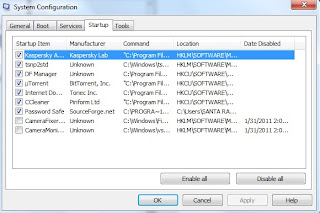
4. Unchecked unnecessary startup programs that you want to disable. If you found any program that
you are not sure then just leave it enabled for just safe.
5. Then click on apply and ok. After you disable your startup programs it wont run from you next
reboot.
Tuesday, January 21, 2014
Top 5 free antivirus for windows Free Download Best Antivirus Programs For Your Windows Pc
There are various antiviruses but choosing the right one is very difficult ,so heres the list of top 5 antivirus


4) AVG Free Antivirus :
AVG antivirus was really a great software when they launched its service as a free antivirus. The updates are really easily to download and very consistent. There was a false information about the software that it will automatically creates a virus application system in ones computer after 3months and will cause the whole system to crash. This is just a bad rumor about the software. They took this as a challenge and released a new interface which is very impressive and very consistent.Since the software was very famous from past years, it got many users who trust the software. The AVG Free Antivirus is really very very simple to install and use. All you have to do is to download the software and install it. AVG Free Antivirus also a upgraded version which acts similar to the Free AVG Antivirus Software. So its not that necessary to buy it.

5) Avira AntiVir Personal :
Our last free antivirus is Avira AntiVir Personal which is really the simplest antivirus in the market. The simple user interface is easy to understand. Avira AntiVir Personal is very good in detecting root kit threats and other viruses. One of the most important feature of Avira AntiVir Personal is that it can find the malware very easily. People say that Avira AntiVir Personal is not good at finding the false and virus emails in our system, which is completely a false imagination.

1) Microsoft Security Essentials :
I would say Microsoft Security Essentials is the most simple and easiest way to protect your computer. The main advantage of this antivirus software is, its completely free and its interface is really very easy and user friendly. The only thing you have to remember is that your Windows Operation system which you are using must be a genuine one. If you have a genuine Windows Operating system, Microsoft Security Essentials will automatically updates and installs new items daily. If not you have to try your luck with other antivirus or atleast get a new genuine Windows key.Microsoft Security Essentials can guard your system from various viruses, malicious software’s and spywares.
2) Panda Cloud Antivirus :
This free antivirus is really worth to give it a try.Panda Cloud Antivirus actually is very useful for scanning and finding viruses in your computer. Its unique interface is really easy to work and more consistent than any other. This antivirus comes from the very famous Cloud Antivirus Security. You can deactivate many unwanted process operations running behind your computer and make a quick background scan. When installed, the antivirus will first try to connect to there Panda Labs Collective Intelligence servers and protects your computer from viruses and malicious software’s.
3) Avast Free Antivirus :
Avast is really a great way of protecting your computer from viruses. I would say there New Internet Security software is pretty impressive. But while coming to the Avast Free Antivirus its really gives maximum protection to your computer for home machines.Though it is not quite impressive with the Online shopping and bank account safety, Doesn’t really stop hackers to harm your computer automatically. And also quite unsatisfactory with the SPAM messages and mails. But you can find all of this features available in Pro and Internet Security. Avast Free Antivirus best part is that it will automatically update when there is a new update available.
4) AVG Free Antivirus :
AVG antivirus was really a great software when they launched its service as a free antivirus. The updates are really easily to download and very consistent. There was a false information about the software that it will automatically creates a virus application system in ones computer after 3months and will cause the whole system to crash. This is just a bad rumor about the software. They took this as a challenge and released a new interface which is very impressive and very consistent.Since the software was very famous from past years, it got many users who trust the software. The AVG Free Antivirus is really very very simple to install and use. All you have to do is to download the software and install it. AVG Free Antivirus also a upgraded version which acts similar to the Free AVG Antivirus Software. So its not that necessary to buy it.
5) Avira AntiVir Personal :
Our last free antivirus is Avira AntiVir Personal which is really the simplest antivirus in the market. The simple user interface is easy to understand. Avira AntiVir Personal is very good in detecting root kit threats and other viruses. One of the most important feature of Avira AntiVir Personal is that it can find the malware very easily. People say that Avira AntiVir Personal is not good at finding the false and virus emails in our system, which is completely a false imagination.
Subscribe to:
Posts (Atom)