Monday, March 24, 2014
Identifying The Auto Startup Programs
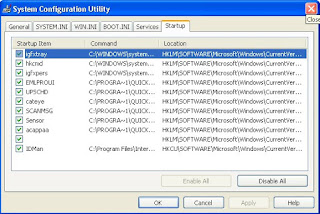
The first step in stopping the auto startup is identifying exactly what is starting up and what its purpose is. To do so, you will use a cool little program called the system configuration utility, which is built into Windows XP, and the Google search engine (www.google.com), which can look up what the entries are for. First, you will need to start up the system configuration utility and write down what programs are listed. To do so, follow these directions:
1. Start up the System Configuration Utility by clicking the Start Menu and selecting Run. Then key in msconfig and click OK.
2. Once the System Configuration Utility has loaded, click the Startup tab.
3. Now that the list of the active startup programs is visible, make a list of all of the items listed with the name as well as the file that is loaded, which is listed under the command column.
4. Once you have your list made, you can start researching which programs should be removed from the list and which programs should stay. Because almost every computer has different programs starting up after logon, I recommend that you browse the Web and look for a specific program and what will happen if it is removed from startup. One interesting site to visit is a database of common startup programs called Answers That Work. It is located at cant present you with recommendations for each of the programs listed. If you can not find one of your programs listed on that site, just do a quick search on Google and most likely you will find several Web sites telling you what that program does and what removing it will do.

Saturday, January 18, 2014
Make Auto Follow Your Followers on Twitter
Previously Amateur discussed tips on how to Updating your Facebook and Twitter with Google Talk maybe youre busy but want twitter to stay awake. Now Amateur here want to share how to keep us awake and twitter can automatically follow people who have followed you.
Applying the principle of "What you want others to do to you, do that to others.", then if you want your followers to stay following with you, then you can also follow them (sounds confusing?), this makes your followers feel important and would love following you.
So here are the steps on how to automatically follow someone when they follow you:
1. Go to SocialOomph, and "Register" if dont have any account on SocialOomph
2. If not register select register, fill up the registration form with you contact and bio preferences, note that the username and password you enter on SocialOomph is different or must be different from your twitter account.

3. Then after you have account, Activate your account registration by clicking the verification email on your emails inbox. (After clicking the verification link, you will be redirected to their Newsletter Signup page, you can optionally subscribe if you want or prefer not.)

4. Login to SocialOomph and on the side menu options, Hover your mouse to Social Accounts->Add New Account->Add Twitter, add your id twitter account here.
5. Click on "Authorize Access", (it will redirect you to your Twitter account if your already login, and if not, then you will be asked to login first), then click on "Allow".

6. After Allowing SocialOOmph to access your twitter account you will be redirected again to your Twitter Automation Settings, Tick or check the "Automatically Follow People" box (optionally you can also create an automated welcome message to your follower.).
7. Done..., Thats it, from now on every person who will follow your twitter on a follow by your automatic.
Enjoy it.....
Thursday, January 16, 2014
Top 5 Two Wheelers In Auto Expo 2012
1.Triumph Rocket III:

2.Hero MotoCorp Leap (First Hybrid Scooter):

3.Royal Enfield Thunderbird 500:

4.Piaggio Vespa:

5.Ducati – Monster 795:

Sunday, January 12, 2014
2012 Suzuki Swift Sport Concept–Launching At Frankfurt Auto Show In September

The new Suzuki Swift Sport is a refined sport compact resulting from the first full model change since the launch of the original Swift Sport in 2006.As far as the exterior of the car is concerned, the new sporty hatchback will be based along the lines of the Swift S Concept that was showcased earlier. Bigger wheels, a rear spoiler and aggressive body cladding is expected to be included in the package.

It has a more aggressive and dignified exterior look thanks to a low-slung form that gives a sense of stability and tension, and a big front grille that evokes a sporty performance feel. The cabin combines essential sportiness with a high-quality look and feel, and design features that gives more excitement about the driving experience.And also its a hotter version of the three-door hatchback.

Higher power and lower fuel consumption are delivered by the 1.6-litre M16A engine, which Suzuki developed exclusively for the Swift Sport.The new power plan could churn out 134 horsepower and 160 torques.

The engine is mated to a specially developed six-speed manual transmission, resulting in performance that is both exciting and environmentally responsible.

The new Swift Sport offers superior cornering stability and brisker, more responsive handling thanks to struts with internal rebound springs and an exclusive rear-suspension design.
Friday, January 10, 2014
Grand Theft Auto Vice City v1 03 APK SD Data

Description
Welcome back to Vice City. Welcome back to the 1980s.From the decade of large hair, excess and pastel suits comes a story of one mans rise to the best of the criminal pile. Vice City, a enormous urban sprawl ranging from the beach to the swamps and the glitz to the ghetto, was one of the most varied, total and alive digital cities ever developed.Combining open-planet gameplay with a character driven narrative, you arrive in a town brimming with delights and degradation and offered the opportunity to take it more than as you choose.
To celebrate its 10 year anniversary, Rockstar Games brings Grand Theft Auto: Vice City to mobile devices with higher-resolution graphics, updated controls and a host of new features like:
• Beautifully updated graphics, character models and lighting effects
• New, precisely tailored firing and targeting choices
• Custom controls with a totally customizable layout
• Huge campaign with numerous hours of gameplay
• Compatible with the MoGa Wireless Game Controller and choose USB gamepads
• Integrated with Immersion tactile effects
• Tailor your visual experience with adjustable graphic settings
Languages Supported: English, French, Italian, German, Spanish, Korean, Russian, and Japanese.
Grand Theft Auto: Vice City is now offered on:
Android Phones: Motorola Atrix, Motorola Atrix HD, Motorola Atrix 4G, Motorola Photon, HTC Rezound, HTC 1 X, HTC One X+, Samsung Galaxy Nexus, Samsung Galaxy Note, Samsung Galaxy Note 2, Samsung Galaxy R, Samsung Epic 4G, Samsung Galaxy S2, Samsung Galaxy S3, Google Nexus four, Sony Xperia Play, Sony Xperia Sola, Sony Xperia S / P / T & TL, Sony Walkman Z Series Media Player
Android Tablets: Acer Iconia, Asus Eee Pad Transformer Prime, Asus Transformer Pad TF300T, Asus Transformer Pad Infinity 700, Motorola Xoom, Samsung Galaxy Tab 7. / 7.7 / 8.9 & 10.1, Samsung Galaxy Note 10.1, Sony Tablet S, Sony Tablet P, Sony Xperia Tablet S, Toshiba Thrive, Toshiba Regza, Google Nexus 7, Google Nexus 10, Fujitsu Stylistic 10.1
**Grand Theft Auto: Vice City was created and tested only on these devices. If your device is not listed, please verify assistance.rockstargames.com for any updates to this list**
For optimal overall performance, we suggest re-booting your device following downloading and closing other applications when playing Grand Theft Auto: Vice City.
Please make certain you have at least 1.5 GB of cost-free space before installing Grand Theft Auto: Vice City.
Play Retailer

Download :
Download APK
or
Download APK no lag
SD Data : Single hyperlink
Instructions :
information: sdcard/Android/obb/com.rockstargames.gtavc/