Showing posts with label channels. Show all posts
Showing posts with label channels. Show all posts
Saturday, March 22, 2014
Easy To create Free Online TV Channels !
Bangladesh has got slow internet speed.Everybody know that currently series of internet speed provided of WiMax.If you want than you owner create Online TV channels!
 You can easily create Online TV Channels .At first you go to World-TV Web site. After a while to load into the page, and you got see the video and image to link your channels and click the next button.
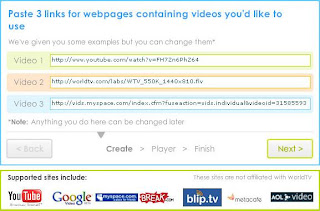 Than next step is the choice of a name for your channels.If you do not have a channels than try another.Than you click next button and select the next button and select the TV channels logo and your email address .
Than ,click next,go to edit page and correct the setting.Add your web site and just above the tab editor for assistance .
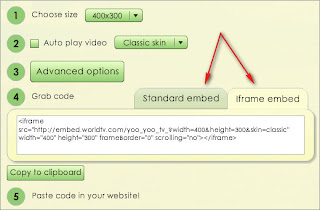 Standard or choose of the embedded or iFrame and you can add your site.
Last you can visit Online channels and watch the TV and video and image .As you can see and thanks for everyone.
Than ,click next,go to edit page and correct the setting.Add your web site and just above the tab editor for assistance .
Last you can visit Online channels and watch the TV and video and image .As you can see and thanks for everyone.

Monday, March 10, 2014
How to Create Multiple YouTube Channels in one account
Well, if you have already one YouTube Channel and need to create another one YouTube Channel with the different name then follow the steps given below.
1
Go to Google and Sign in with your Google account’s email ID and password
2
After signing in with Google , go to YouTube by clicking on YouTube icon for the more information check the screenshot below.

3
After clicking on YouTube Icon you will be redirect to the YouTube, there you will see your Google+ Profile pic at right top corner of the page. Click on your pic then few options will be show up as drop down Then click “Switch Account“. See the screenshot below for the example :

4
When you click on “Switch account” option, Then, new box will be appear with options to switch your YouTube Channel account but if you haven’t created any account earlier then switching account option will be disappear and you have to choose and click on “All My Choices” see the screenshot below, for the more information.

5
Now, you will be taken to the different page, where you will be able to see listing of all your YouTube channel (if you have) or you will see “Create a New Channel” option to create new channel with your same account.
Monday, February 3, 2014
Hide Channels From Whois In Freenode
If you are a geek you must be hanging on lots of irc channels. I like to hide my details as much as possible. So I prefer to hide the other channels Ive joined. To do so, the command you type is
Read more »
/quote mode user_name +iAlso you can get cloak to hide your IP.
Subscribe to:
Posts (Atom)