Saturday, March 22, 2014
How to convert DVDs to AVI or MPEG video files
AutoGK or DVDx can be used.
AutoGK (Official) Tutorial
For Macs
Handbrake, theres also Instant Handbrake.
Handbrake gives a good interface and multiple format/compression options.

Friday, March 21, 2014
How to Block or Remove Blogspot Follower User
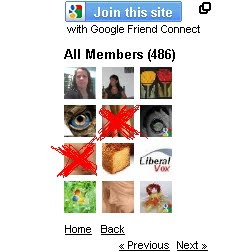
How to Add Friend Blogapot Follower User?
Some Blogspot follower user use Adult and sexy image. If you are having blogger blog, you will have followers widget for every blog by default. In this case any visitor can become your follower. Now if you wanted to moderate it and blog any follower here are some simple steps to do this. Or else if you wish to Add the follower as friend then also check the below 8 steps.
1. Login to blogger.com.
2. Here, for every blog of you an see followers link if it has minimum one, as you can see in bellow image my blog has 101 Followers
3. Click on Followers Link for the blog for which you want to block some follower
 4. It will show list of followers as shown in bellow image.
5. Now click on the picture of the follower which you wanted to block
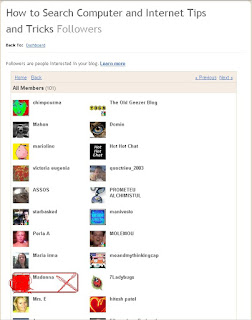 6. This will show updates and links of follower as well as link for blocking the follower.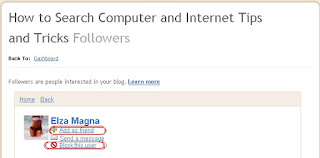
7. Click on Block This User Link and follow the steps and the follower gets blocked from following your blog.
8. If you dont want block the follower but add as a friend then click on Add as friend as shown in the above image.
Thank you....
Monday, March 10, 2014
How To Prevent Copy or Cut File From Computer to Flashdisk

- Sign in to Regedit (Press Windows key + R and type regedit)
- Sign in to HKEY_LOCALMACHINE SYSTEM CurrentControlSet Control
- Right-click on the Control folder select New-> Key
- Name the new folder with "StorageDevicePolicies"
- Then right click on the folder with the name "StorageDevicePolicies", and select New-> DWORD
- Give the name "WriteProtect"
- Double click DWORD with the name "WriteProtect", and then change the Value Data to 1
- Restart your computer
- Note: If that takes data from the user computer will display the message *. User to restore it just change the Value Data from key "WriteProtect" to 0
Friday, March 7, 2014
How to Add or change language in Windows 8
The steps are as follows:
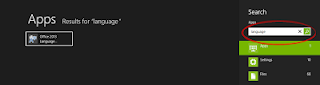
1. Go to the search box by pressing WIN + Q at the same time, then type in "Language" in the search box
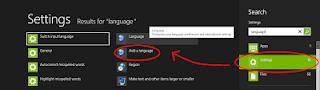
2. Then select the option "Settings" on the search results and select "Add Language"
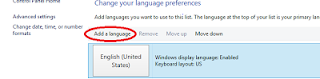
3.The new jendel it will appear as shown below, then click "Add Language"
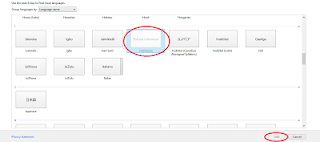
4. Next will come a list of the worlds languages, in this case we select "Indonesian" Then click "Add"
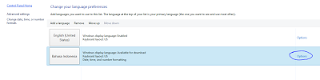
6. Then click "Download and Install Language Pack"

7. Furthermore, the download window and install the update and wait for it to finish
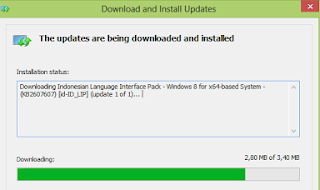
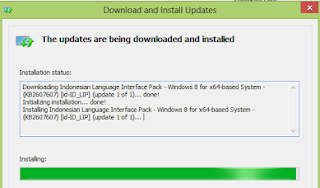
8. After the installation process is finished the next will appear as below, then click the "Close"
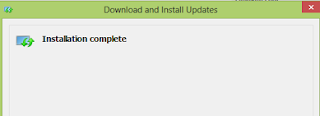
9. Furthermore Indonesian positioned above by clicking "Move Up"
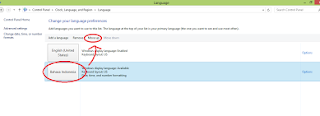
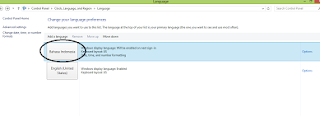
12. Good luck
Wednesday, March 5, 2014
How to Find the Name or Title of a Song by Lyrics
Anyway, so if you know some of the lyrics for the song you’re looking for, you can try out a few of these lyric search engines to try and find the band or song name. Actually, there are quite a few of them out there, but only a few really have large databases of song lyrics. Here are some them websites :
1. Search Lyrics – This site also has some non-English lyrics and you can translate any of the English lyrics to another language on the lyric pages. Get Lyrical finds an exact match for your lyrics whereas Search Lyrics searches for those words anywhere in a particular song and will return a result even if the words are all not together.

3. LyricsFly – Make sure you click on Lyrics first and then perform a search.

The other web sites that I tried did not work good for song lyrics and so I’m not going to mention them here. If you know of any other lyric search engines, post a comment!
Monday, March 3, 2014
Should I Replace Or Upgrade My Personal Computer
 If your PC is getting a bit long in the tooth, the temptation to replace it with a newer model is always there. The very latest in top-spec laptops, Notebooks, PCs and computers are constantly advertised and the pressure to buy the latest model is intense. The price of new technology is far lower proportionally than when computers first became a common household addition, but do you actually need to replace your entire system or can you save yourself time and money by upgrading what you already have?
The question you have to ask yourself is: does my current computer do everything I want it to do? If the answer to that is yes, then your current system will probably be sufficient for some time to come. But if you are determined to upgrade, then you dont have to replace the entire system to enhance its capabilities - you can upgrade areas of your existing hardware for a fraction of the cost.
The monitor
Old computer monitors are cumbersome, energy-greedy and have a limited lifespan. The easiest way to upgrade your set-up is to start with the monitor. Flat screens take up far less desk space, are higher resolution (meaning far better picture quality) and modern LED screens are also much more energy efficient. The old monitor can be consigned to the recycling centre and a sleeker, more efficient flat screen is the quickest way to upgrade your set-up for a fraction of the cost of a new computer system.
RAM memory
The more RAM you have, the faster your PC will run. Applications use the RAM memory to run and the operating system uses it to ensure that applications work correctly. RAM is an add-on that is simple to install and relatively cheap. However, different machines take different types of RAM so contact a manufacturer and they will be able to tell you which RAM you need simply from the make and model number of your PC.
Storage
Hard disks have a finite amount of storage space available, so updating your storage system can free up your computers hard drive. A remote hard drive is also an excellent way of keeping all your data and information safe, enabling you to restore your computer to full working capacity in the event of a catastrophic hard drive failure such as a virus attack or mother-board problem. Files such as films, music and other downloads take up a great deal of storage space so downloading these onto a remote hard drive is a great way of freeing up your computers disk space and helping it to run more quickly.
Graphics
Graphics cards are easily replaced. These plug-ins power the display and the faster and more capable your graphics card, the sharper and clearer your images will be. This is particularly useful if you are into computer games, as the graphics in modern games are exceptionally sophisticated and require high-resolution graphics.
Processing power
Your processor is the heart of the computer. This determines the speed that your computer operates at and replacing it can be a complex task, so only attempt it if you are absolutely sure you know what you are doing. You may also need some specialist equipment and to be sure that the processor you wish to insert is compatible with your system so if you do decide to upgrade your processing power, it is best to talk to an IT expert first.
You can also upgrade your current PC by adding USB ports, network cards or modems is all relatively easy to do by simply opening the casing of the unit and inserting the cards into the PCI slots. Upgrading your computer is one of the simplest and cheapest ways of increasing the speed and capability of your computer without having to throw the entire system away and buy a new one.
There is also the problem that your new computer may have trouble recognising all of your old data from your previous machine, making data transference difficult and frustrating. So is it better to stick with the devil you know? Modern computers are adaptable and easily upgraded. Whilst you dont always need to be at the cutting edge of technology, its wise to consider at least one upgrade in every computers life. If youve reached the limits of your current computers capacity, then perhaps that is the time to think about finally replacing it for a newer model.
IT247.com has one of the UKs largest catalogues of IT, consumer electronics and related accessories, at highly competitive prices and best availability. Buy New Desktop Computers online at http://www.it247.com
Saturday, February 8, 2014
How To Listen Music or Audio On Bluetooth Headset via BTmono In Any Android Smartphone
 Many times we want to use Bluetooth headset not only for just receiving or making calls but also to listen to music or any audio file.
But this is not possible in most of the smartphones. Then we search on internet on how to do it and we end in downloading just crap application.
BTmono is the best solution to this problem as it is very easy to use and small application which will solve your problem in seconds.
Click Here To Download BTmono from Play Store
How to use -
- First connect yur bluetooth headset
- Open BTmono
- Click ON
- Go to your music player and play music on your headset
1. Automatically enable Bluetooth on app launch (user can still choose not to allow this). Make sure your headset is actually CONNECTED before hitting On.
2. In-app Media Volume control. Adjust the Bluetooth In-Call Volume using the physical buttons on your phone or headset.
3. Ongoing Status Bar notification while the program is running.
4. Automatic turn on at app launch available via Menu-->Preferences. Note - if enabled your headset must be connected before running BTmono.
5. ICS (Android 4.0) support including use of Holo theme
For any queries comment below or contact us
Clear Zeitgeist or Gnome Activity Journal
rm ~/.local/share/zeitgeist/activity.sqliteIf you open Gnome-Activity-Journal after this, youll see that all your history has been cleared out.
zeitgeist-daemon --replace
Saturday, January 25, 2014
Earthquake alert in SMS or Email


Wednesday, January 22, 2014
screenlets mac or vista widget for linux
The kiba-dock or AWN produces dock that resembles MAC dock. Here is my older post regarding them if you have missed it http://.blogspot.com/2008/03/mac-like-dock-for-ubunut.html
Now lets see the power of a program called screenlets. With it, you can put widgets on your desktop. Check preview below.

Follw the installation procedure.
sudo echo deb http://hendrik.kaju.pri.ee/ubuntu gutsy screenlets >> /etc/apt/sources.list
sudo apt-get update
sudo apt-get install screenlets
sudo apt-get install python-gnome2-extras
sudo apt-get install python-feedparser
This will install screenlets on your system.
Now go to Accessories->screenlets or simply run screenlets-manager from terminal.
There you will find many screenlets.
Double click them or select start/stop to start them.
Select Auto start to start the selected screenlets automatically at logon.
There are few important options:
Window->Lock This locks the position of screenlets making them unmovable.
Window->Sticky This makes your screenlets appear on all workspace.
Window->Widget This makes you screenlets like dashboard in Mac OS X. RUN csm(compiz setting manager), search for the option widget in top left corner and enable it. Now change your screenlets to widget. It will disappear but appear when you press F9 key.
Goto screenlets.org for more screenlets.
Also, now you can use Google gadgets, and other gadgets and web application as your screenlets.
On screenlets-manager select install and select the required option.
Heres what screenlets.org have to say regarding them.
http://screenlets.org/index.php/Google_gadgets_now_run_on_Screenlets_engine_...
http://screenlets.org/index.php/SuperKaramba_themes_now_runs_on_Screenlets_engine_...
Have fun.