Showing posts with label post. Show all posts
Showing posts with label post. Show all posts
Tuesday, March 4, 2014
Is Post Auction Tariff Hike Really Imminent We find it out
Spectrum auction 2014 has been ended and already the incumbent operators are feeding the media that telecom tariff hike is imminent, as they have to shell out huge money to retain their spectrums. If anyone checks their claim about high cost for getting their spectrum is actually a lie. These companies have gone for both 900 and 1800MHz spectrum in the latest auction, but actually licenses of only 900MHz band spectrum which they have in 3 metros is going to be expired by November 2014.
 They knew about license expiration timeline, and therefore they should arrange money for it. But whatever spectrum in 1800MHz band they acquired in February 2014, that will be used mostly for 4G/LTE roll out. They look into the future and most importantly it’s not voice, it’s data. And the tariff hike generally goes to vanilla services – voice, text and 2G data. So their view about tariff hike is not a perfect decision.
There is another reason that will prevent all operators to jump into next round of tariff hike. The reason is upcoming launch of Reliance Jio’s 4G data and now voice as well as plethora of services. It’s almost sure that Jio will follow it’s trend to disrupt the market with ultra cheap wireless mobile broadband. So the situation in the market is something which can not be controlled by incumbent players – Airtel, Vodafone and Idea Cellular.
If you had checked the trends behind the tariff hike earlier, it was something like that: revision in rate cutter pricing or the validity. But ultimately people did not stuck to their basic plans, and they started using rate cutters to keep the tariff high. What I feel these old players may hike the tariff to maximum 0.5paisa per seconds and no more than that. And people will use rate cutters to keep talking at low rate.
The newer operators like Idea in some circles, Aircel, Tata Docomo, Reliance Mobile, Uninor, Videocon and MTS should look into strategic change to be competitive in the market. Apart from true unlimited onnet calling packs, they must think about low cost (10p to 5p to 1p per minute) calling plans within their own networks in different time of the day.
So our readers, what do you think about tariff hike in near future? Drop comments!

Thursday, February 27, 2014
200th Post Contest Extravaganza!
Well, its taken me 2 whole years and a bit to get to this mark! To be honest, I never expected Id last this long or review this many toys. But here I am!
In order to celebrate this momentous occasion, Chase Variant is having its first ever contest! Yes, its not a trick nor a hoax. Yes, the can-never-hold-a-contest-to-save-my-life SirDragonBane is finally giving away free stuff. What a stingy bastard Ive been, eh? :P
Lets just lay down a little ground rules before we start:
1) If you win the contest and youre overseas (i.e: anywhere else in the world but in Singapore), youll still receive the figure for free! Ill cover the shipping cost, including shipping materials. I may opt to open the toy (something Im very good at) and remove the bubble, especially if shipping gets too steep. But Ill ship everything else from the card to the inserts if you like. ;)
2) If you live in Singapore, theres no definitely shipping charge--well arrange for a meet up so I can shake your hand, hand you the prize, and let the media (aka me) take a few snap shots. (Just kidding, no photos necessary. Lol.)
Ok, so lets begin!
Theres a couple of things you have to do in order to enter.
Firstly, identify the toy in the pic on the right! Yes, it is your prize. ;) Heres a clue: I reviewed many of this movie superheros brethren on Articulated Discussion but never got around to reviewing him there or on their new site! There are posts linked to all the figures I reviewed there right here on this site. But I never reviewed him on Chase Variant either! So thats another clue. ;)
Secondly, once youve identified the prize in question, reply to this post and tell me what the toy is! Each correct answer will receive one chance to win. But thats not all--you can double your chances if you recommend someone else to Chase Variant and get them to follow it. (Youll have to let me know who you recommended in your post and Ill double your entry once theyve followed! Its that easy. For you, that is! For me it might turn out to be a mathematical nightmare. ;P)
Well all thats left now is a closing date! Lets call it a week and a bit from the time of this post, thats 6am Singapore time on Thursday the 9th of June. (Thats GMT +8.)
Before I end Id like to sincerely thank all of you whove been reading reviews on Chase Variant. Its been a pleasure and an honor that you keep coming back for more!
So without further ado, let the games begin!
Read more »
In order to celebrate this momentous occasion, Chase Variant is having its first ever contest! Yes, its not a trick nor a hoax. Yes, the can-never-hold-a-contest-to-save-my-life SirDragonBane is finally giving away free stuff. What a stingy bastard Ive been, eh? :P
Lets just lay down a little ground rules before we start:
1) If you win the contest and youre overseas (i.e: anywhere else in the world but in Singapore), youll still receive the figure for free! Ill cover the shipping cost, including shipping materials. I may opt to open the toy (something Im very good at) and remove the bubble, especially if shipping gets too steep. But Ill ship everything else from the card to the inserts if you like. ;)
2) If you live in Singapore, theres no definitely shipping charge--well arrange for a meet up so I can shake your hand, hand you the prize, and let the media (aka me) take a few snap shots. (Just kidding, no photos necessary. Lol.)
Ok, so lets begin!
Contest Rules
Theres a couple of things you have to do in order to enter.
 |
| Come on! Its a gimme! |
Secondly, once youve identified the prize in question, reply to this post and tell me what the toy is! Each correct answer will receive one chance to win. But thats not all--you can double your chances if you recommend someone else to Chase Variant and get them to follow it. (Youll have to let me know who you recommended in your post and Ill double your entry once theyve followed! Its that easy. For you, that is! For me it might turn out to be a mathematical nightmare. ;P)
Well all thats left now is a closing date! Lets call it a week and a bit from the time of this post, thats 6am Singapore time on Thursday the 9th of June. (Thats GMT +8.)
Before I end Id like to sincerely thank all of you whove been reading reviews on Chase Variant. Its been a pleasure and an honor that you keep coming back for more!
So without further ado, let the games begin!
Sunday, February 16, 2014
How To Add Custom Popular Post Widget In Blogger
Today we provide you how to Add Custom Popular Post Widget In Blogger to display your popular posts in sidebar. Blogger allow adding simple popular post widget with default style so we provide you some style to change your popular post widget style to custom popular widget. Popular post widget shows most visited blog posts and display in four combinations:
- Only the title of the post.
- Post with thumbnail and title.
- Post with Summary and Title.
- Post with thumbnail and post snippet.
Popular post widget also attract visitors to get most popular post in your blog which means your blog get higher income and increase number of page views. We provide you step by step guide to how to add custom popular post widget in blogger. Let’s Start:

How To Add Custom Popular Post Widget In Blogger
There are two part of add custom popular post widget to blogger. Please follow below steps to Add Custom Popular Post Widget In Blogger:
Part 1: Add Popular Post widget in blogger
Step 1
Login into blogger account. Go to Blogger dashboard and click on Layout tab and click on Add a Gadget link as shown in below picture.

Step 2
When you click on Add a Gadget link a popup window will open with all gadgets list. Select popular widget from gadgets list as shown in below picture.

Step 3
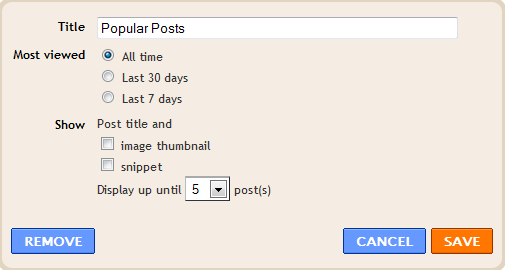
Now Customize popular post widget as your requirement as shown in below picture.
Step 4
Click on save button.
Part 2: Change Popular Post Widget Style
Please follow below steps to add custom style of popular post widget:
Step 1
Now go to Template and click on Edit HTML button as shown in below picture.

Step 2
Search below code with help of CTRL + F:
]]></b:skin>
Step 3
Now choose your style from below images. Copy below code of style and paste it to just before above code:
Style 1
.popular-posts ul{padding-left:0px;} .popular-posts ul li {background: #FFF no-repeat scroll 5px 10px; list-style-type: none; margin:0 0 5px 0px; padding:5px 5px 5px 20px !important; border: 1px solid #dcdcdc; border-radius:10px; -moz-border-radius:10px; -webkit-border-radius:10px; } .popular-posts ul li:hover { background:#FF8040; } .popular-posts ul li a { text-decoration:none; font:14px Georgia, verdana; color:#222222; } .popular-posts ul li a:hover { text-decoration:none; color:#fff; }
Style 2
#PopularPosts1 h2{position:relative;padding:8px 10px 6px 10px;width:100%;margin-bottom: 5px;font-size:17px;color:#757575; /* Color of the widgets title */text-align:left;}#PopularPosts1 ul{list-style:none;counter-reset:li;padding:10px;left:-8px;width:100%;}#PopularPosts1 li{ /* Styles of each element */width:100%;position:relative;left:0;margin:0 0 1px 12px;padding:4px 5px;}#PopularPosts1 ul li:before{content: counter(li);counter-increment: li;position: absolute; left: -30px;top: 50%;margin-top: -13px;background: #8E8E8E; /* background color of the numbers */height: 1.9em;width: 2em;line-height: 2em;text-align: center;font-weight: bold;color: #fff;font-size: 14px;}#PopularPosts1 ul li:after{position: absolute;content: ;left: -2px;margin-top: -.7em; top: 50%;width: 0;height: 0;border-top: 8px solid transparent;border-bottom: 8px solid transparent;border-left:10px solid #8E8E8E; /* background color of the right arrow*/}#PopularPosts1 ul li a{color: #444;text-decoration: none; font-size:15px;}#PopularPosts1 ul li {position: relative;display: block;padding: .4em .4em .4em .8em;*padding: .4em;margin: .5em 0 .5em 0.4em;background: #ddd;transition: all .3s ease-out;text-decoration:none;transition: all .1s ease-in-out;}#PopularPosts1 ul li:hover{background: #eee; /* Background color on mouseover */} #PopularPosts1 ul li a:hover{color:#444; /* Link color on mouseover */margin-left:3px;}
Style 3
.popular-posts ul{padding-left:0px;}
.popular-posts ul li {
list-style-type: none;
margin:0 0 5px 0px;
padding:5px 5px 5px 20px !important;
border: 1px solid #dddddd;
-moz-box-shadow:1px 1px 2px #dcdcdc;
-web-kit-box-shadow: 1px 1px 2px #dcdcdc;
-goog-ms-box-shadow:1px 1px 2px #dcdcdc;
box-shadow:1px 1px 2px #dcdcdc;
border-radius:5px;
background: rgb(44,83,158); /* Old browsers */
background: -moz-linear-gradient(top, rgba(44,83,158,1) 0%, rgba(44,83,158,1) 100%);
/* FF3.6+ */
background: -webkit-gradient(linear, left top, left bottom, color-stop(0%,rgba(44,83,158,1)),
color-stop(100%,rgba(44,83,158,1))); /* Chrome,Safari4+ */
background: -webkit-linear-gradient(top, rgba(44,83,158,1) 0%,rgba(44,83,158,1)
100%); /* Chrome10+,Safari5.1+ */
background: -o-linear-gradient(top, rgba(44,83,158,1) 0%,rgba(44,83,158,1) 100%);
/* Opera 11.10+ */
background: -ms-linear-gradient(top, rgba(44,83,158,1) 0%,rgba(44,83,158,1) 100%);
/* IE10+ */
background: linear-gradient(to bottom, rgba(44,83,158,1) 0%,rgba(44,83,158,1)
100%); /* W3C */
filter: progid:DXImageTransform.Microsoft.gradient( startColorstr=#2c539e,
endColorstr=#2c539e,GradientType=0 ); /* IE6-9 */
}
.popular-posts ul li:hover {
-moz-box-shadow:1px 1px 2px #dcdcdc;
-web-kit-box-shadow: 1px 1px 2px #dcdcdc;
-goog-ms-box-shadow:1px 1px 2px #dcdcdc;
box-shadow:2px 2px 4px #333333;
border:1px solid #333333;
color:#fff;
}
.popular-posts ul li a
{
text-decoration:none;
font:16px Georgia, verdana;
color:#ffffff;
}
.popular-posts ul li a:hover {
text-decoration:none;
}
Style 4
#PopularPosts1 h2{padding:8px 10px 3px 0;width:100%;margin:0;font-size:16px;position:relative;left:-20px;display:block;border-bottom:2px solid #ccc;}#PopularPosts1 ul{list-style:none;counter-reset:li;padding:10px;width:100%;}#PopularPosts1 li{ /* Styles of each element */width:100%;position:relative;left:0;margin:0 0 6px 10px;padding:4px 5px;}#PopularPosts1 ul li:before{ /* Style of the numbers */content:counter(li);counter-increment:li;position:absolute;top:3px;left:-39px;font-size:21px;width:28px;height:28px;border-radius: 50%;color:#777; /* Text color */border: 2px solid #ddd; /* Rounded border color */padding:0;text-indent:9px;}#PopularPosts1 ul li a{display:block;position:relative;left:-45px;width:100%;margin:0;min-height:28px;padding: 5px 3px 3px 39px;color:#333; /* color of the links */text-decoration:none;font-size:14px; /* Font size of the links */font-style: italic;
}#PopularPosts1 ul li a:hover{color:#3366ff;margin-left:3px;}
Style 5
.popular-posts ul { padding-left:0px; -moz-box-shadow:1px 1px 2px #dcdcdc; -web-kit-box-shadow: 1px 1px 2px #dcdcdc; -goog-ms-box-shadow:1px 1px 2px #dcdcdc; box-shadow:1px 1px 2px #dcdcdc; border: 1px solid #dcdcdc; } .popular-posts ul li { list-style-type: none; margin:0 0 5px 0px; padding:5px 5px 5px 20px !important; border-bottom:1px dashed #dcdcdc; background:#ffffff; } .popular-posts ul li a { text-decoration:none; font:16px georgia,verdana; color:#3d87c4; } .popular-posts ul li a:hover { text-decoration:none; color:#333333; }
Step 4
Click on Save button and refresh your blog to see custom popular widget on your blog.
Wednesday, January 22, 2014
How to Change Blogger Post A Comment with Image
We will show you How to Change Blogger "Post A Comment" text to image in this tutorial. We provide you full step by step guide to replace Post A Comment with an image which is shown above comment box. Many blogger not want to show common word above comment box so here a tutorial about changing it’s to image. You can add your own image and we are also providing some images if you like any one of them then you can use on your blog.

Replace Post A Comment with Image
To replace "Post A Comment" text to an image in your blogger blog with follow below steps:
Step 1.
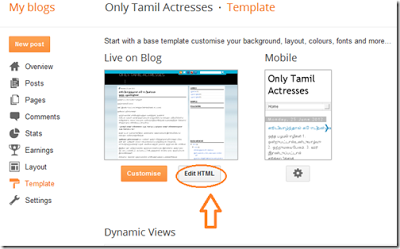
Login to Blogger Dashboard. Go to Template > Edit HTML as shown in below picture.
Step 2.
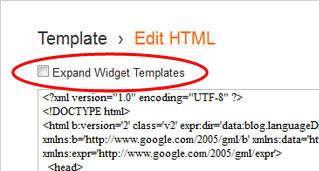
Click on "Expand Widget Templates" as shown in below picture.
Step 3.
Now search following code with the help of CTRL + F:
<a expr:href=data:post.addCommentUrl expr:onclick=data:post.addCommentOnclick>
<data:postCommentMsg/></a>
And also search below code
<h4 id=comment-post-message><data:postCommentMsg/></h4>
Step 4.
Replace <data:postCommentMsg/> to below image code

<img src="https://blogger.googleusercontent.com/img/b/R29vZ2xl/AVvXsEhoOtLIgvLE5SZJHtQNI2DXwt3Z2yqQ87QBudvqQRnZnGkaZqrEj7_SNC4Ka5Dwq1s82flmCMiOeXgn8CgljOaoozWtEfETvqVC3LsoRtBJk82dFRHbaEp63JwV9IUdWCMHau4w6ajSgpVx/h105/leave-a-comment-trans.gif" />

<img src="https://blogger.googleusercontent.com/img/b/R29vZ2xl/AVvXsEgMX7TUsM2asOq-fkJ2-ruxTfuVz1mINjyZ_xerdIMagmsr8DS9ZNvWKuP78WRk3k80cdRahzdtGllW3ibaZdP9_ROdfd0l_86YxQCutr2FMT-zwbpW8Ru7HCOzh2KwD7BlNxyGa9vbTJPS/s180/leave-comment.gif" />Or replace your own image with image source URL.
Step 5.
Save Template.
Now you have done perfectly. If you have any suggetion or updates about codes please give us your update at below form we will publish your updates as soon as possible.
Subscribe to:
Posts (Atom)