Friday, March 21, 2014
Disabling Remote Desktop connection
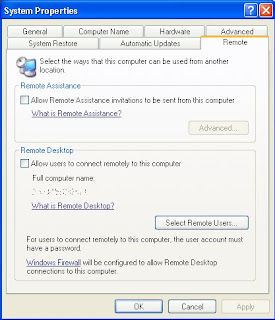
The Remote Desktop feature of Windows XP is a great way to be able to access your
computer when you are away from the office or home. However, if you have poor computer security, the Remote Desktop also is a great way for anyone to be able to access and control your whole computer. Remote Desktop is a very risky application to leave exposed to the world. Its security relies solely on your account password, which for most users is easy to guess.
If you do not use Remote Desktop, then it would be a good idea to disable the feature. Doing so is a snap. Just follow these steps to turn it off:
1. Right-click the My Computer icon on the desktop or in the Start Menu and select
Properties.
2. Click the Remote tab to expose the remote access settings.
3. Next, uncheck the box under Remote Assistance.
4. Uncheck the box under Remote Desktop as well.
5. Click OK to save your changes.
When Remote Desktop connections are disabled, you have one less thing to worry about namely, someone having the ability to break into your computer.

Friday, March 7, 2014
Blackberry Desktop Software On Windows 8
If you are going to upgrade to windows 8, you may be wondering whether or not your BlackBerry Desktop Software will work. As noted by RIM in their BlackBerry knowledge base, everything will go fine provided you follow some initial steps.

BlackBerry Desktop Software will function when installed on Microsoft Windows 8 however .NET Framework 3.5 must be installed and enabled prior to the install of the BlackBerry Desktop Software. Microsoft .NET 3.5 framework can be installed and enabled by following the instructions in the Microsoft article listed below.
http://msdn.microsoft.com/en-us/library/hh506443.aspx
In addition, RIM also notes that an updated version of the BlackBerry Desktop Software is coming that will have enhanced features specifically for Windows 8 users.
Wednesday, March 5, 2014
How To Choose Between A Laptop And A Desktop
 Owning at least one computer is becoming more and more important these days. Many businesses offer their employees the option of working from home, and many schools and universities require work to be done at least in part on a computer. Additionally, there are plenty of games and other forms of entertainment that a computer is perfect for.
In case you havent been down to the computer store lately, then you might not be aware that there have been more and more technological advances recently, and deciding which kind of computer to buy can be a confusing choice. If youd like to buy a computer, but havent quite decided if you want a laptop or a desktop, then this article is for you. After reading this, youll have a much easier decision.
The main advantages of getting a desktop is that you can get a much more powerful machine. You arent limited to space, nor do you require a battery. Hard drives are generally larger, and there are more slots for memory, so you can upgrade a desktop machine quite a bit. Also with desktops, you can get a much larger screen, since you dont have to worry about stuffing it into your purse or briefcase.
One of the biggest drawbacks to a desktop is that it sits right there on your desk, and nowhere else. Its pretty tough to take it with you, as you have all kinds of cords and cables connecting everything together. If you ever need to do some work away from home, at a hotel for example, then you wont be able to use your desktop.
The main benefit of having a laptop, of course, is that you can take it anywhere. Most places these days have some kind of wireless Internet, either free or paid, that you can use to connect with. And if you cant find a place to plug your machine in, then the battery should last several hours, depending on what you are using your computer for.
Some drawbacks to having a laptop is limitations on size, both on the keyboard, mouse and screen. Some of the biggest laptops have screen of seventeen inches, and this might not be large enough if you need to have several windows open at once. Also, upgrading your laptop by adding memory or an additional hard drive might be a little difficult, and require professional assistance.
So depending on where and when youll need to use your computer, you can choose which one is appropriate. If you only imagine yourself doing work at home, then a desktop is the best choice. If you need to do work in several different locations, then a laptop is the way to go. Of course, if you can afford it, getting both is always an option.
Wednesday, February 19, 2014
Desktop publishing with Ubuntu linux
1) scribus

http://www.scribus.net/
2) inkspace

"Inkscape is an open-source vector graphics editor similar to Adobe Illustrator, Corel Draw, Freehand, or Xara X. What sets Inkscape apart is its use of Scalable Vector Graphics (SVG), an open XML-based W3C standard, as the native format."
http://inkscape.org
Saturday, February 1, 2014
Intel� Desktop Board DX58SO

The Intel® Desktop Board DX58SO is designed to unleash the power of the all new Intel® Core™ i7 processors with support for up to eight threads of raw CPU processing power, triple channel DDR3 memory and full support for ATI CrossfireX* and NVIDIA SLI* technology. Today’s PC games like Far Cry 2* need a computing platform that delivers maximum multi-threaded CPU support and eye-popping graphics support.
Expansion capabilities:
- One PCI Conventional* bus add-in card connectors (SMBus routed to PCI Conventional bus add-in card connector)
- One primary PCI express 2.0 x16 (electrical x16) bus add-in card connector
- One secondary PCI Express 2.0 x16 (electrical x16) bus add-in card connector
- One PCI Express* 1.0a x16 (electrical x4) bus add-in card connector.
- Four 240-pin DDR3 SDRAM Dual Inline Memory Module (DIMM) sockets
- Support for DDR3 1600 MHzς, DDR3 1333 MHzς, DDR3 1066 MHz
- Support for up to 16 GBς of system memory.
Thursday, January 23, 2014
conky system monitor on your desktop

conky is very light weight system monitor.
Documentation
With more than 250 builtin objects, it includes support for email clients and media players too.


see more screenshots
Friday, January 17, 2014
Dell Launches studio xps 7100 desktop
