Wednesday, March 5, 2014
How To Choose Between A Laptop And A Desktop
 Owning at least one computer is becoming more and more important these days. Many businesses offer their employees the option of working from home, and many schools and universities require work to be done at least in part on a computer. Additionally, there are plenty of games and other forms of entertainment that a computer is perfect for.
In case you havent been down to the computer store lately, then you might not be aware that there have been more and more technological advances recently, and deciding which kind of computer to buy can be a confusing choice. If youd like to buy a computer, but havent quite decided if you want a laptop or a desktop, then this article is for you. After reading this, youll have a much easier decision.
The main advantages of getting a desktop is that you can get a much more powerful machine. You arent limited to space, nor do you require a battery. Hard drives are generally larger, and there are more slots for memory, so you can upgrade a desktop machine quite a bit. Also with desktops, you can get a much larger screen, since you dont have to worry about stuffing it into your purse or briefcase.
One of the biggest drawbacks to a desktop is that it sits right there on your desk, and nowhere else. Its pretty tough to take it with you, as you have all kinds of cords and cables connecting everything together. If you ever need to do some work away from home, at a hotel for example, then you wont be able to use your desktop.
The main benefit of having a laptop, of course, is that you can take it anywhere. Most places these days have some kind of wireless Internet, either free or paid, that you can use to connect with. And if you cant find a place to plug your machine in, then the battery should last several hours, depending on what you are using your computer for.
Some drawbacks to having a laptop is limitations on size, both on the keyboard, mouse and screen. Some of the biggest laptops have screen of seventeen inches, and this might not be large enough if you need to have several windows open at once. Also, upgrading your laptop by adding memory or an additional hard drive might be a little difficult, and require professional assistance.
So depending on where and when youll need to use your computer, you can choose which one is appropriate. If you only imagine yourself doing work at home, then a desktop is the best choice. If you need to do work in several different locations, then a laptop is the way to go. Of course, if you can afford it, getting both is always an option.

Thursday, February 27, 2014
Share Audio Output Between Computers
So today I decided to route the sound of my new laptop to my hinge broken laptop. With synergy Ive been sharing the keyboard and mouse. Now sound card will also be added.
This is how I transfer audio to different hardware.
On the server computer install PulseAudio Preferences. You can install it by clicking here . You can run it running the command paprefs .
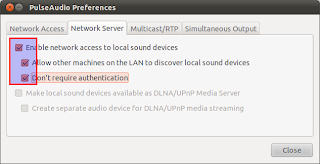
Go to Network Server tab and enable:
- Enable network access to local sound devices
- Allow other machines on the LAN to discover local sound devices
- Dont require authentication
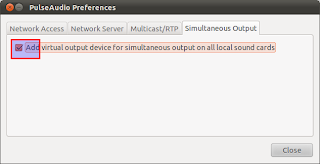
Now go to Simultaneous Output tab and enable:
- Add virtual output device for simultaneous output on all local sound cards
Now go to client computer and install the same program and run it. This is a very simple but powerful program for PulseAudio hardware sharing.
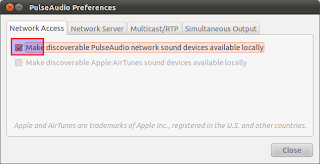
Go to Network Access tab and enable:
- Make discoverable PulseAudio network sound devices available locally
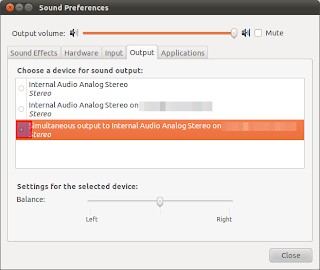
Now in the same client computer go to your Sound Preferences and go to output tab. There you will see a new output device as on the picture.
Thursday, January 16, 2014
Comparison Between McLaren F1 vs McLaren MP4 12C

The British journalists from Autocar, Steve Sutcliffe got the chance to conduct a comparison between McLaren MP4-12C and its predecessor, the McLaren F1. In order to do so, British journalists carried out the both cars on the Top Gear track.
The McLaren F1 is powered by 6064 cc BMW V12 engine that produces 600hp. With this output McLaren F1 can reach 0 to 60 mph (97km/h) in just 3.2 seconds. On the opposite, the newcomer McLaren MP4 12C is powered by 3.8 liter V8 engine, develops 600 hp and 600 Nm of torque. This means that both models have the same amount of power output but when it comes to the weight, F1 weights around half ton less then the new MP4 12C.
