Saturday, March 22, 2014
Remove MSN Messenger 3 Way
 How to Remove MSN Messenger?
Follow This Staps:
1rd way:
The following method works in Windows XP Professional, but
has not been tested on a system with SP1 installed. FYI, Ive seen scripts that are
similar to this, but fail miserably, automatically deleting other much-needed
components! Better to do this slow and manually!
1. Exit MSN Messenger by right-clicking the MSN icon in the notification area, and
selecting Exit.
2. Add the following registry entries, both with a DWORD value of 1:
a. HKEY_LOCAL_MACHINESoftwarePoliciesMicrosoftMessengerClientPreventRun
b. HKEY_LOCAL_MACHINESoftwarePoliciesMicrosoftMessengerClientPreventAutoRun
3. Open a command prompt by clicking Start/Run, then typing "command" and clicking OK.
4. Uninstall MSN Messenger by typing "rundll32 advpack.dll,LaunchINFSection %systemRoot%INFmsmsgs.inf,BLC.Remove"
5. Uninstall the leftover installation information file by typing
"rundll32 setupapi,InstallHinfSection BLC.Remove 128 %systemRoot%INFmsmsgs.inf"
6. Allow MSN Messenger to be displayed in the Add/Remove Windows Components dialog
in the future (if it pops up again!)
by typing "notepad.exe %systemRoot%INFsysoc.inf" and deleting the word "hide" from the
line that starts with "msmsgs=".
It MAY be possible to skip to this step directly and perform the uninstallation directly from
the Add/Remove Windows Components dialog, but that method MAY leave unwanted
components and has not been thoroughly tested.
7. Cross your fingers and reboot! You will probably get a message asking you to confirm the
removal of some leftover files. Click OK.
2th way:
There Is a way to uninstall Messenger cleanly. I dont know if these steps apply for Home version.
1. Control PanelAdd Remove Programs click on "add remove windows components" on the left hand side.
In the box that pops up...scroll down to the bottom and highlight "windows messenger" then UNcheck the box.
2. Hit next and let the uninstall complete. (its not a very obvious un-install) When its, done make sure you
to RESTART WINDOWS! (the messenger icon will still be in the tray if you dont!)
3th way
1. First, right click the Messenger icon in the system tray and click Exit.
2. Right click the Start button and click the Explore command to open the Windows Explorer.
3. In the Windows Explorer, expand the Program Files folder on the partition where your operating
system is installed (the partition that holds the WINDOWS directory) and right click the Messenger
folder and select Rename.
4. Rename the folder to MessengerDISABLED and press ENTER to commit the name change.
5. Restart the Computer. No more Windows Messenger

Using WPA for a more secure wireless connection

Wi-Fi Protected Access, or WPA, is a new, improved security standard for wireless connections. WPA has addressed the weaknesses of WEP; it was developed to create a viable alternative to WEP that is more secure than that standard. The fundamentals are the same between the standards, but WPA has improved some of the various mechanisms that plagued WEP. For example, encryption keys are now dynamic and change often automatically. Additionally, the complexity of the encryption key has also been increased to help fight off users who try to derive a key from data that they capture. One of the largest improvements in WPA is the addition of authentication to the wireless connection. Now, users have to have the right encryption settings, as well as a valid username and password, to gain access to the network.
This new standard is just starting to gain momentum. Microsoft has released a special patch for Windows XP that adds this new standard to Windows. However, installing the patch will not allow you to use this new standard. Just as with WEP, WPA is programmed into the firmware of the hardware components. In order to use WPA, you must have hardware that specifically supports it. Currently, only a few companies offer base stations and wireless adapters that support this new method of security. However, that will change in time.
The next time you are considering purchasing a wireless base station and adapter, do some research and pick one that supports WPA to ensure that your wireless communications will not be decrypted and your privacy is secure.
Basic Information of Clearing a Printer
 Printers is usually don’t require clearing, but paper dust and airborne can collection inside , adding to heat build –up and leading to medical problems. We can clean the outside surface of most printers with a dry or damp cloth, but don’t use solvents or spray
Clears which may be harmful to some printer’s parts.
To clean the inside of the printers, open it up and removes all paper. Removes the toner cartridge, or ribbon as your owners manual directs. Use a lint-free cloth or swabs to gently remove built-up dust and dirt.
Do not use a wet cloth, and never spray any kind of liquid cleaner into your printer unless the manufactures recommends doing so.
If the printers have a great deal of dust built up inside, you can use a vacuum cleaner with a narrow nozzle to pull out the dust. If dust appears to be stuck or is embedded in tiny spaces use a can of compressed air to blast it loose, then vacuum it out.
Thanks
How to convert DVDs to AVI or MPEG video files
WikiHow page on steps for converting a DVD to an AVI file or MPEG file.
AutoGK or DVDx can be used.
AutoGK (Official) Tutorial
For Macs
Handbrake, theres also Instant Handbrake.
Handbrake gives a good interface and multiple format/compression options.
Read more »
AutoGK or DVDx can be used.
AutoGK (Official) Tutorial
For Macs
Handbrake, theres also Instant Handbrake.
Handbrake gives a good interface and multiple format/compression options.
Easy To create Free Online TV Channels !
Bangladesh has got slow internet speed.Everybody know that currently series of internet speed provided of WiMax.If you want than you owner create Online TV channels!
 You can easily create Online TV Channels .At first you go to World-TV Web site. After a while to load into the page, and you got see the video and image to link your channels and click the next button.
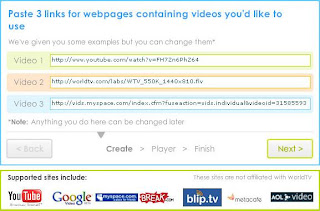 Than next step is the choice of a name for your channels.If you do not have a channels than try another.Than you click next button and select the next button and select the TV channels logo and your email address .
Than ,click next,go to edit page and correct the setting.Add your web site and just above the tab editor for assistance .
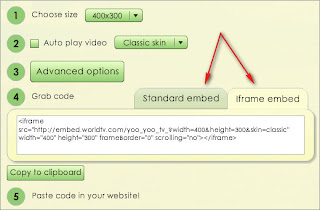 Standard or choose of the embedded or iFrame and you can add your site.
Last you can visit Online channels and watch the TV and video and image .As you can see and thanks for everyone.
Than ,click next,go to edit page and correct the setting.Add your web site and just above the tab editor for assistance .
Last you can visit Online channels and watch the TV and video and image .As you can see and thanks for everyone.
Subscribe to:
Posts (Atom)