Friday, March 21, 2014
Top 10 keyboard shortcuts everyone should know
Using keyboard shortcuts can greatly increase your productivity, reduce repetitive strain, and help keep you focused. For example, highlighting text with the keyboard and pressing Ctrl + C is much faster than taking your hand from the keyboard, highlighting the text using the mouse, clicking copy from the file menu, and then putting your hand back in place on the keyboard. Below are our top 10 keyboard shortcuts we recommend everyone memorize and use.
Ctrl + C or Ctrl + Insert
Copy the highlighted text or selected item.
Ctrl + V or Shift + Insert
Paste the text or object thats in the clipboard.
Ctrl + Z and Ctrl + Y
Undo any change. For example, if you cut text, pressing this will undo it. This can also often be pressed multiple times to undo multiple changes. Pressing Ctrl + Y would redo the undo.
Ctrl + F
Open the Find in any program. This includes your Internet browser to find text on the current page.
Alt + Tab or Alt + Esc
Quickly switch between open programs moving forward.
Tip: Press Ctrl + Tab to switch between tabs in a program.
Tip: Adding the Shift key to Alt + Tab or Ctrl + Tab will move backwards. For example, if you are pressing Alt + Tab and pass the program you want to switch to, press Alt + Shift + Tab to move backwards to that program.
Tip: Windows Vista and 7 users can also press the Windows Key + Tab to switch through open programs in a full screenshot of the Window.
Ctrl + Back space and Ctrl + Left or Right arrow
Pressing Ctrl + Backspace will delete a full word at a time instead of a single character.
Holding down the Ctrl key while pressing the left or right arrow will move the cursor one word at a time instead of one character at a time. If you wanted to highlight one word at a time you can hold down Ctrl + Shift and then press the left or right arrow key to move one word at a time in that direction while highlighting each word.
Ctrl + S
While working on a document or other file in almost every program pressing Ctrl + S will save that file. This shortcut key should be used frequently anytime youre working on anything important.
Ctrl + Home or Ctrl + End
Move the cursor to the beginning or end of a document.
Ctrl + P
Print the page being viewed. For example, the document in Microsoft Word or the web page in your Internet browser.
Page Up, Space bar, and Page Down
Pressing either the page up or page down key will move that page one page at a time in that direction. When browsing the Internet pressing the space bar will also move the page down one page at a time. If you press Shift and the Space bar the page will go up a page at a time

Sharp 85 inch 8k glassse free 3D TV
Early reports from CES 2014 showed that this year might be the year of the humongously big TV with Samsung and Vizio both unveiling TV’s topping the 100-inch milestone. Of course, both TV’s feature the newest 4k technology, allowing one to view TV as one has never viewed it before.
That was until Sharp revealed their designs for an 85-inch, 8k television during their CES press conference. This is not the first time Sharp has unveiled an 85-inch 8k television, doing so during last years CES. The difference this year, however, is that the model is now less of a prototype / more of a reality, and it offers glasses-free, 3D viewing.
Sharp produced the 85-inch TV alongside Phillips and Dolby. The 8k rating for the TV means that it will be able to handle resolutions measuring 7680 x 4320, which is 16 times more than current, standard HD TV’s. (1080p resolutions being 1920 x 1080.)
 That being said, the 85-inch 8k offering from Sharp may be stretching a bit beyond current technological carrying capacity. Much debate has been raised over the past few years concerning whether or not the eye can discern the differences between ultra-high resolutions. Most television producers are currently focusing on furthering the development of 4k resolution televisions (3840 x 2160), a viewing quality which already faces difficulties due to the lack of channel support (due to inadequate technology) from satellite or cable companies.
As it currently stands, most experts agree that one could only notice the increase in viewing quality with an 8k TV if one views it at uncomfortably close distances. If that is the case, the one positive aspect of this offering from Sharp would be the glasses-free (autostereoscopic) 3D viewing capabilities.
 Fortunately for Sharp, the company has not placed all of its eggs into one basket. During CES 2014, the company also unveiled new products in its Aquos line, the most impressive of which being the Aquos Quattron Plus, a television offering 10 million more subpixels than standard HD televisions. These extra subpixels places the Aquos Quattron Plus at the level between standard HD and 4k, making it a viable viewing option for those with less-deep pockets and being more compatible with current cable and satellite provider technologies.
Sharp showed some scenes from the Oscar winning movie "Life of Pi" and "Frozen". Good Luck Sharp.
That was until Sharp revealed their designs for an 85-inch, 8k television during their CES press conference. This is not the first time Sharp has unveiled an 85-inch 8k television, doing so during last years CES. The difference this year, however, is that the model is now less of a prototype / more of a reality, and it offers glasses-free, 3D viewing.
Sharp produced the 85-inch TV alongside Phillips and Dolby. The 8k rating for the TV means that it will be able to handle resolutions measuring 7680 x 4320, which is 16 times more than current, standard HD TV’s. (1080p resolutions being 1920 x 1080.)
That being said, the 85-inch 8k offering from Sharp may be stretching a bit beyond current technological carrying capacity. Much debate has been raised over the past few years concerning whether or not the eye can discern the differences between ultra-high resolutions. Most television producers are currently focusing on furthering the development of 4k resolution televisions (3840 x 2160), a viewing quality which already faces difficulties due to the lack of channel support (due to inadequate technology) from satellite or cable companies. As it currently stands, most experts agree that one could only notice the increase in viewing quality with an 8k TV if one views it at uncomfortably close distances. If that is the case, the one positive aspect of this offering from Sharp would be the glasses-free (autostereoscopic) 3D viewing capabilities.
Sharp showed some scenes from the Oscar winning movie "Life of Pi" and "Frozen". Good Luck Sharp.
Thursday, March 20, 2014
Overclockers Titan 400i Dagger PC Story

This laptop was provided to United States as a base laptop system with a spread of internal and external upgrade choices, contact the manufacturer to urge the precise specification you need
Even before you add any upgrades, the Overclockers Titan 400i Dagger prices a reasonably significant £710, therefore is not in rivalry for our Budget obtain award. However, it is a powerful system that stands out among most anonymous laptop black boxes due to its notably snazzy-looking white case. similarly as well-to-do, its well finished and provides you lots of house to figure in.
The laptop is additionally uncommon therein its a water-cooling system for its processor. This makes a high-pitched whine, and therefore the the} case also has fairly lowest soundproofing due to its copious air vents, that ar designed to create it simple to suit additional fans if you wish them. This makes the Dagger aloof from the quietest system we have seen, therefore wed positively suggest keeping this laptop on the ground.
This cooling system ought to enable the PCs Intel Core i5-4670K processor to be overclocked, though Overclockers hasnt done therefore for you. The powerful processor made associate degree overall score of 109 in our benchmark tests. The MSI Z87-G43 motherboard is fitted with 8GB of one,600MHz RAM, effort house for 2 a lot of modules.
The motherboard additionally has 3 PCI slots, 2 PCI-E x1 slots and 2 PCI-E x16 slots. However, one in every of the x1 slots is blocked by the graphics card higher than it and, like most motherboards, the second x16 slot solely runs at x4 speed. There ar six SATA3 ports and a vacant USB3 header.
The cases front panel has simply 2 USB ports and therefore the usual three.5mm mic and electro-acoustic transducer connectors. At the rear of the motherboard, you will find a PS/2 port for a mouse or keyboard, six USB ports and 2 USB3 ports. There are six three.5mm stereo outputs for seven.1 analogue surround sound.
The graphics card comes with the PCs base specification, and may be a 1GB Nvidia GeForce GTX 650 Ti. Wed have liked to own the choice to upgrade the cardboard, because it does not have the performance that hardcore gamers would possibly hope for. attributable to driver compatibility issues with the graphics card, we have a tendency to werent ready to run our Dirt disagreement check, however we have a tendency to saw a reasonably jerky frame rate of twenty three.9fps in Crysis a pair of at extremist quality and a resolution of one,920x1,080. Drop the standard to Extreme, though, and you may see frame rates hit a nearly-smooth average of twenty nine.9fps.
The laptop is supplied with a DVD-RW drive and a 1TB fixed disk. youll add associate degree SSD for the lowest price of £25. sadly, this can be solely a 60GB SSD, that is therefore little on be of rather lowest use. youll get a 120GB SSD for a really cheap £44, that may be a far better plan.
For £156 youll have a matt twenty three.6in Iiyama Prolite E2481HS monitor, that is concerning the market value for this show. whereas several monitors do not extremely like standardization, the E2481HS is associate degree exception. At default settings, it might show simply eighty nine.4% of the sRGB color gamut, and looked rather washed out. once standardization it might show a wonderful ninety seven of sRGB, and hues looked rather more lifelike. sadly, a standardization tool can set you back around £100 anyway, therefore we have a tendency to would like the monitor might show a lot of correct colors out of the box.
While it is easy to become inundated by selection once given a spread of upgrades to pick from, Overclockers has maybe narrowed the sector a trifle an excessive amount of by solely providing the choice of associate degree SSD upgrade for its Titan 400i Dagger. though the laptop is well created and thoughtfully designed, neither the systems base specification nor its upgrades ar particularly sensible worth. If you are on a budget, we have a tendency to suggest the laptop Specialist time A10 professional Elite, whereas those trying to splash out ar happier with the Chillblast Fusion Kestrel.


Android JellyBean 4 1 Vs iOS 6 User Interface
User Interface
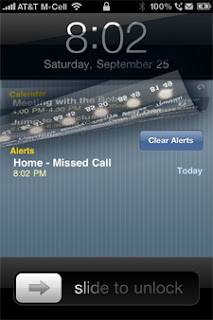
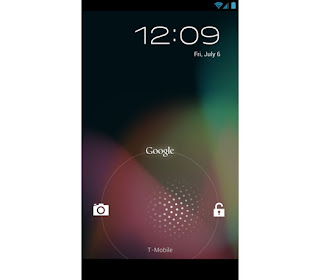
LockscreensWell,most of you people are aware of the main difference between Android and iOS -customization vs ease of use.Well,first of all,when you turn your phone on you go to the lockscreen.Well the lockscreens in both the platforms are very different.In Iphone you get the typical Slide to unlock lockscreen,whereas in case of android jellybean you will be confronted with the drag to unlock lockscreen.However.there is one major difference -in case of iOS you are restricted to the Slide to unlock feature whereas in android you will get a whole bunch of third party lockscreens that you can install,thus enhancing your experience.
Check out Android Lockscreen Alternatives
User Interface

Well after the lockscreen comes the user interface.In iOS 6 you are once again presented with the plain icons.In case of android once again it is all about customization.One thing that I noticed is that folders open faster in jellybean than iOS ,maybe because of project butter.
Notification Area
Well in this case it is almost a tie only a slight edge to android because of more allowance of choices in this area.
Effective Guest Blogging Tips
A post for bloggers with effective guest blogging tips to experience its benefits and to perform well in the blogosphere.

Most of the website owners have started considering guest blogging very seriously as it is an effective marketing technique in the online world. Not only bloggers, even multinational companies have started guest blogging for some valid reasons.
If you are an influential blogger, I am sure that you have already started to guest post on other blogs of your same niche and tasting its benefits.
But if you are a newbie blogger, then you might ask “What is guest blogging?” and “Why should I write guest posts on other blogs?”
Yeah, both are good questions! But before answering to it,let me ask some questions because I always taking care and love to read other blogs :)
Add “Do you” for every question of mine!
Now here is the answer for your very first question:
But be sure that your guest post should not ruin the status of the blog where you are appearing as a guest blogger. It means that you need to submit quality guest posts on other blogs and help those blog owners to get good traffic through your posts.
Hope you are now somewhat clear with “Guest blogging and its benefits”. Am I correct?
I always used to write high quality guest posts for my blogging friends and influential bloggers. Also am feeling virtuous as this is my 13th guest post in my 5 months blogging career.
Ok, let me explain some common myths of guest blogging.
Myth #1. Number of guest posts approved is important than its quality.
Some bloggers performing guest blogging just to build backlinks to their blog. They are showing interest to create more number of guest posts on various blogs and never mind about its quality. It is a bad practice and should be avoided by the bloggers.
Truth: Quality guest posts sounds greater than more no. of guest posts submitted just for link-building.
Myth #2: Blogs should have good PR to submit guest post on other blogs.
Newbie bloggers think that their blog should have high Pagerank to submit their guest post on other blogs. It is not true! My guest posts were accepted in PR4 and PR3 blogs and my blog’s page rank is 0. So, don’t hesitate to guest post on energetic blogs even if you have low or zero page rank.
Truth: Valuable guest posts which are helpful for the visitors are readily accepted in famous blogs.
Myth #3: Taking much effort for guest blogging is waste
I came across few bloggers with the statement “Why should I write long and quality posts just for backlinks and I have alternate ways for it”. No it is really wrong and the bloggers should not expect instant results from guest blogging.
Truth: Guest blogging is only effective if it focused to have long term benefits.
Most of the website owners have started considering guest blogging very seriously as it is an effective marketing technique in the online world. Not only bloggers, even multinational companies have started guest blogging for some valid reasons.
If you are an influential blogger, I am sure that you have already started to guest post on other blogs of your same niche and tasting its benefits.
But if you are a newbie blogger, then you might ask “What is guest blogging?” and “Why should I write guest posts on other blogs?”
Yeah, both are good questions! But before answering to it,let me ask some questions because I always taking care and love to read other blogs :)
Add “Do you” for every question of mine!
- Want to increase credibility among your blog readers?
- Need to have more blog subscribers?
- Prefer the natural promotion for your blog?
- Desire to gain more visibility and traffic to your blog?
- Favor effective link building method?
- Wish to make friendship with fellow and prominent bloggers?
Now here is the answer for your very first question:
What Is Guest Blogging?
"Guest blogging is a strategy of appearing on other same niche blogs with your fresh post as a guest."
But be sure that your guest post should not ruin the status of the blog where you are appearing as a guest blogger. It means that you need to submit quality guest posts on other blogs and help those blog owners to get good traffic through your posts.
Hope you are now somewhat clear with “Guest blogging and its benefits”. Am I correct?
I always used to write high quality guest posts for my blogging friends and influential bloggers. Also am feeling virtuous as this is my 13th guest post in my 5 months blogging career.
Ok, let me explain some common myths of guest blogging.
Guest Blogging Myths
Myth #1. Number of guest posts approved is important than its quality.
Some bloggers performing guest blogging just to build backlinks to their blog. They are showing interest to create more number of guest posts on various blogs and never mind about its quality. It is a bad practice and should be avoided by the bloggers.
Truth: Quality guest posts sounds greater than more no. of guest posts submitted just for link-building.
Myth #2: Blogs should have good PR to submit guest post on other blogs.
Newbie bloggers think that their blog should have high Pagerank to submit their guest post on other blogs. It is not true! My guest posts were accepted in PR4 and PR3 blogs and my blog’s page rank is 0. So, don’t hesitate to guest post on energetic blogs even if you have low or zero page rank.
Truth: Valuable guest posts which are helpful for the visitors are readily accepted in famous blogs.
Myth #3: Taking much effort for guest blogging is waste
I came across few bloggers with the statement “Why should I write long and quality posts just for backlinks and I have alternate ways for it”. No it is really wrong and the bloggers should not expect instant results from guest blogging.
Truth: Guest blogging is only effective if it focused to have long term benefits.
Tips To Get Your Guest Posts Accepted
- Try to impress the blog owners whom you are selected to submit your guest posts with polite approach and explain why you have selected their blog to submit your post.
- You should write guest post for related niches with good PR and high authority blogs, so sure to be thorough with their guidelines of guest posting.
- Follow your unique style in writing to stand out from other guest bloggers.
- It is really exciting to see your name on well performing blogs right? So include a simple and gorgeous Author-bio for your guest post.
- Make efforts to engage the visitors from the beginning of your guest post by offering some fresh or unread data for them.
Subscribe to:
Posts (Atom)