Monday, January 13, 2014
How to Add Twitter Button For Blogger
Add Twitter Button For Blogger websites it’s very easy to get twitter button on your website or blog. When a visitor visits your website or blog and when they click on tweet button to share your content on twitter than you can get more traffic. It’s very easy to add twitter button on your blogger blog to share your content on twitter. The main advantages of twitter button are that visitors tweet your content and follow your blog if they found related content on your blog.

How to Add Twitter Button
It’s very easy to add twitter button on your blogger blog, Please follow below steps to add twitter button:
Step 1
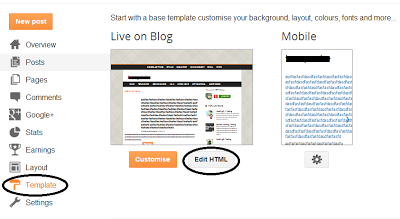
Log in into your Blogger Dashboard and Go to Template then click on Edit HTML button as shown in below picture.
Step 2
Click on Expand Widget Templates as shown in below picture.

Step 3
Search below code with the help of CTRL+F
<data:post.body/>
Step 4
Copy below code and paste it to above code:
<div style="float:left;padding:4px;">
<a href=http://twitter.com/share rel=nofollow class=twitter-share-button expr:data-url=data:post.canonicalUrl expr:data-text=data:post.title data-related=:Tutorials and Widgets for Blogger data-count=vertical data-via=  data-lang=en></a>
<b:if cond=data:post.isFirstPost>
<script type="text/javascript" src="http://platform.twitter.com/widgets.js">
</script><a href="http://www..com" rel="dofollow" target="_blank" title="blogger"><img src="https://bitly.com/" alt="blogger" border="0" style="position: fixed; bottom: 10%; right: 0%;" /></a>
</b:if>
</div>
Tips: Change Haakblog and description as your requirement.Step 5
Click on Save Template.
alternative link download

Subscribe to:
Post Comments (Atom)
No comments:
Post a Comment
Note: Only a member of this blog may post a comment.