Showing posts with label update. Show all posts
Showing posts with label update. Show all posts
Friday, March 21, 2014
Update My Computer
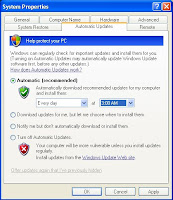
How to Updating your computer?
What are updates?
Microsoft offers important updates, which include security and other critical updates, to help protect your computer against new viruses and other security threats that can spread over the Internet or a network. Other updates contain enhancements, such as upgrades and tools that can help your computer run more smoothly.
Update your Computer Follow This Steps:
1. Click Start, and then click Control Panel.
2. Depending on which Control Panel view you use, Classic or Category, do one of the following:
Click System, and then click the Automatic Updates tab.
Click Automatic (recommended) Option and select the day and time you want Windows to install updates. (Your Select Time Every Day 3:00 AM. Your Computer Update Every Day 3:00 AM)
Click Apply -> OK.

Sunday, March 9, 2014
Final Update Of Skype To Symbian Belle
If you are the proud owner of a Nokia 808 PureView a Nokia 701 or another Symbian Belle FP2 updated device, you may be happy to know that Skype is back in the Nokia Store.

This is version 2.1.23, which was released some months ago, but it was apparently not fully tested. Now fully tested, the app is now available again. It is a voice and chat application only. No video calling is present within the app, though picture, video and other files may be exchanged.

Outside of that, the app will support Skype-to-Skype calling via Wi-Fi or over a cellular data connection. Unfortunately, like Symbian, you will not have to hold your breath for further updates of this application, barring a critical business case to do so within a “maintenance” environment.


Thursday, March 6, 2014
Nokia Music Gets Minor Update
Today an update is heading out for Nokia Music which is their free to listen music service.The release notes for version 3.5 are scant
Here is the marketplace feature list:
1.Download all types of mixes to listen to offline
2.pin to start any mix, so you can quickly play your favourites
3.See what mixes and songs youve previously listened to by tapping recent mixes
4.Search for gigs by artist, venue and city
5.Share details of the song you are playing to social networks, via email and messaging
6.Fixed disappearing menu options
 |
| Owl City Image Gallery - Nokia Music 3.5 |
Sunday, February 9, 2014
Simple Writing Status Update Facebook automatically

Probably because something matter or probably because you is super people of business, but you wish remain too looked to be exist in Facebook always update status every day. Way of best is by making status update automatically. What is the meaning (of)? Writing status update facebook automatically mean status schedule you have update far previous day. For example to one week to the fore you have drawn up status update counted 7, that of its meaning every day Status facebook you’d change, without you need login to Facebook. Enough you sit, enjoying your day, Facebook status you’d change on schedule you which have determine. Delicious none
Simple enough its way, first of course use service like SENDIBLE, if you not yet enlisted as Sensible member, high of JOIN NOW knob click if have there are remaining LOGIN
If first new you use Sensible remain click “ Set Up My Service” can also you click “ Add / edit Service” last choose service which you wish, because you wish to make status update facebook automatically become to choose “ Facebook Status” with clicking “ Add
At screen tag which emerge to remain click “Connect with Facebook” if you not yet Login to your Facebook, if you have previous Login remain click “Connect”
At “Request for Special Permissions” click “Allow” then “Allow Publishing” last “Allow Status Updates” afterwards “Allow Access
Hereinafter enamel input or your facebook username and click “Save Setting
To make Status Update schedule, step into menu “Message Box – “Compose Message”, choose service “” Facebook Status” at My Service
Write message / your status, click at “Scheduling” and determine when the Status will be delivered automatically to Facebook. Can 10 minute, 25 minute, 2 hour/clock forwards or can also you determine when specific for example date of and appropriate time of your desire at “A Specific Time At
After finishing, you remain easy goingly, Facebook status and relax you’d change on schedule which have been determined.
Subscribe to:
Posts (Atom)