Showing posts with label corby. Show all posts
Showing posts with label corby. Show all posts
Saturday, March 1, 2014
Samsung Corby Mobile
Tutorial on updating the firmware of samsung corby to S3650XEIJ2
Step1-
SAFETY FIRST- Make sure that u backup all your files, messages ,contacts, etc from your phone....
Download s3650xeij2 firmware from here- http://www.mediafire.com/?ogmzmgzdj5l
Download Multiloader v5.56 from here- http://www.4shared.com/file/TAf-S0eQ/MultiLoader_V556.html
Remove SIM CARD and MEMORY CARD from your mobile.....
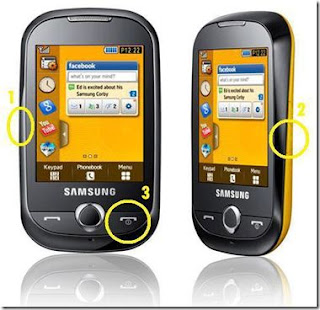
Turn off your phone then Press Volume down button, camera button and end key at once.
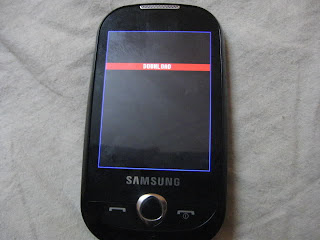
Now this screen should come up :
Download s3650xeij2 firmware from here- http://www.mediafire.com/?ogmzmgzdj5l
Download Multiloader v5.56 from here- http://www.4shared.com/file/TAf-S0eQ/MultiLoader_V556.html
Remove SIM CARD and MEMORY CARD from your mobile.....
Turn off your phone then Press Volume down button, camera button and end key at once.
Now this screen should come up :
Step2-
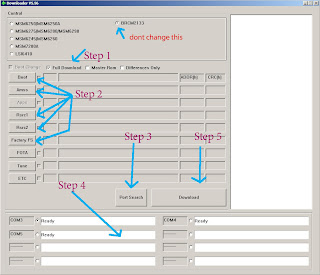
Now connect your phone to the pc in media player mode via usb cable and open the Multi Loader 5.56..
Multi Loader screen shot
Step 3:
STEP 3-
Now extract the downloaded firmware to any folder.......
And open Multiloader v5.56....
1) Put a tic on full download.. leave others alone
2) For BOOT choose "boot files" folder from the extracted S3650XEIJ2 Firmware
3) For AMSS select apps_compressed.bin
4) For Rsrc1 select Rsrc_S3650_Open_Europe_Slav.rc1 (the name may vary but extension should be the same .rc1 )
5) For Factory FS select FactoryFs_S3650_Open_Europe_Slav.ffs (the name may vary but the extension should be the same .ffs)
6) Ignore FOTA , Tune and ETC
7) Click Port Search and when found put a tick....
8) Then Click download and wait till it finishes..
it will take 5 to 7 minutes and then unplug the usb cable and turn on your new phone!
Now extract the downloaded firmware to any folder.......
And open Multiloader v5.56....
1) Put a tic on full download.. leave others alone
2) For BOOT choose "boot files" folder from the extracted S3650XEIJ2 Firmware
3) For AMSS select apps_compressed.bin
4) For Rsrc1 select Rsrc_S3650_Open_Europe_Slav.rc1 (the name may vary but extension should be the same .rc1 )
5) For Factory FS select FactoryFs_S3650_Open_Europe_Slav.ffs (the name may vary but the extension should be the same .ffs)
6) Ignore FOTA , Tune and ETC
7) Click Port Search and when found put a tick....
8) Then Click download and wait till it finishes..
it will take 5 to 7 minutes and then unplug the usb cable and turn on your new phone!

Sunday, January 26, 2014
Samsung Corby II GT S3850 Tthe series continued success of the Corby
Whereas in the past Samsung has successfully released the series of Corby, which comes in two variants with tauchscreen and Corby TXT. Now Samsung continue upon the success Samsung Corby by presenting a newer version. Samsung Corby II GT-S3850, thats the new name is pinned to the colorful cell phone. Surely there are some features in it renewal.
With a screen width of 3.14 inch, Samsung Corby II supports GSM / EDGE networks. Although not 3G, there are already connection options via Wi Fi b / g / n for internet connection.
On the camera there is no change, still with a resolution of 2 megapixels. But the affairs of social networking might be any better with the support of Social Hub, which integrates the SNS (Social Network Services) to the phonebook, calendar and inbox.
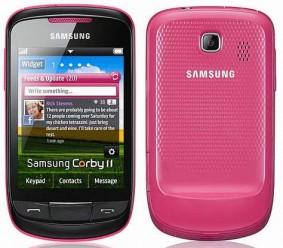
Other features such as Microsoft Exchange support, stereo FM with RDS, Bluetooth 3.0, 3.5 mm audio port and support a microSD slot. While the display style of the Samsung TouchWiz user interface claimed more interesting.
The design itself is quite different although both rely on flashy colors, perhaps to try to lure young people. The plan, Samsung Corby II will be released late March in Germany, then go to other areas. Currently no information on what the price Samsung Corby II.
Specifications of the Samsung Corby II (GT-S3850):
- Network: Quad-band 850/900/1800/1900MHz
- Dimensions: 109.9 x 60.6 x 11.7 mm (4.33 x 2.39 x 0.46 in)
- Weighs: 102g (3.6oz).
- 3.14-inch TFT capacitive touchscreen
- 2 Megapixel camera
- Wi-Fi 802.11 b/g/n
- Memory expandable up to 16 GB
- Bluetooth 3.0 with A2DP
- FM Radio
- 3.5 mm audio jack
- Accelerometer sensor
- MP3, MP4, WMA, H.263, H.264 and a few more
- 1,000mAh battery
+ 9.5 hours of talk time
+ 25.8 days of standby
Read more »
With a screen width of 3.14 inch, Samsung Corby II supports GSM / EDGE networks. Although not 3G, there are already connection options via Wi Fi b / g / n for internet connection.
On the camera there is no change, still with a resolution of 2 megapixels. But the affairs of social networking might be any better with the support of Social Hub, which integrates the SNS (Social Network Services) to the phonebook, calendar and inbox.
Other features such as Microsoft Exchange support, stereo FM with RDS, Bluetooth 3.0, 3.5 mm audio port and support a microSD slot. While the display style of the Samsung TouchWiz user interface claimed more interesting.
The design itself is quite different although both rely on flashy colors, perhaps to try to lure young people. The plan, Samsung Corby II will be released late March in Germany, then go to other areas. Currently no information on what the price Samsung Corby II.
Specifications of the Samsung Corby II (GT-S3850):
- Network: Quad-band 850/900/1800/1900MHz
- Dimensions: 109.9 x 60.6 x 11.7 mm (4.33 x 2.39 x 0.46 in)
- Weighs: 102g (3.6oz).
- 3.14-inch TFT capacitive touchscreen
- 2 Megapixel camera
- Wi-Fi 802.11 b/g/n
- Memory expandable up to 16 GB
- Bluetooth 3.0 with A2DP
- FM Radio
- 3.5 mm audio jack
- Accelerometer sensor
- MP3, MP4, WMA, H.263, H.264 and a few more
- 1,000mAh battery
+ 9.5 hours of talk time
+ 25.8 days of standby
Subscribe to:
Posts (Atom)